
If you are a Java developer and you see this token /**, you know that some serious wisdom is going to be dropped on you next. Similarly, when you press / * * on your keyboard, you immediately put on your best writer’s coat and take your best goose feather pen to write the most precise, readable, and concise comment bits in your entire life. That’s the everyday magic of Javadocs 🌈
Recently, I have had to do something not-so-everyday - publish Javadocs as a web page. That indeed does not happen often in our engineering lives; at least, I’ve done it for the first time in my 12-year career. Since it was not as straightforward as adding one more star symbol to the comment, I want to share a couple of tricks I’ve used to make it work.

🙊 Why do we usually not publish?
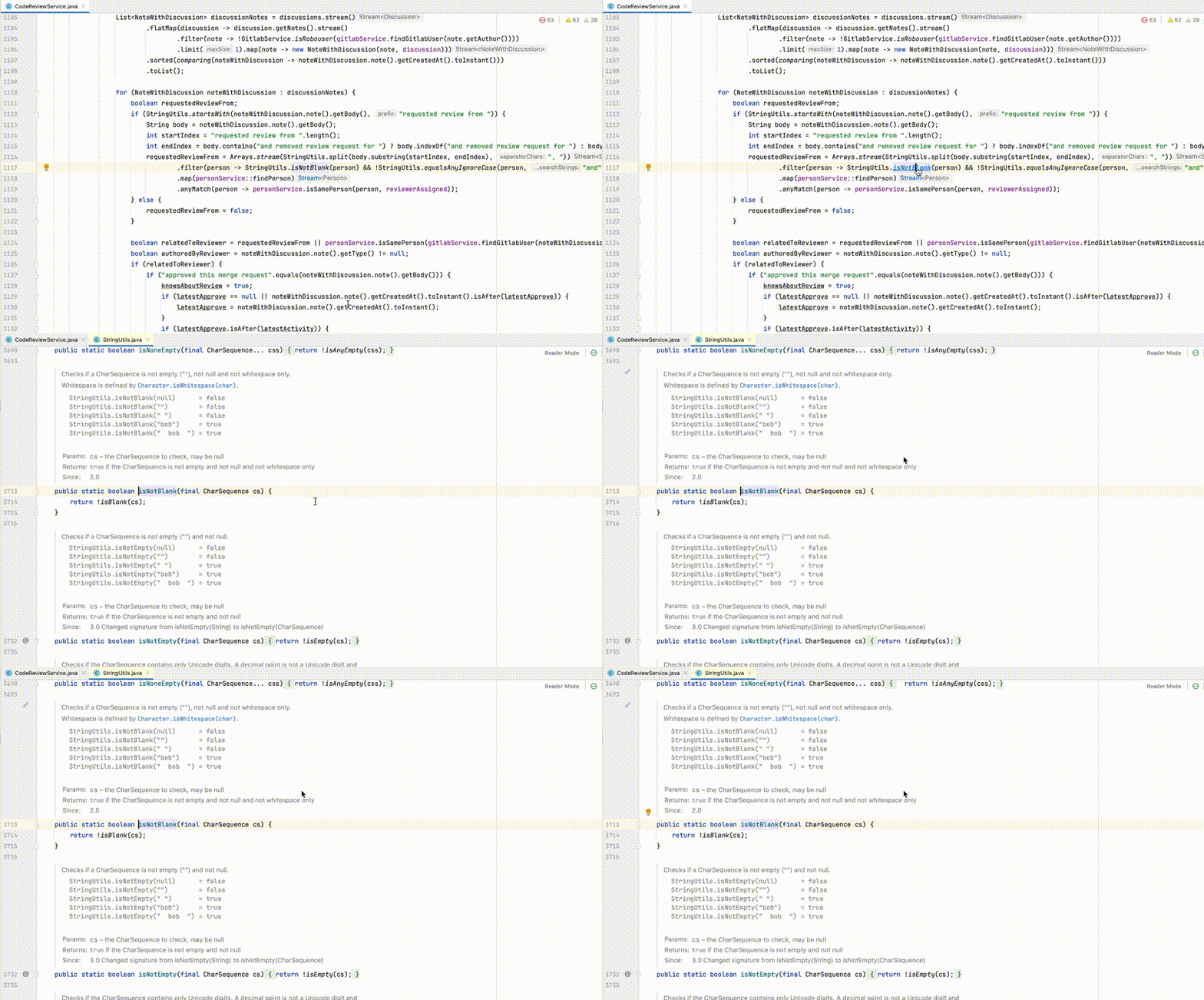
Because why should we? Java developers spend most of their time in IntelliJ IDEA, and all they have to do to read Javadoc for a class or method is to click on their name:
🙉 Why might we have to publish?
Such an approach works well until time and org size scales are insignificant. At a certain point, you need to recognize that not all consumers of your documentation:
-
have your repository and IntelliJ IDEA on their laptops
-
are from your team
-
are software engineers
-
know what they are looking for
The problem of knowledge sharing in a large org is fascinating by itself, but for the sake of this story, the only advice I’m going to give is to make all knowledge easily discoverable. A more traditional approach is to have an internal search engine that indexes all available documents. However, it seems pretty inevitable that soon, it will be disrupted by Large Language Models that use internal knowledge to answer your questions. In both cases, you need to publish your Javadocs in your intranet.
🙈 Tips for publishers
Tip 1: Despite what a quick search may promise you, setting the destination directory may not be enough:
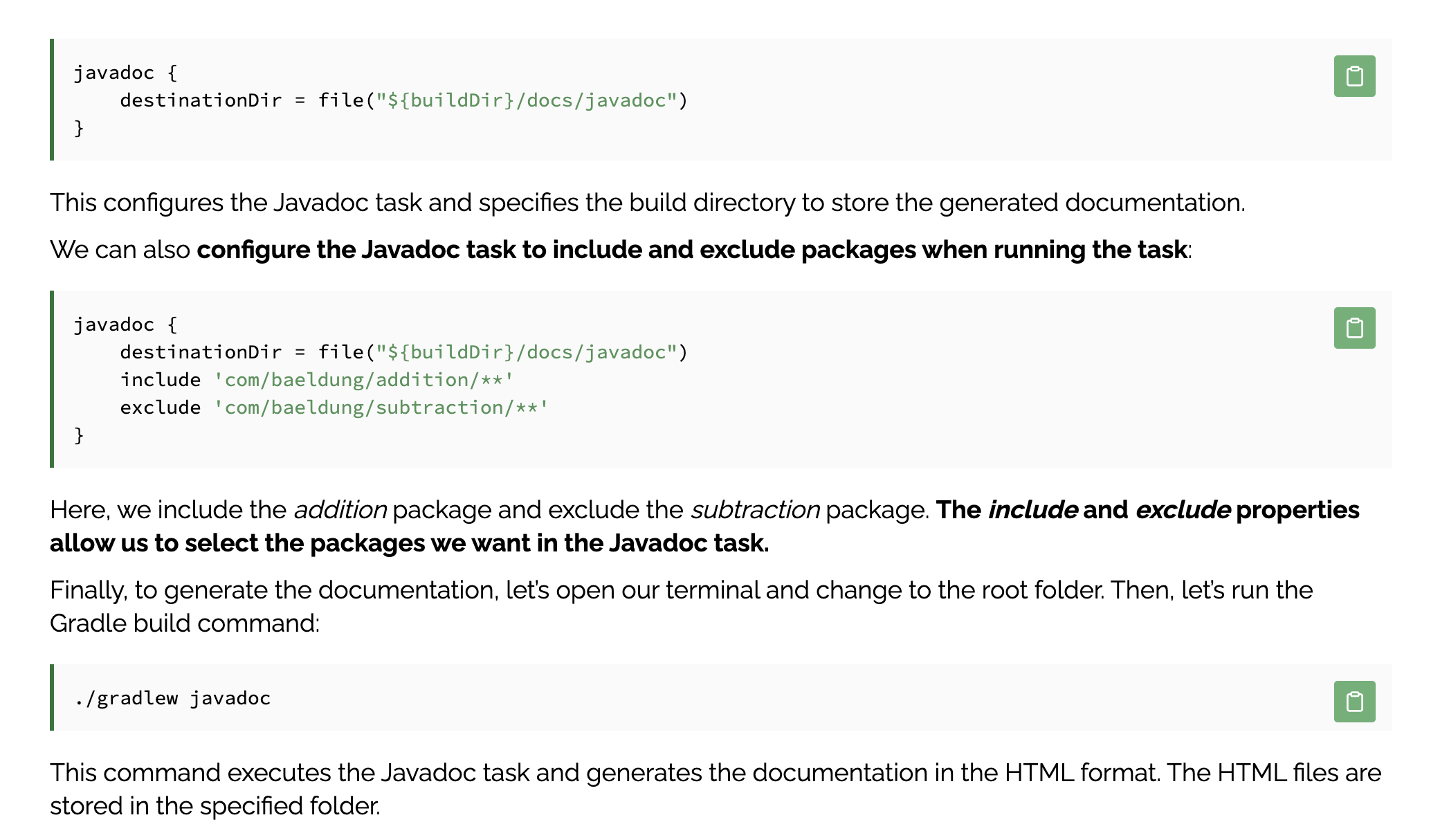
Although, of course, that’s a good starting point:
task combinedJavadoc(type: Javadoc) {
    ...
    destinationDir = file("${buildDir}/docs/javadoc")
    ...
}
Tip 2: You may have already forgotten the scare from the “Project Jigsaw” phrase, or it might be replaced with the fright of the JPMS acronym. The gist is that JVM, since version 9 (and we are on 21 already), is much better at protecting its internals. My project uses some of these classes, so I have to allow it explicitly for the compiler:
ext {
    compilerJvmArgs = [
        "--add-exports",
        "java.base/jdk.internal.misc=ALL-UNNAMED",
        "--add-exports",
        "jdk.attach/sun.tools.attach=ALL-UNNAMED"
    ]
}

compileJava {
    options.compilerArgs.addAll(compilerJvmArgs)
}
and for JVM in runtime:
ext {
    compilerJvmArgs = [
        "--add-exports",
        "java.base/jdk.internal.misc=ALL-UNNAMED",
        "--add-exports",
        "jdk.attach/sun.tools.attach=ALL-UNNAMED"
    ]
    baseJvmArgs = compilerJvmArgs + [
        "--add-opens",
        "java.base/jdk.internal.misc=ALL-UNNAMED",
        "--add-exports",
        "java.base/java.lang=ALL-UNNAMED",
        "--add-opens",
        "java.base/java.lang=ALL-UNNAMED",
        "--add-opens",
        "java.base/java.math=ALL-UNNAMED",
        "--add-opens",
        "java.base/java.util=ALL-UNNAMED",
        "--add-opens",
        "java.base/java.util.concurrent=ALL-UNNAMED",
        "--add-opens",
        "java.base/java.util.concurrent.locks=ALL-UNNAMED",
        "--add-opens",
        "java.base/java.net=ALL-UNNAMED",
        "--add-opens",
        "java.base/java.text=ALL-UNNAMED"
    ]
}

application {
    applicationDefaultJvmArgs = baseJvmArgs
}
[

](/en/blog/java-version-upgrade-is-quite-simple/)
[
Java version upgrade is quite simple. All you need to do is… (Part 3)
](/en/blog/java-version-upgrade-is-quite-simple/)
·
October 20, 2023
Javadocs publish task needs to access them as well, although here it doesn’t look as nice and orderly, but rather like you are trying to break into someone’s property using dark magic and pure luck:
configurations {
    javadocConfig
}
dependencies {
    javadocConfig files("${System.properties['java.home']}/lib/jrt-fs.jar")
    javadocConfig files("${System.properties['java.home']}/lib/modules")
}

task combinedJavadoc(type: Javadoc) {
    ...
    classpath = files(subprojects.collect { project ->
        project.sourceSets.main.compileClasspath
    }) + configurations.javadocConfig
    ...
}
Tip 3: I use Gradle multi-project build, but I need to combine all subprojects into one Javadocs distribution:
task combinedJavadoc(type: Javadoc) {
    ...

    source subprojects.collect { project ->
        project.sourceSets.main.allJava
    }

    classpath = files(subprojects.collect { project ->
        project.sourceSets.main.compileClasspath
    }) + configurations.javadocConfig

    ...
}
Tip 4: I need to publish Javadocs only for selected packages that are interesting for other teams:
def javadocPackages = [
    ...
]

task combinedJavadoc(type: Javadoc) {
    ...

    source subprojects.collect { project ->
        project.sourceSets.main.allJava.filter { file ->
            javadocPackages.any { packageName ->
                file.text.contains("package ${packageName};")
            }
        }
    }

    classpath = files(subprojects.collect { project ->
        project.sourceSets.main.compileClasspath
    }) + configurations.javadocConfig

    ...

    subprojects.each { subproject ->
        def packageName = subproject.group
        if (packageName instanceof String && javadocPackages.contains(packageName)) {
            options.addStringOption('group', "${packageName} (${subproject.name}):${packageName}.*")
        }
    }
}
Tip 5: Some straight-from-documentation but important parameters are title, encoding, and minimal visibility level for documented members:
task combinedJavadoc(type: Javadoc) {
    title = 'My Javadocs'

    ...

    options.memberLevel = JavadocMemberLevel.PROTECTED
    options.encoding = 'UTF-8'

    ...
}
Tip 6: By default, Javadocs validates what you have written, including if every potential member is documented. I’m not ready for such a commitment, so turning off validation:
task combinedJavadoc(type: Javadoc) {
    ...

    options.addStringOption('Xdoclint:none', '-quiet')

    ...
}
So the Gradle task I ended up with, all together:
configurations {
    javadocConfig
}
dependencies {
    javadocConfig files("${System.properties['java.home']}/lib/jrt-fs.jar")
    javadocConfig files("${System.properties['java.home']}/lib/modules")
}

def javadocPackages = [
    ...
]

task combinedJavadoc(type: Javadoc) {
    title = 'My Javadocs'

    destinationDir = file("${buildDir}/docs/javadoc")

    source subprojects.collect { project ->
        project.sourceSets.main.allJava.filter { file ->
            javadocPackages.any { packageName ->
                file.text.contains("package ${packageName};")
            }
        }
    }

    classpath = files(subprojects.collect { project ->
        project.sourceSets.main.compileClasspath
    }) + configurations.javadocConfig

    options.memberLevel = JavadocMemberLevel.PROTECTED
    options.encoding = 'UTF-8'

    options.addStringOption('Xdoclint:none', '-quiet')

    subprojects.each { subproject ->
        def packageName = subproject.group
        if (packageName instanceof String && javadocPackages.contains(packageName)) {
            options.addStringOption('group', "${packageName} (${subproject.name}):${packageName}.*")
        }
    }
}
So now you really can “just” run ./gradlew combinedJavadoc.
Tip 7: Well, not really. To publish the result, I deploy it to GitLab Pages using the following jobs:
build javadoc:
  extends: .gradle_template
  stage: check
  needs: []
  dependencies: []
  script:
    - ./gradlew combinedJavadoc --no-daemon
  after_script:
    - mkdir javadoc
    - mv build/docs/javadoc/* javadoc || true
  artifacts:
    paths:
      - javadoc
    expire_in: 1 week
    when: always

pages:
  extends:
    - .npm_template
    - .auto_master_not_scheduled
  stage: deploy env
  needs:
    - 'build javadoc'
  dependencies:
    - 'build javadoc'
  script:
    - mv javadoc team-portal/static
    - cd team-portal
    - npm install
    - npm run build
    - cd ..
    - mv team-portal/build public
  artifacts:
    paths:
      - public