
Java 21 is now available! Usually, it is a time for long internet discussions about whether to upgrade or not. Various evangelists and advocates try to convince everyone to upgrade to get newly released JEPs (JDK Enhancement Proposals). A small group follows, but most people either refuse to upgrade to non-LTS versions (21 is an LTS version that follows 17, 11, and 8, so you won’t hear this argument this time) or even upgrade at all. Without context, none of these three strategies (never upgrade, always upgrade, upgrade to LTS only) is the right solution. Let’s try to come up with a decision framework for them.
🧩 What is the Java version?
What people usually mean by “Java version” is the version of the Java language that restricts what language features can be used. For example, to use records you need this version to be at least 16. It is controlled by -source parameter of javac or practically by Gradle config:
java {
    sourceCompatibility = JavaVersion.VERSION_16
    targetCompatibility = JavaVersion.VERSION_16
}
Yes, there is another companion version controlled by the javac parameter -target! It restricts the virtual machine features used during the compilation of sources to bytecode. We can start counting versions; there are two of them now.
Technically, -target is the minimal JVM version required to run your code. It suggests that the actual runtime JVM version is a third version.
And by the way, javac comes from JDK (Java Development Kit) which has its own version. Four!
These four numbers (source version, target version, build-time JDK version, and runtime JVM version) are usually enough representation of what “Java version” really is. The most important takeaway from this section is that you can upgrade them separately (but not entirely independently). And still, there could be even more, less important versions. From the top of my head - the JDK version that your developers use locally and the JVM version used to run tests. Anything else important I’m missing?
🎶 Major, minor, LTS, previews
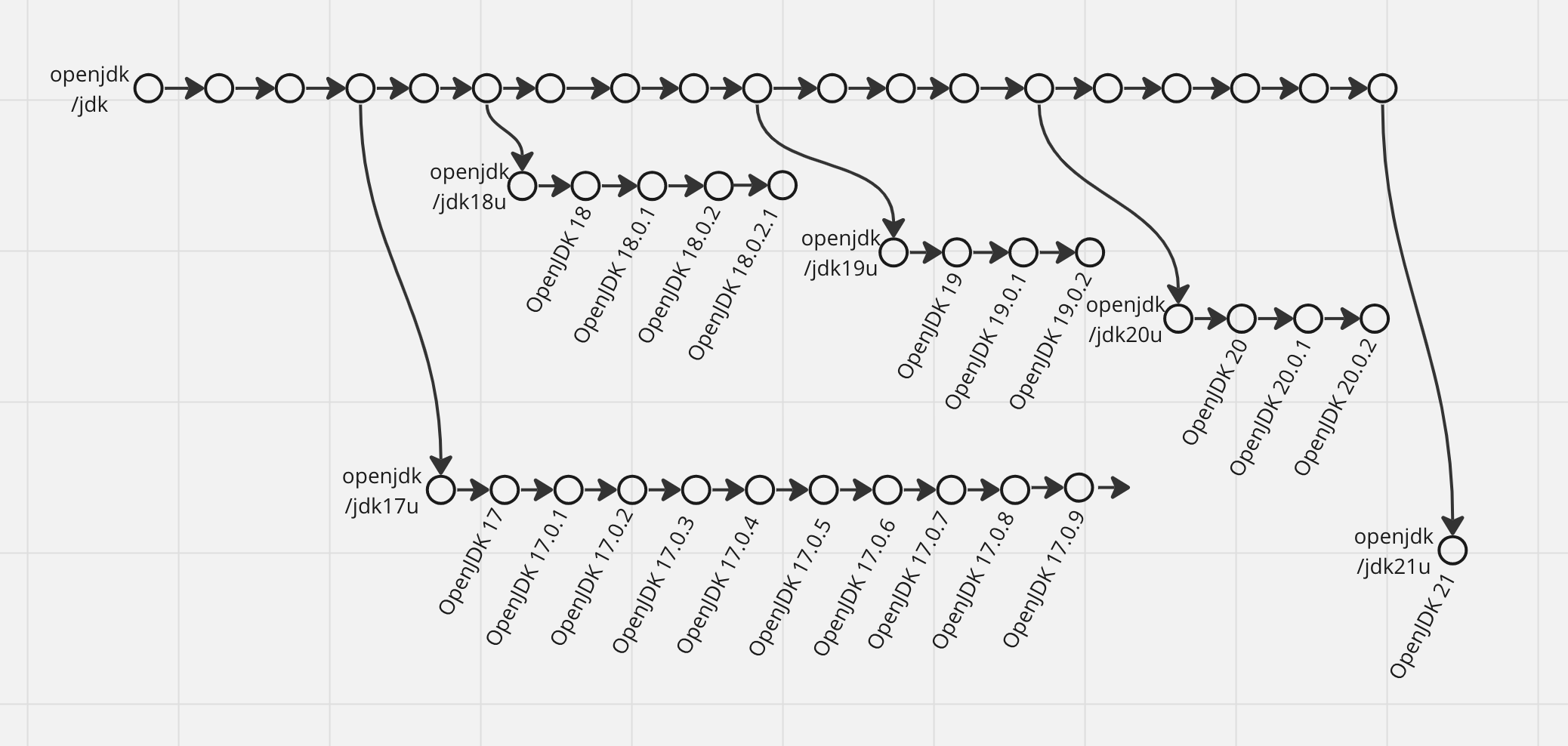
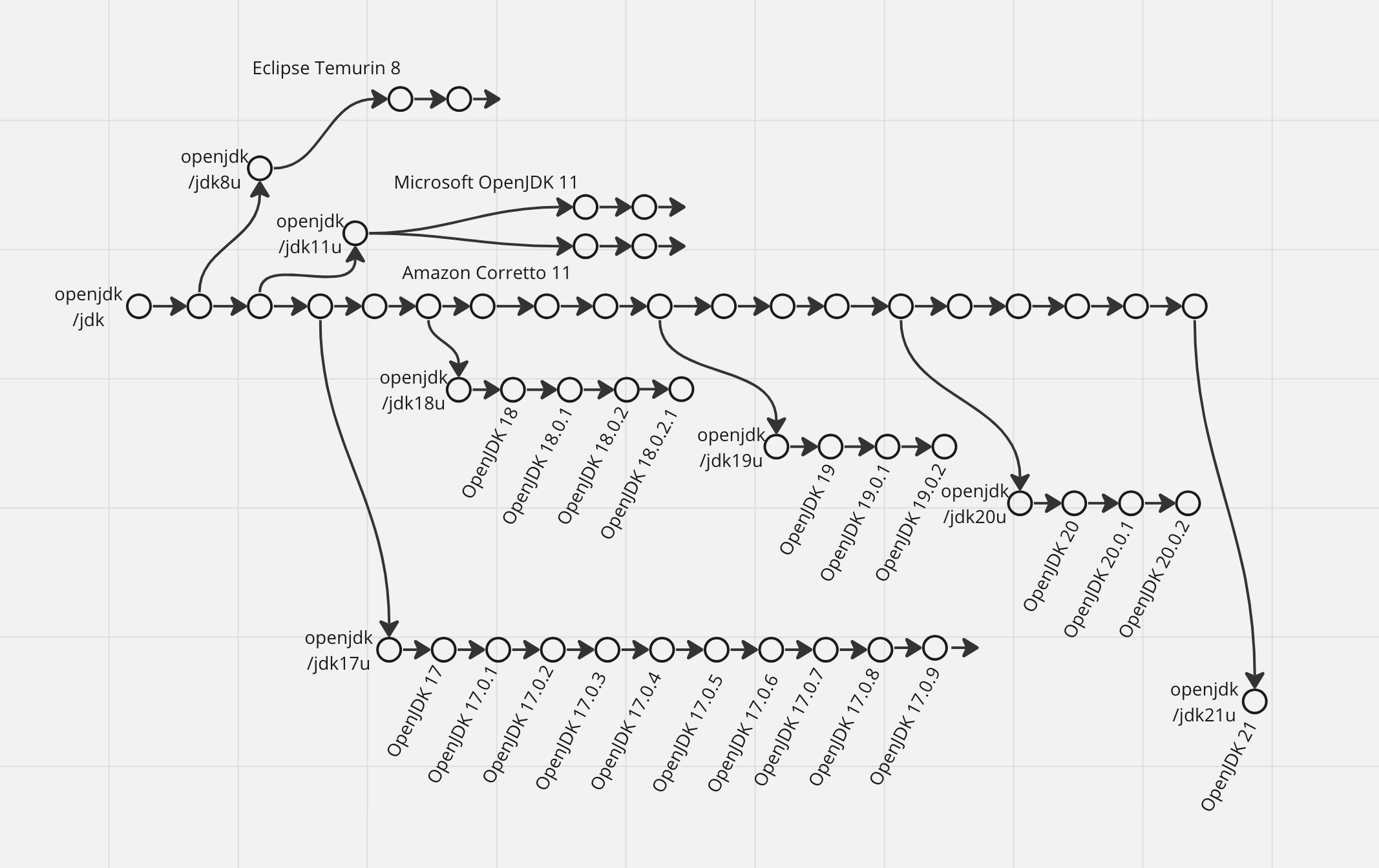
Now let’s talk about the releases. Periodically, new versions of the reference implementation of JDK are released (each includes javac, JVM, standard library, and everything). How? Every six months, the openjdk/jdk main repository is forked into a new openjdk/jdk${ver}u repository. It becomes a basis for a feature release - the one that gets all attention, a new major number, and all of the implemented new features (some of them may be hidden behind the --enable-preview flag though).
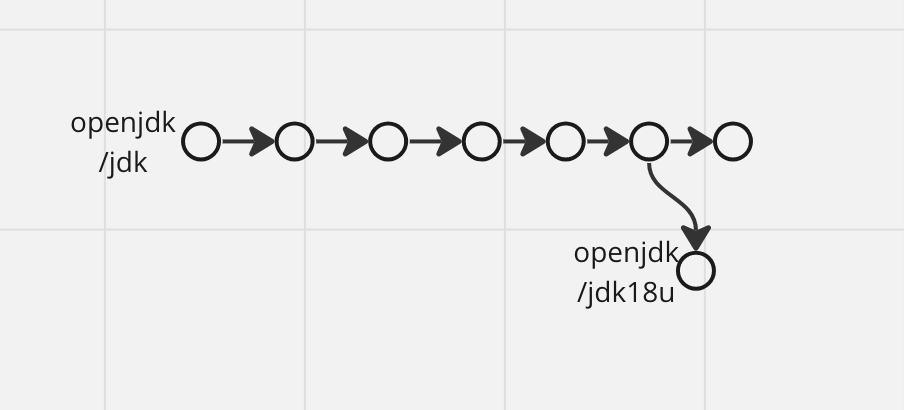
After the first feature release, new minor releases come from the forked repo every two months. These releases do not contain new features - only fixes and minor improvements. It means that minor releases do not produce new source and target versions, only new build-time JDK and runtime JVM versions. In case of a critical bug or security incident, there may be an additional release out of schedule. For example, OpenJDK 17.0.4.1 fixed a regression in the C2 JIT compiler which caused the Java Runtime to crash unpredictably.
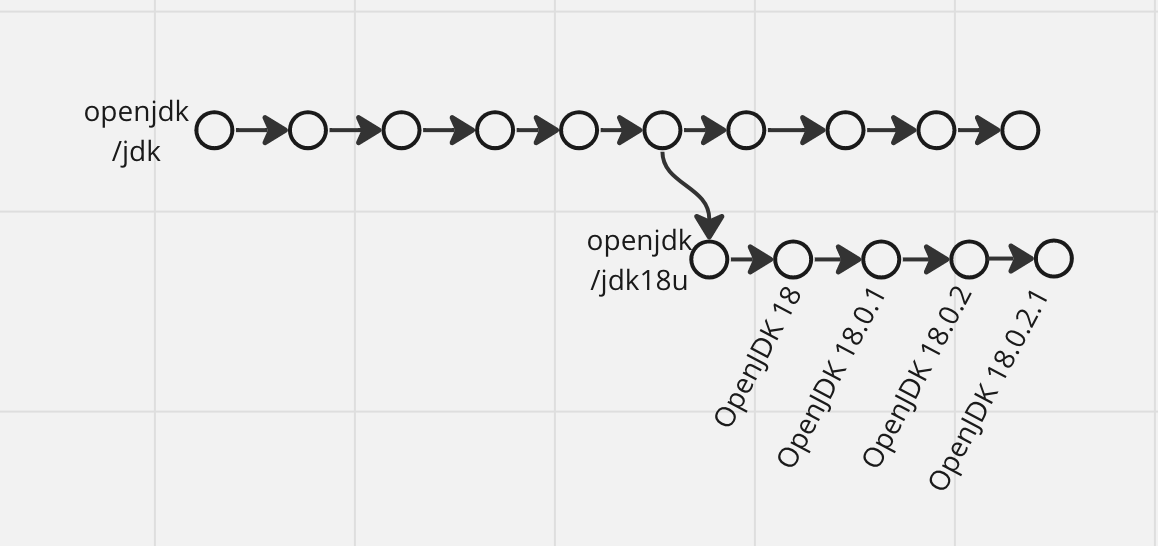
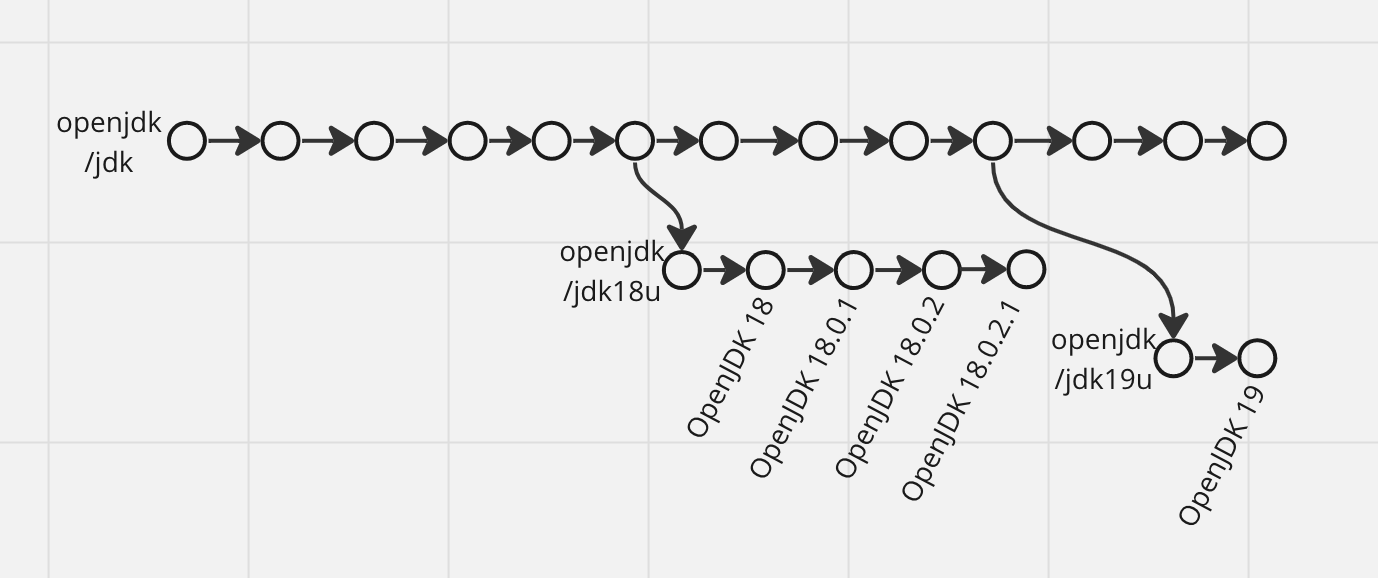
But for most of the forks, minor releases stop after a new feature release is done (so there are only two of them) and the repository is archived.
Every fourth feature release is declared an LTS (long-term support) release. It means that new minor releases for it will come at least until the next LTS release is done, which is two years.
For some reason, this is the second big source of confusion about Java version upgrades so again in bold and caps:
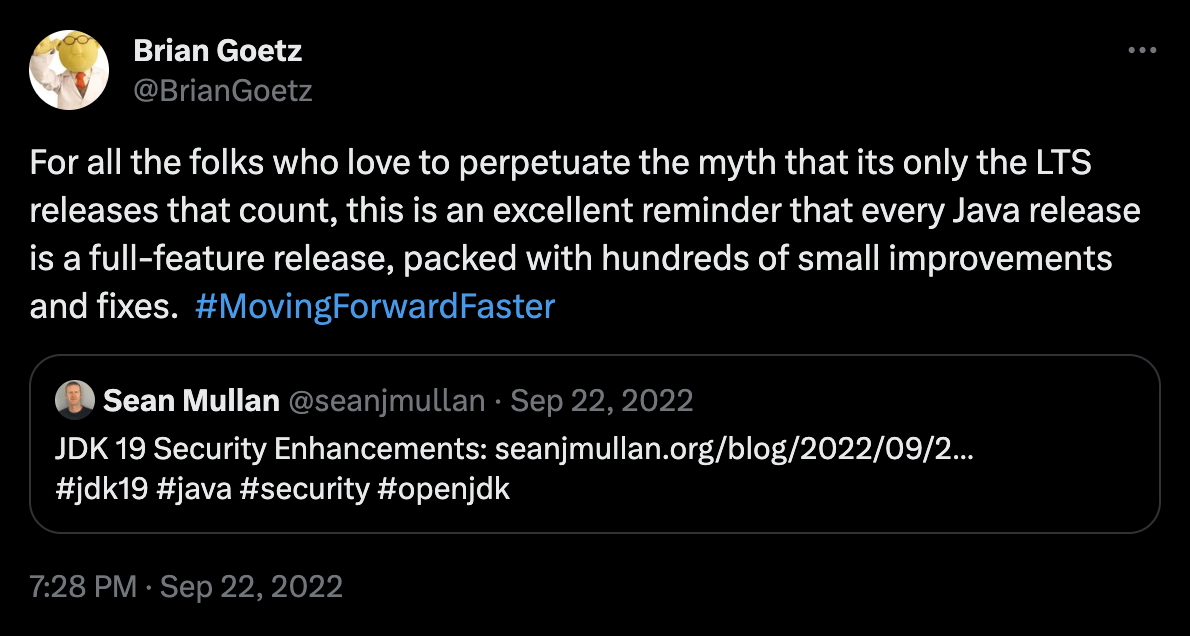
LTS VERSIONS ARE NOT DIFFERENT (MORE STABLE, HAVE MORE IMPORTANT NEW FEATURES, OR ANYTHING ELSE) FROM OTHER FEATURE VERSIONS. YOU WILL JUST GET MINOR RELEASES FOR THEM FOR AT LEAST TWO YEARS INSTEAD OF NO MORE THAN SIX MONTHS.
And once more, from Brian Goetz himself:
™️ Vendors
The important thing about the previous section is that it is about reference implementation releases only. openjdk/jdk is open source, so anyone can take it and start releasing JDK distribution with their own rules and cadence. Oracle does it with OracleJDK in addition to OpenJDK itself, as well as Amazon with Corretto, Eclipse Foundation with Temurin, Microsoft, and others.
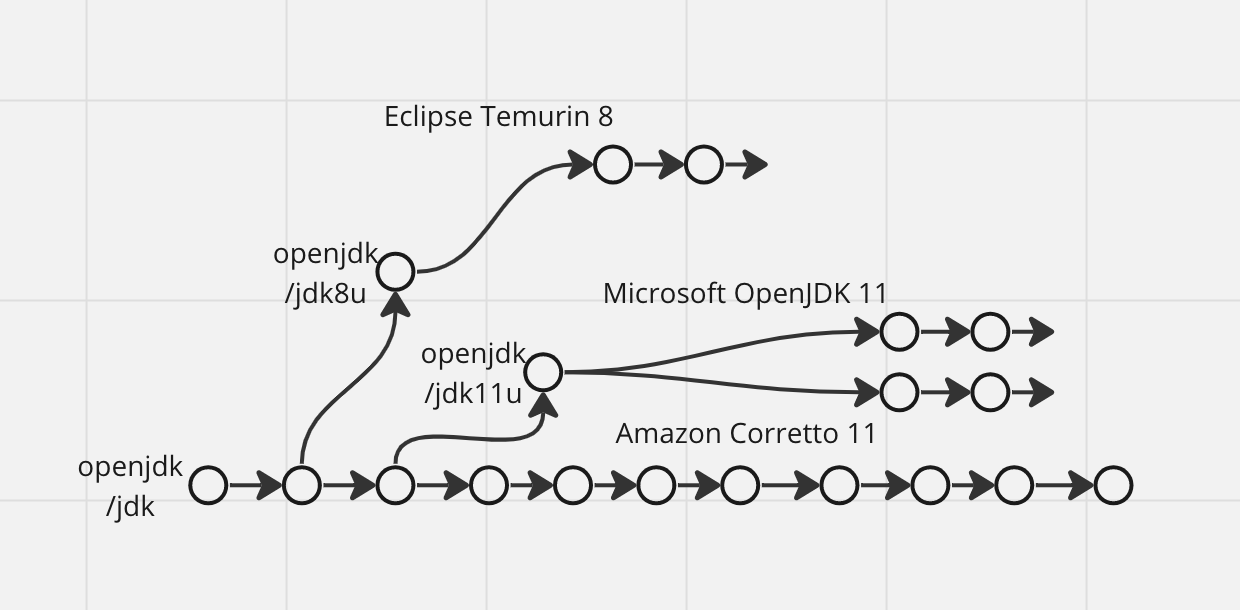
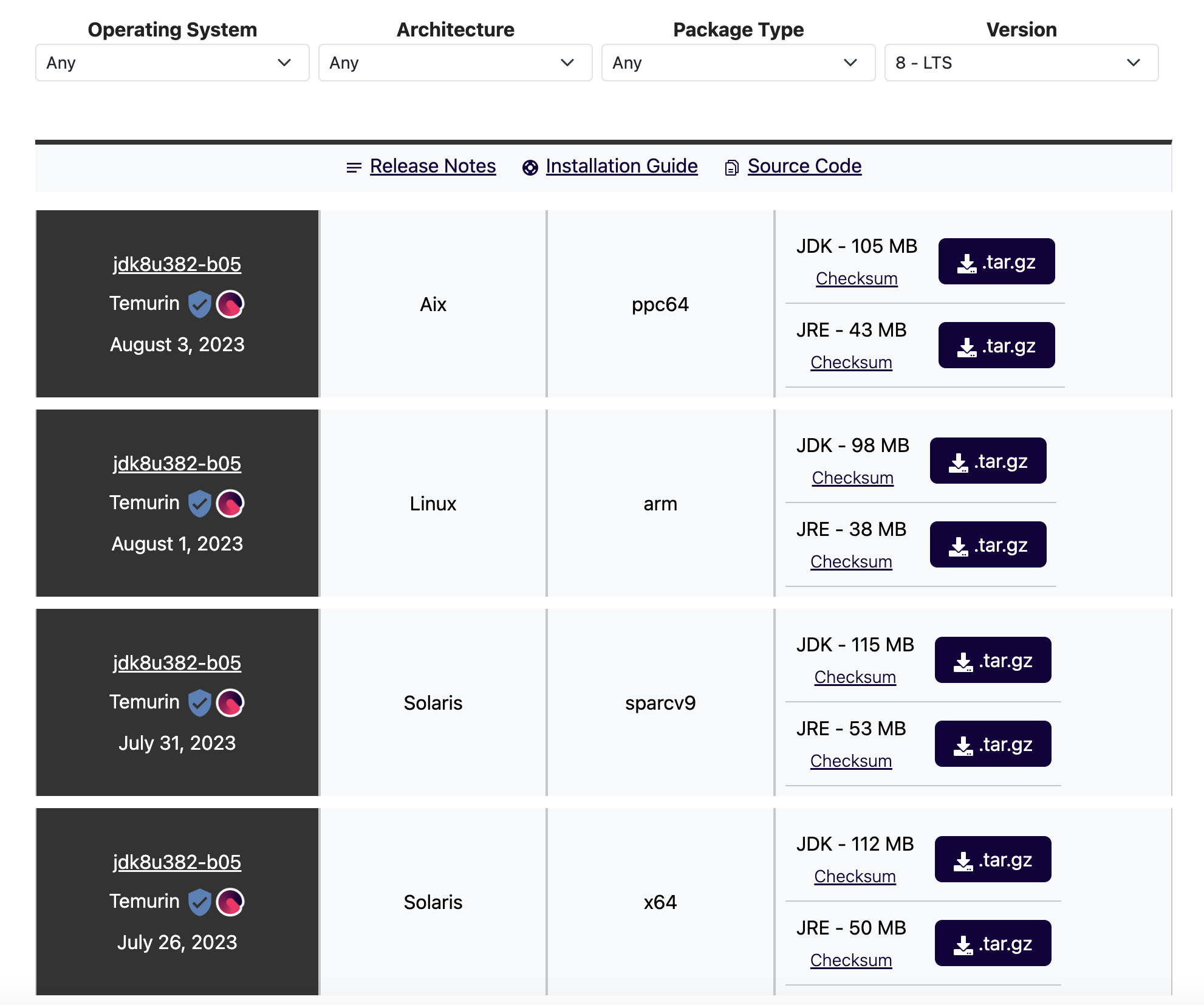
In practice, to care about Java developers’ mental health, most vendors follow the same rules regarding feature and LTS versions, but provide support and minor releases for LTS versions for a longer period of time - for example, there are still fresh releases of Temurin 8 and Temurin 11.
Some JDK distributions are more than just OpenJDK builds. Some prominent examples of JDKs with unique components are Zing by Azul, J9 by IBM, and Graal by Oracle. Their release schedule can be completely different from OpenJDK’s. I will not dig deep into this topic as I don’t have experience with it but TL;DR is use them only when you understand why you need to.
😊 Reasons to upgrade
Can we just always stay on whatever Java version was at our project’s inception? Well, we can, and it can be a good strategy. But the risk is that there is a chance that, at some moment, you will need to upgrade.
Why may you need to upgrade? It can be a security issue, bug, or new functionality you absolutely need. The longer your software exists, the higher the chance that such an event happens - probably not after months, but likely yes after years. And when it happens, you need the upgrade process to be as smooth as possible. In case of security issue, the speed of execution may be critical; otherwise, it will be a matter of invested resources. Obviously, a minor version upgrade is much easier than a major version upgrade.
For major releases, Java is pretty strict on compatibility guarantees. Officially, incompatible changes between versions are very small and quite rare. It has even gotten to the point when it became a risk for the development pace of JDK, as every change should have been very carefully considered and then maintained forever. To mitigate this risk --enable-preview flag was introduced. It enables JDK changes that do not have strict compatibility guarantees. If you use it, there is a very high chance that your code will break after upgrading to the next feature release, so I strongly recommend never using --enable-preview.
The bigger problem is that a lot of Java libraries use internal JDK APIs like Unsafe class that doesn’t have same compatibility guarantees. This makes a major version upgrade harder and harder with the number of skipped major versions growing.
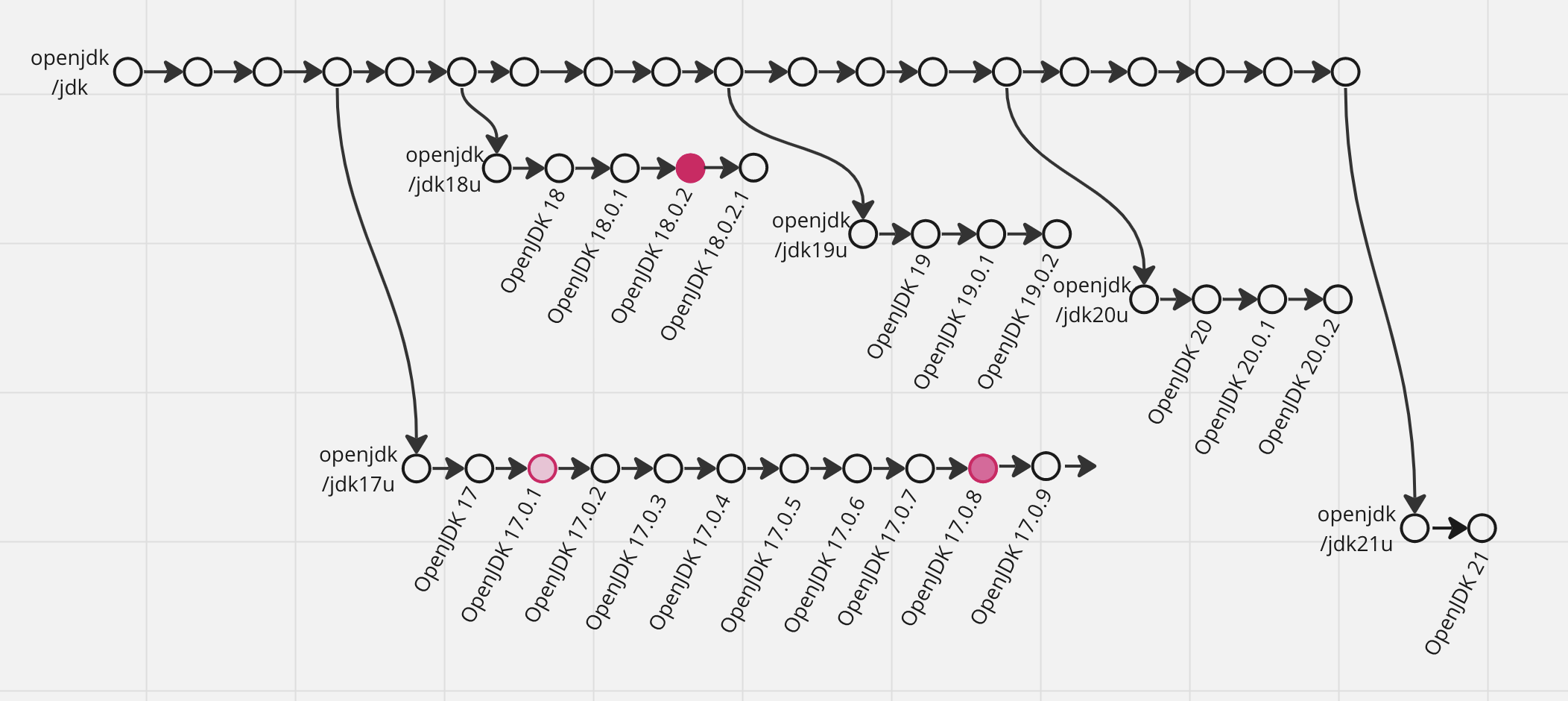
So, in case you always stay on the latest feature version, the upgrade you need will always be either a minor version upgrade (for example, from 20.0.1 to 20.0.2) or a major upgrade to the next feature version (for example, from 19.0.1 to 20).
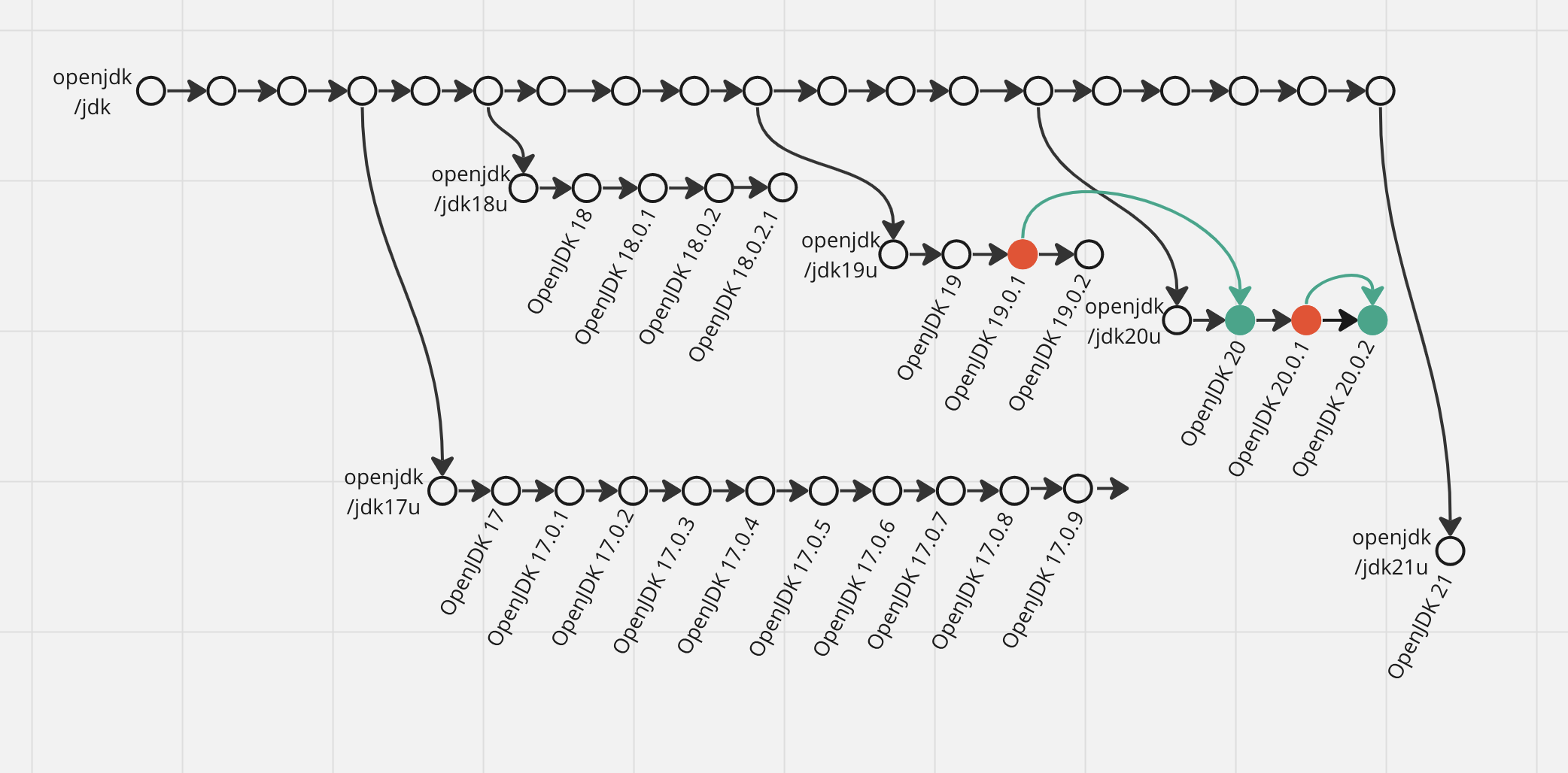
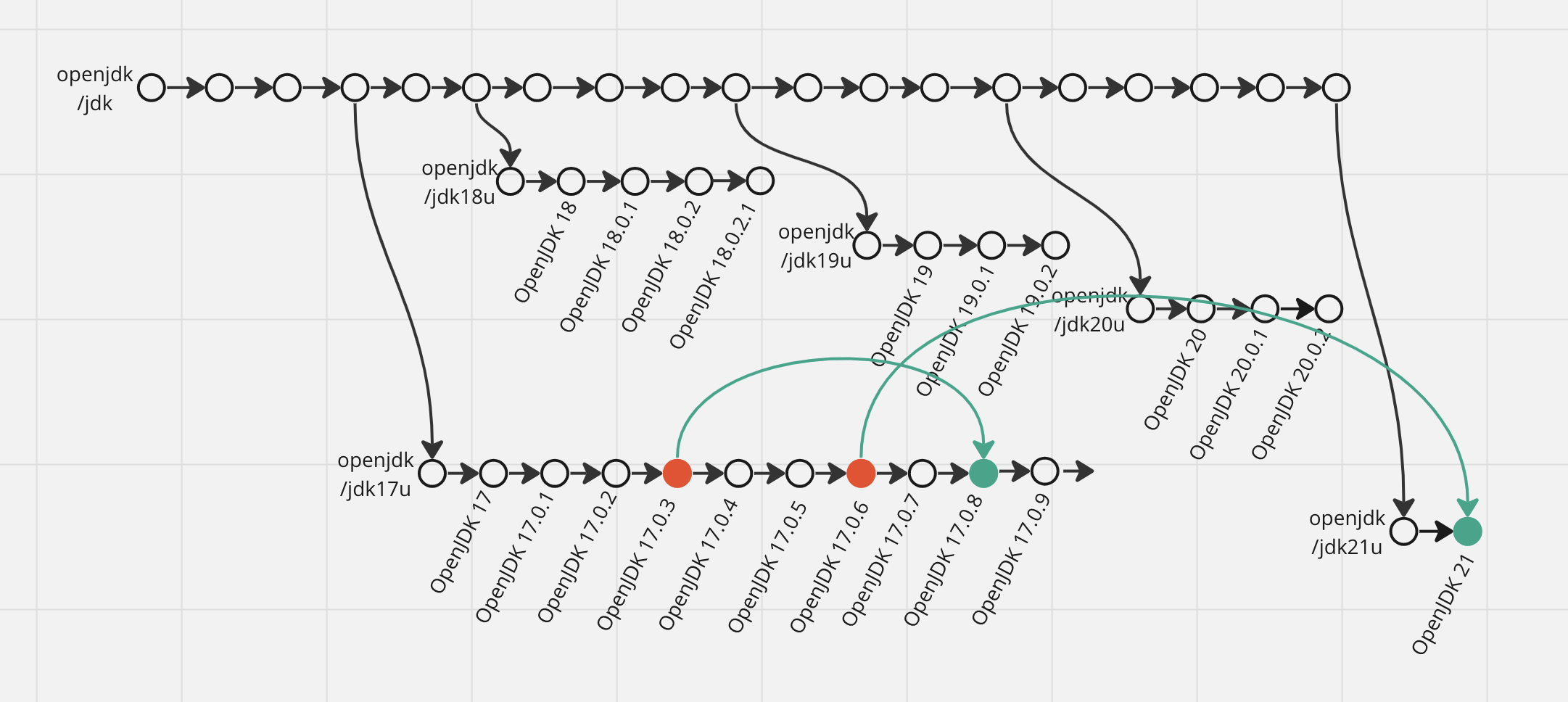
In case you stay on the latest LTS version, the upgrade you need will always be either a minor version upgrade (for example, from 17.0.3 to 17.0.8) or a major upgrade to the next LTS version (for example, from 17.0.6 to 21.0.1).
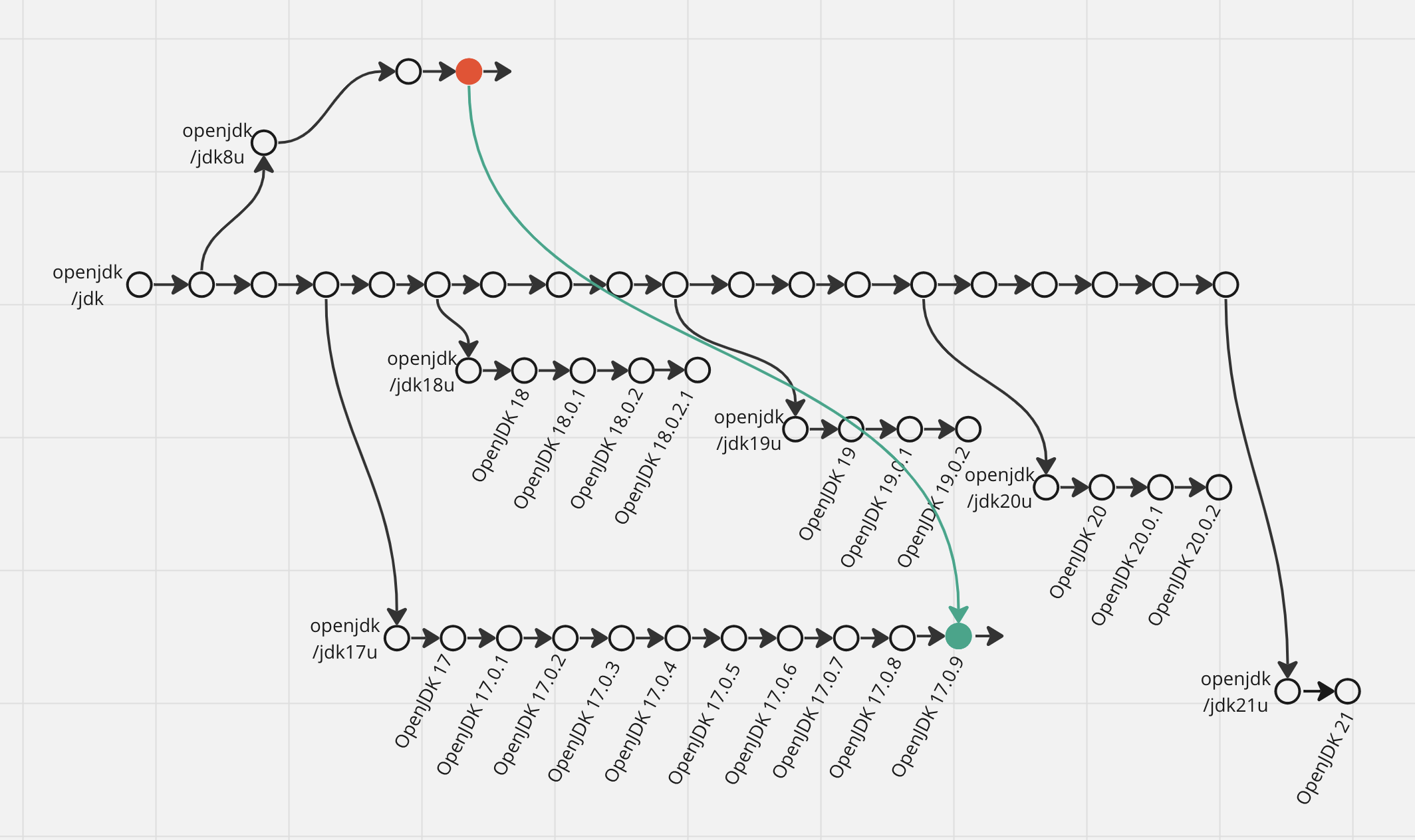
In case you never upgrade, you will likely have to upgrade multiple major versions, more with every six months passed (for example, from 8 to 17.0.9).
This should be the first driver for your upgrade strategy decision.
The second driver should be the famous principle of continuous integration - when you do something more often, you become better at it. In case you never upgrade, that time when you absolutely need to do it will be your first, so be ready for lots of unexpected problems. Upgrading every two years from LTS to LTS also hardly passes as “often”, so my advice would be if you stay on LTS versions, try to do minor upgrades as often as possible. Upgrading to every minor is ideal, but even doing it every six months would be a great driver to make the upgrade process smooth and polished.
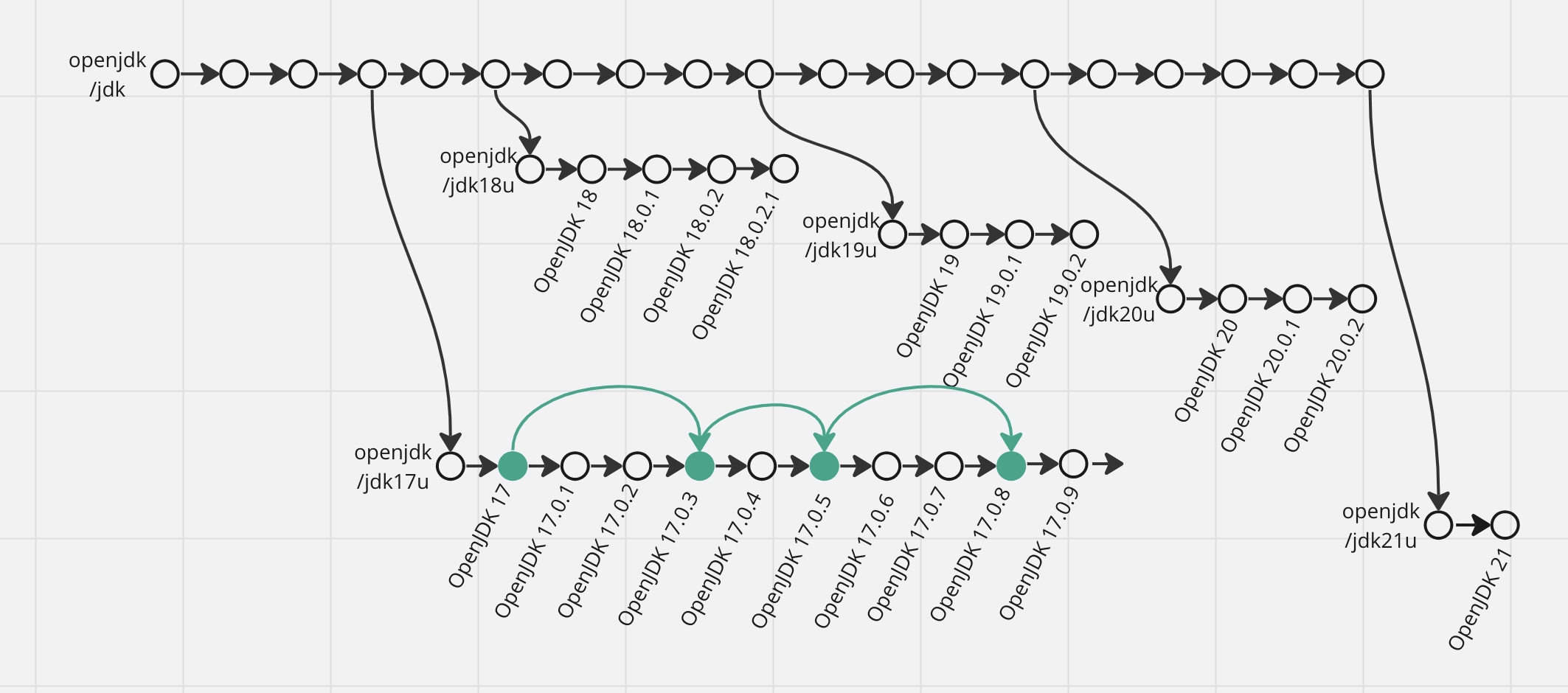
The same applies if you upgrade for every feature release - a six-month cadence is not the worst, but doing at least one minor upgrade in between would be beneficial for your processes.
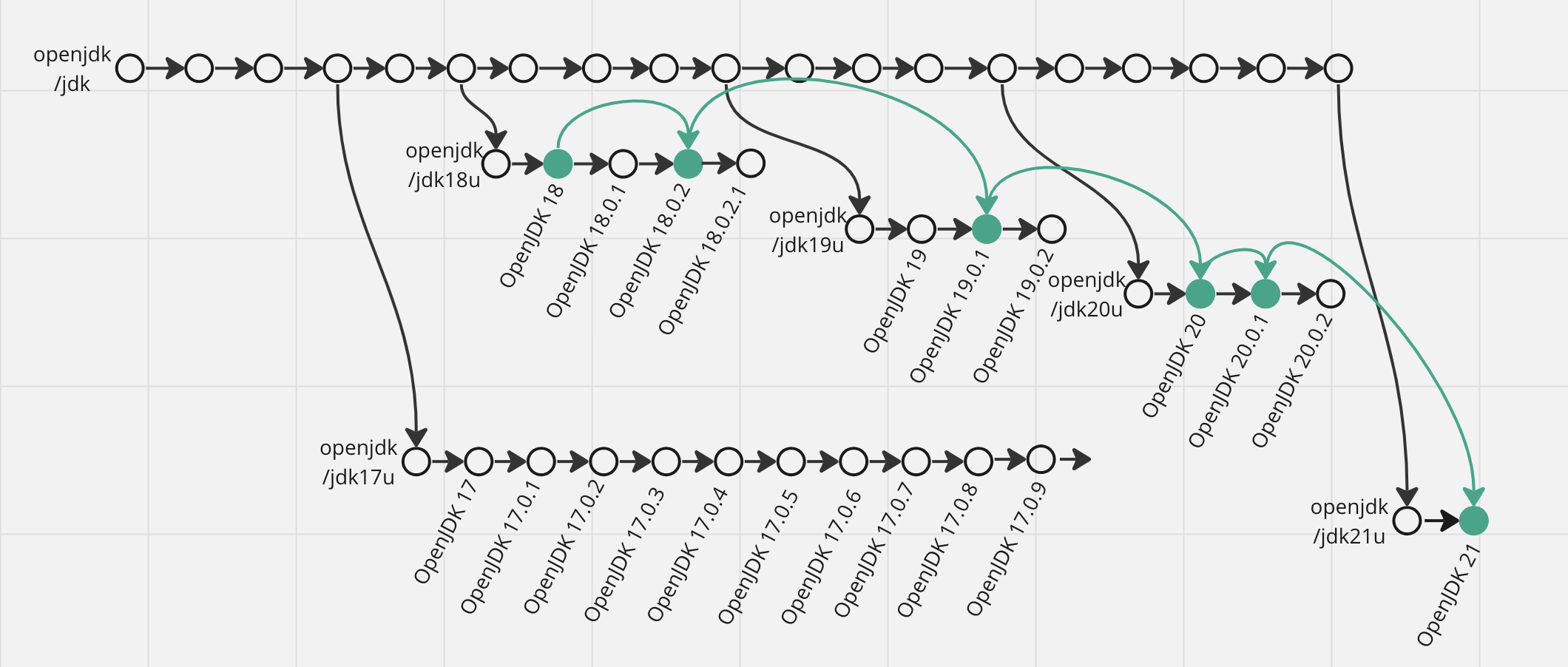
Last, and in this case probably least indeed, driver can be summarized as “new is always better”. Java development is thriving at this moment, so every later release (according to semver, not date) has more features, fewer bugs, and better performance. It is safe to say that version 18.0.2 is definitely more advanced than 17.0.8, which in turn is more advanced than 17.0.1. But mind that it does not mean the first feature releases are unstable or have higher risks of bugs - there is no need to wait for the first minor release to do a major version upgrade.
😫 Limiting factors
Now let’s explore another extreme and think, can we just always upgrade to the latest Java version?
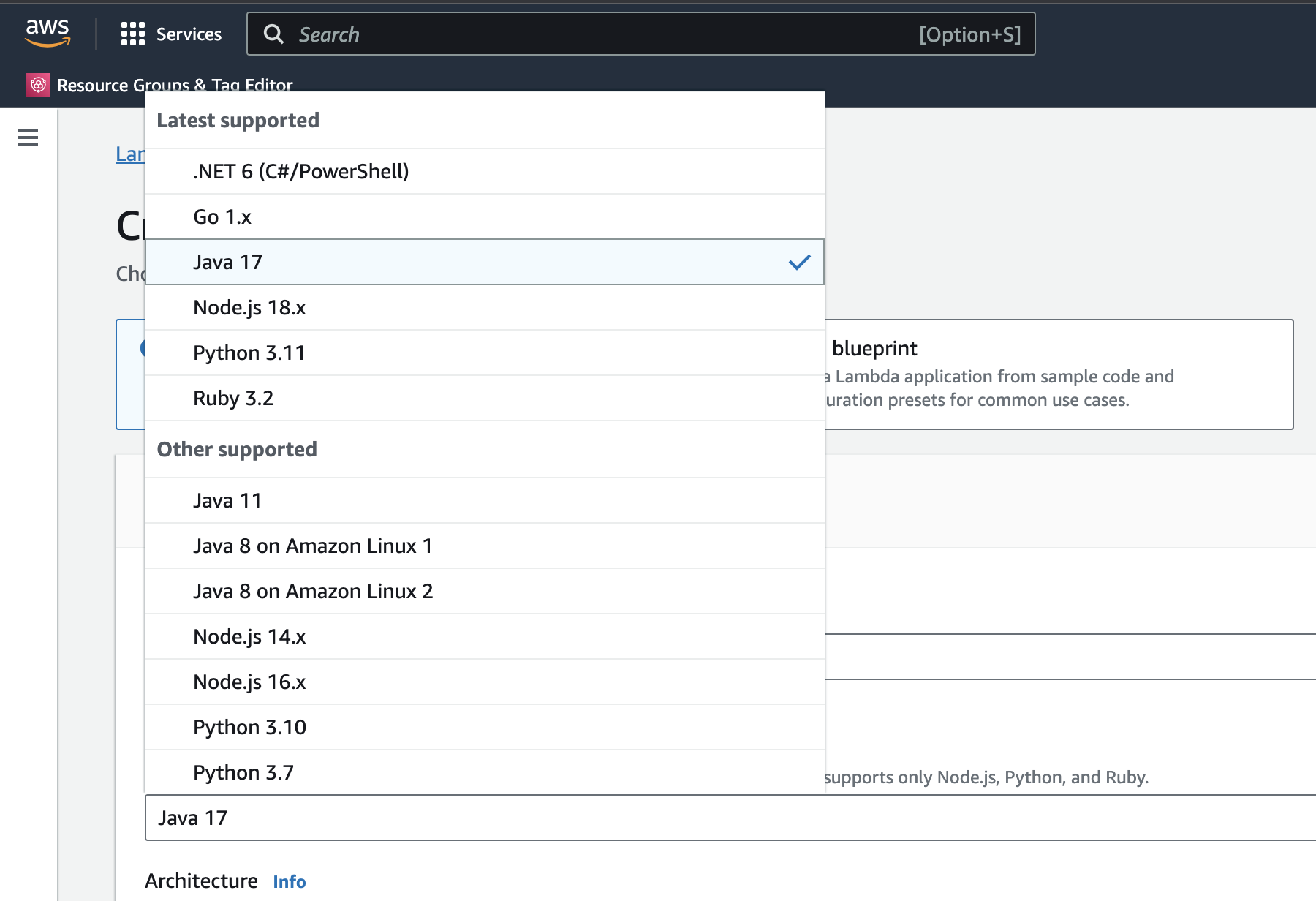
The first factor that limits us is the runtime environment. If you control where your code runs, you can use any version of runtime JVM. In the case of a managed environment like AWS Lambda, MapReduce cluster of any vendor, or your Operation’s team choice, you have limited options from the offered versions.
Selection of the target version is trickier, as it is limited by two factors. First, it can’t be higher than the runtime JVM version. In case you are a library maintainer, runtime environment selection is in the hands of your consumers. If you have specific requirements from them, you can put the minimal version of their runtime JVMs as yours. Otherwise, using the latest LTS version is a good default choice as it is a sweet spot between supporting most of potential customers without tying yourself to legacy versions too much.
The second factor is the libraries you use. Bytecode manipulation is a very widespread technique in the Java world, but unfortunately, it can’t be done in a forward-compatible way. It means that you are limited to using the minimal Java version your bytecode manipulation dependencies were aware of or lower as the target version. Good reminder to upgrade all your dependencies versions continuously! Unfortunately, looking through docs of every dependency you have to get their supported version is not very practical. Instead, you can run tests, deploy to the qa environment, and if you see an error like:
java.lang.IllegalArgumentException: Unsupported class file major versiondowngrade one version back and retry.
The source version can’t be higher than the target version. The only reason to set it lower I’m aware is to limit the usage of new language features the first couple weeks after migration to the new target version in case you will have to rollback because of Unsupported class file major version. Do you know any others?
The build-time JDK version can’t be lower than the target version. For convenience, it makes sense to use the same version as the runtime JVM version or just the latest feature release version. One problem you can get here is that your build tool needs to support this JDK version. If it does not - use one version behind. The developer environment JDK version should be the same as the build-time JDK version.
Test runs JDK version should be exactly the same version as the runtime JVM version to mimic the production environment better. If you are a library maintainer, it makes sense to run your tests on each feature version from your target to the latest available.
The most important limiting factor is your development intensity. While in maintenance mode - stay on the latest available LTS version. If you know that the code will be in active development for at least a year - it is an excellent opportunity to upgrade to every new feature version.
The last interesting question for today is how to select a JDK vendor. From my experience, there is no need to dwell for a long time on this question, as OpenJDK is an excellent choice in almost any situation. Here are a few reasons why you should consider an alternative:
-
If, for any reason, you need the old JDK version or do not plan to upgrade under any circumstances - use Eclipse Temurin.
-
If you don’t want to build your own Docker image with JDK - use the one provided by Eclipse Temurin.
-
If you run your code using some cloud provider - learn about JDK distribution from this provider, it might be optimized for this cloud provider.
📐 How to select Java upgrade strategy?
Step 1: Runtime JVM version. If you develop a library - go to step 2 😝
If you don’t fully control your runtime environment, use the latest available runtime JVM version. (for example, if you use AWS Lambda, use Java 17)
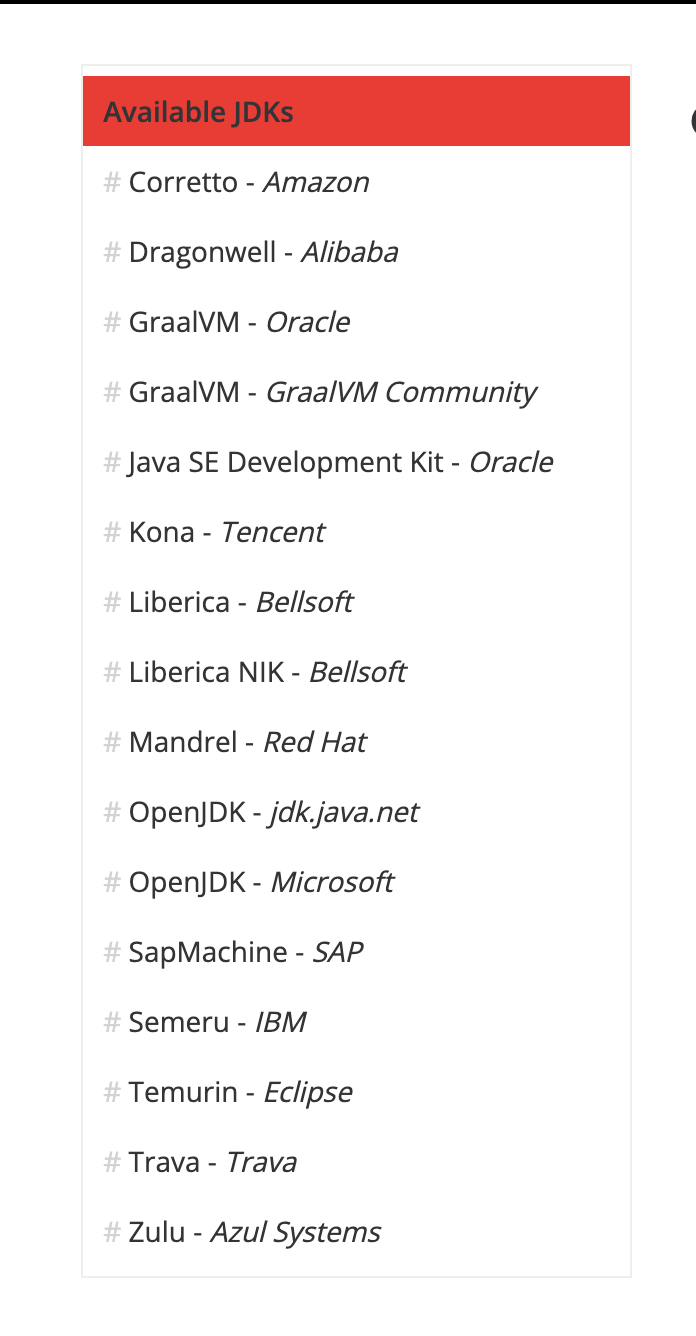
If you use a cloud provider, learn about their JVM distribution (good list - sdkman.io/jdks). If you see value in their offering - use it. (for example, Amazon Corretto provides an alternative crypto provider optimized for AWS infrastructure)
If your service will be actively developed over the next year - use the latest JVM feature release available. Upgrade to every new feature release and at least do one minor release upgrade every feature release cycle.
If your service is going straight to maintenance mode - use the latest JVM LTS release available and Eclipse Temurine distribution - they are likely to have the most prolonged support period. In case of a security incident or critical bug - do a minor upgrade to get the fix.
If you need a Docker image - use the one provided by Eclipse Temurin. If image size is important to you - use jlink as described here. In case you need a customized image (for example, you need it to include debug tools) - consider an option to take an OS base image and install OpenJDK into it.
Never enable --enable-preview for JVM runtime.
Step 2: Build-time JDK version, dev env JDK version, tests JVM version. Use the same vendor and version as for the runtime JVM version. If you don’t use jlink, it may even be the same Docker image, although you may need to add some build tools to it.
In case you develop a library - just use the latest LTS version for build-time JDK, development environment JDK, and tests JVM. It may also be a good idea to test your library with other JVM versions (all LTS and one latest feature release), especially if it uses nontrivial or internal JDK APIs.
If the latest version of your build tool does not support the JDK version you need, use the previous feature version and try to upgrade in a month - this is usually enough time. You may also need to downgrade the source and target Java versions in such a situation.
Never enable --enable-preview for JVM in build time, in the development environment, or in tests.
Step 3: Source and target version. If you develop a library - using the latest LTS version as a source and target Java versions is a good default choice as it is a sweet spot between supporting most of potential customers without tying yourself to legacy versions too much. Of course, you may have specific commitments to your library consumers to support earlier versions. If library development is not your case - use the same major version as you use for the runtime JVM version.
Run all tests you have and deploy to the QA environment. If you see errors in logs:
java.lang.IllegalArgumentException: Unsupported class file major versionTry to upgrade to the latest version of the library that caused the problem (the error originates from outdated ASM transitive dependency). If the problem persists - report it to library maintainers (example: github.com/gradle/test-retry-gradle-plugin/issues/165), downgrade the source and target Java versions by one, and try again until errors disappear.
🐅 Real-life example
My team owns a service that is deployed to AWS ECS, so we fully control the runtime environment specified as a Docker image. Although it is AWS, we see no benefits from using Amazon Corretto, defaulting to OpenJDK instead:
FROM ubuntu:23.04

...

RUN wget $JDK_DOWNLOAD_LINK \
  && tar -zxf openjdk-${JDK_VERSION}_linux-x64_bin.tar.gz \
  && ln -s jdk-${JDK_VERSION} java \
  && rm -f openjdk-${JDK_VERSION}_linux-x64_bin.tar.gz
The service is in very active development (10+ merge requests per day), so we upgrade the Java version every six months to every new feature release and sometimes do minor upgrades as a drill exercise. The current setup requires someone to update the base Docker image manually:
ENV JDK_VERSION=21
ENV JDK_DOWNLOAD_LINK="https://download.java.net/java/GA/jdk21/fd2272bbf8e04c3dbaee13770090416c/35/GPL/openjdk-21_linux-x64_bin.tar.gz"
Later, the Renovate bot picks up a new version of the base image and upgrades it everywhere:
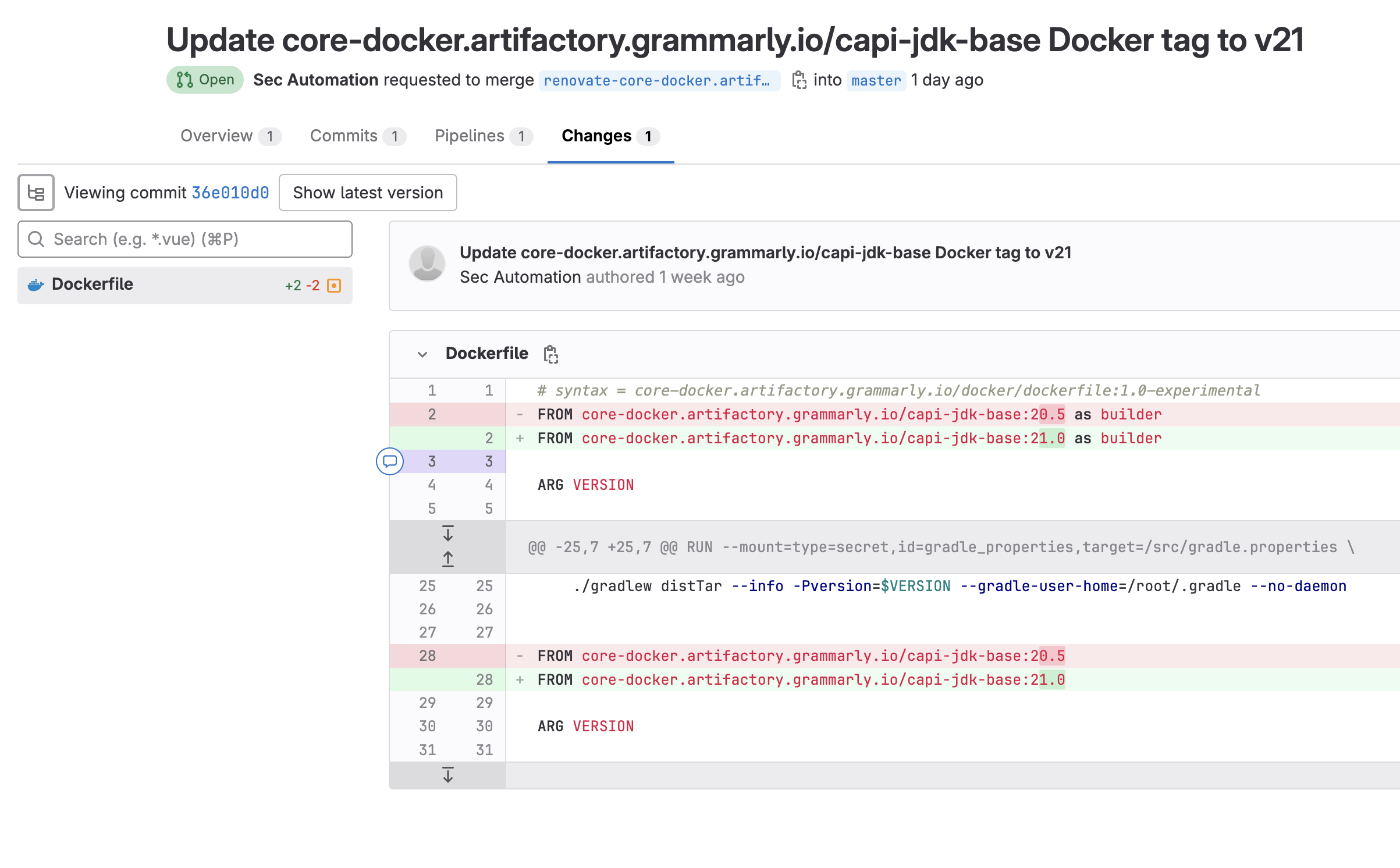
Our automated tests suite ensures this update does not cause regressions, so we are always confident in releasing it to production without any special handling.
It probably makes sense for us to migrate to the Eclipse Temurin base image, and it will eliminate the manual work of updating the Java download link, as Renovate will be able to do it as well:
- FROM ubuntu:23.04
+ FROM eclipse-temurin:21

...

- ENV JDK_VERSION=21
- ENV JDK_DOWNLOAD_LINK="https://download.java.net/java/GA/jdk21/fd2272bbf8e04c3dbaee13770090416c/35/GPL/openjdk-21_linux-x64_bin.tar.gz"

- RUN wget $JDK_DOWNLOAD_LINK \
-  && tar -zxf openjdk-${JDK_VERSION}_linux-x64_bin.tar.gz \
-  && ln -s jdk-${JDK_VERSION} java \
-  && rm -f openjdk-${JDK_VERSION}_linux-x64_bin.tar.gz
Image size is not critical for us, so we don’t invest in reducing it. Moreover, we also install some debug tools into it, like async-profiler:
# renovate: datasource=github-releases depName=jvm-profiling-tools/async-profiler versioning=semver-coerced
ENV ASYNC_PROFILER_VERSION=v2.9

RUN mkdir /opt/async-profiler \
  && cd /opt/async-profiler \
  && ASYNC_PROFILER_SEMVER=`echo "$ASYNC_PROFILER_VERSION" | tr -d v` \
  && wget https://github.com/jvm-profiling-tools/async-profiler/releases/download/${ASYNC_PROFILER_VERSION}/async-profiler-${ASYNC_PROFILER_SEMVER}-linux-x64.tar.gz \
  && tar -zxf async-profiler-${ASYNC_PROFILER_SEMVER}-linux-x64.tar.gz --strip-components=1 \
  && rm async-profiler-${ASYNC_PROFILER_SEMVER}-linux-x64.tar.gz
We use the same image to build the code and run the tests. Although debug tools may seem redundant for build image, having a single one significantly simplifies maintenance for us without serious issues or risks.
To ensure consistency of development environments, we use SDKMAN. Without it, after every upgrade local build will break for every one of almost 100 of our contributors because older local JDK will not recognize the newer Java version. It is nearly impossible to manually manage local environment updates for every engineer, so instead our development environment setup script installs SDKMAN:
is_command_installed sdk || { curl -s "https://get.sdkman.io" | bash ; }and makes sure it is properly configured to switch JDK versions automatically when you cd into the project directory (the config file should have sdkman_auto_env=true line):
SDKMAN_CONFIG=~/.sdkman/etc/config
if ( test -f $SDKMAN_CONFIG && grep -qxF "sdkman_auto_env=true" $SDKMAN_CONFIG ) ; then
  echo "'sdk' auto_env config [OK]"
else
  echo "'Setting 'sdkman_auto_env=true'."
  if ( ! test -f $SDKMAN_CONFIG || ! grep -qF "sdkman_auto_env" $SDKMAN_CONFIG ) ; then
    echo "sdkman_auto_env=true" >> $SDKMAN_CONFIG
  else
    if ( test -f $SDKMAN_CONFIG && grep -qxF "sdkman_auto_env=false" $SDKMAN_CONFIG ) ; then
      sed -i .bak 's/sdkman_auto_env=false/sdkman_auto_env=true/g' $SDKMAN_CONFIG
    fi
  fi
fi
With such a configuration, the environment is managed by the .sdkmanrc file in the project repo. To update everyone’s environment, all we need to do is:
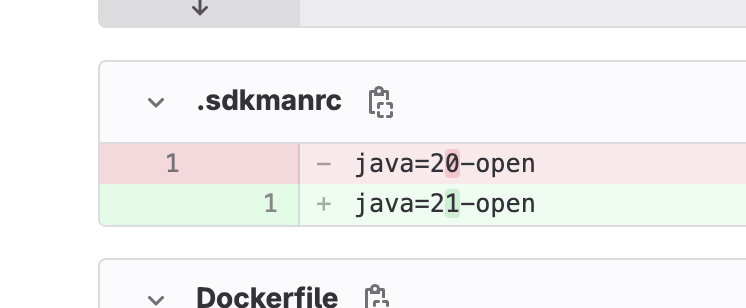
and after this change is merged, SDKMAN will automatically download and install OpenJDK 21 on everyone’s local environment.
As for the Java language source and target versions, we were stuck for a long time on Java 18 even running OpenJDK 20 in production. Two main offenders - Guice and Test Retry Gradle plugin were failing our tests on Java 19 with a bunch of:
java.lang.IllegalArgumentException: Unsupported class file major versionWe also publish a small library and for it we use source and target compatibility with the previous LTS version 17. We will likely keep it for at least 9-12 months before considering upgrading to 21 to give time to consumers for an upgrade.
Recently we migrated from Guice to Spring and also the Test Retry plugin maintainers responded swiftly to my report:
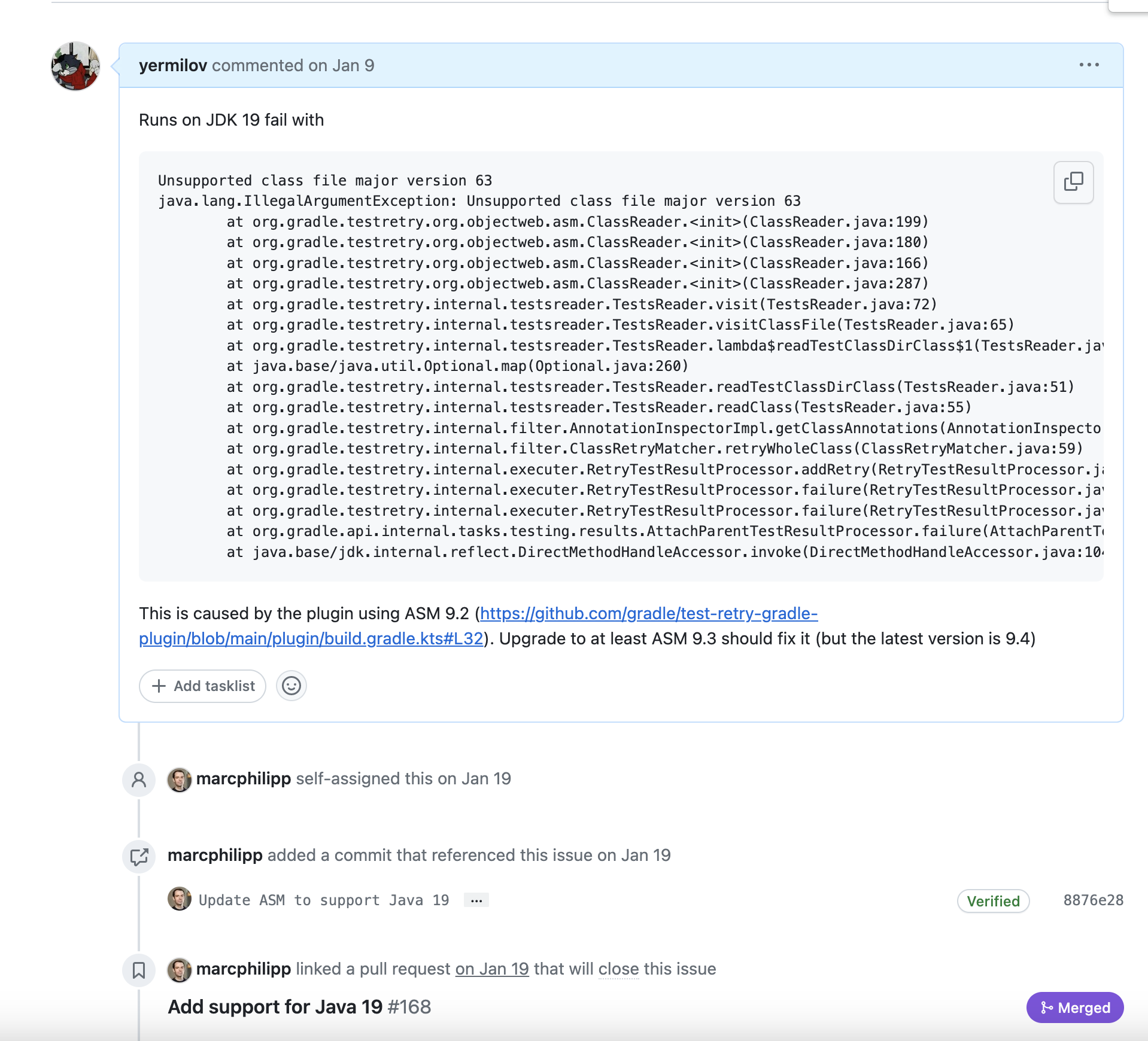
So we are moving fast from Java 18 right into Java 21 right now. Java 21 caused us some problems with the Dependency Analysis Gradle Plugin:

But upgrade to the latest version fixed it:
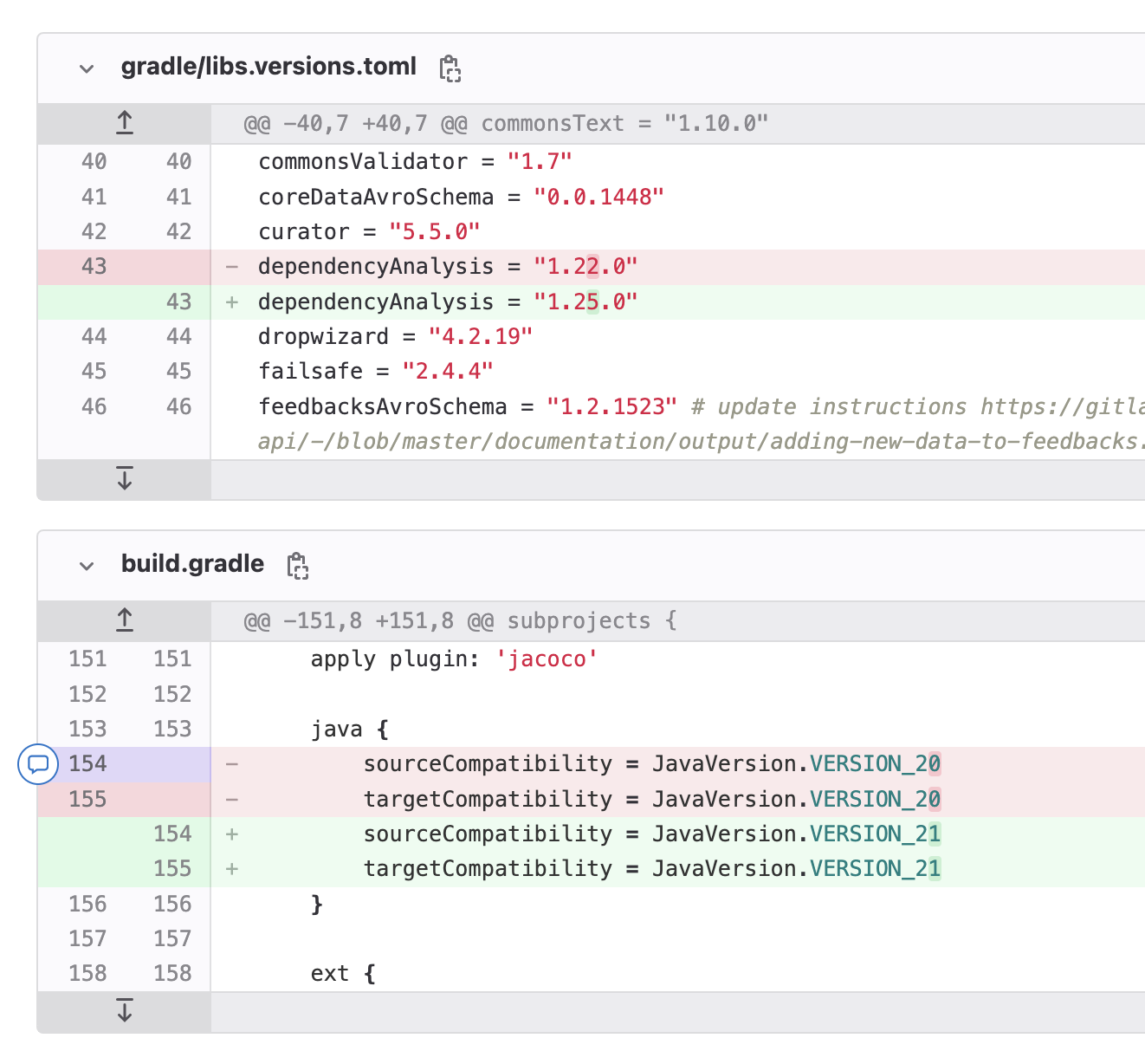
To be on the safer side, it makes more sense to update the target version first, wait for 1-2 weeks to see if there are any problems and then update the source version. It will ensure that no one will use new language features that you will need to revert in case rollback is required.
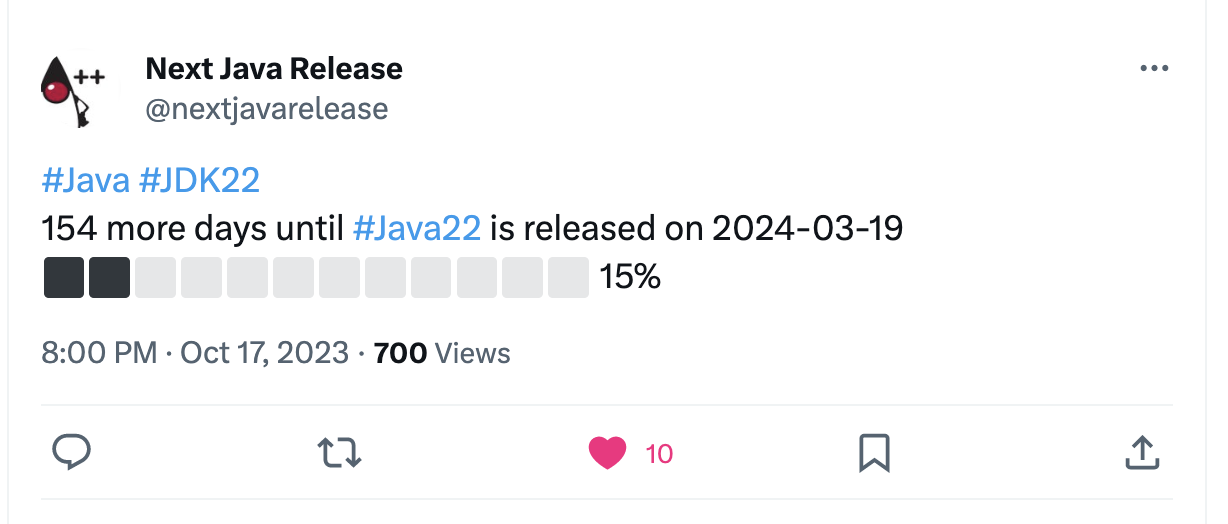
So just a month after the release we are fully compatible with Java 21 and can start waiting for the Java 22 release:
😵 It wasn’t that simple!
If you feel like you should not spend that much effort on the question about the Java version - just always use Eclipse Temurin distribution of the LTS version that was actual one year ago, and you will always be good. Sorry for wasting your time for three weeks 🙈