<?xml version="1.0" encoding="utf-8"?><feed xmlns="http://www.w3.org/2005/Atom"><title><![CDATA[Development notes by Yaroslav Yermilov]]></title><link href="https://yermilov.github.io/old-blog/categories/groovy/atom.xml" rel="self"/><link href="https://yermilov.github.io/old-blog/"/><updated>2018-01-13T23:36:41+00:00</updated><id>https://yermilov.github.io/old-blog/</id><author><name><![CDATA[Yaroslav Yermilov]]></name></author><generator uri="http://sysgears.com/grain/">Grain</generator><entry><title type="html"><![CDATA['GPars: Unsung Hero of Concurrency in Practice' talk at JEEConf 2017]]></title><link href="https://yermilov.github.io/old-blog/blog/2017/12/23/gpars-unsung-hero-of-concurrency-in-practice-talk-at-jeeconf-2017/"/><updated>2017-12-23T14:57:00+00:00</updated><id>/old-blog/blog/2017/12/23/gpars-unsung-hero-of-concurrency-in-practice-talk-at-jeeconf-2017/</id><content type="html"><![CDATA[<div class="paragraph">
<p>Venue: <a href="http://jeeconf.com/program/gpars-unsung-hero-of-concurrency-in-practice/" target="_blank">JEEConf 2017</a></p>
</div>
<div class="paragraph">
<p>Sources: <a href="https://github.com/yermilov/gpars-talk" target="_blank">github</a></p>
</div>
<div class="paragraph">
<p>Slides: <a href="https://docs.google.com/presentation/d/1zWXwr0bNeVhsPou9ZsxVSxvm80zEtDDESXHPTKRMcoU/pub?start=false&amp;loop=false&amp;delayms=3000&amp;slide=id.g21f97de995_0_38" target="_blank">google slides</a></p>
</div>
<iframe width="560" height="315" src="https://www.youtube.com/embed/angDXZBp1zc" frameborder="0" gesture="media" allow="encrypted-media" allowfullscreen></iframe>]]></content></entry><entry><title type="html"><![CDATA[Groovy static sites with Grain]]></title><link href="https://yermilov.github.io/old-blog/blog/2017/06/27/groovy-static-sites-with-grain/"/><updated>2017-06-27T01:04:00+00:00</updated><id>/old-blog/blog/2017/06/27/groovy-static-sites-with-grain/</id><content type="html"><![CDATA[<div class="paragraph">
<p>The first option I considered when I decided to start up this blog was to use static site generator, and Jekyll as the most popular one was an obvious choice.
Shortly after I was ready with the first version of this blog and first post - <a href="/old-blog/blog/2017/02/20/using-jekyll-asciidoctor-and-github-pages-for-static-site-creation/" target="_blank">Using Jekyll, Asciidoctor and GitHub Pages for static site creation</a>, I&#8217;ve noticed a link in <a href="https://twitter.com/sdelamo" target="_blank">@sdelamo</a> <a href="http://groovycalamari.com/issues/68" target="_blank">Groovy Calamary #68</a> to the static site generator from Groovy world - <a href="https://sysgears.com/grain/" target="_blank">Grain</a>.
As I consider myself as a Groovy ecosystem fan, I could not resist it and quickly migrated this blog to Grain.</p>
</div>
<!--more-->
<div class="sect1">
<h2 id="_service_site_generators">Service site generators</h2>
<div class="sectionbody">
<div class="paragraph">
<p>Typical web resource after you request a page from it does something like following:</p>
</div>
<div class="olist arabic">
<ol class="arabic">
<li>
<p>fetch some data from storage</p>
</li>
<li>
<p>process it</p>
</li>
<li>
<p>select one of web page templates and render it</p>
</li>
<li>
<p>return result</p>
</li>
</ol>
</div>
<div class="paragraph">
<p>Many of them do not require dedicated data storage or data itself is changing relatively rarely.
It means that web pages can be generated once and served without no additional processing for every request.</p>
</div>
<div class="paragraph">
<p>It&#8217;s important that we should not return to the boring Web 1.0 world.
If client state on your site is not persisted, it can be handled by JavaScript locally.
If the content is changing relatively rarely, you can just redeploy it with every change.
If you need something like commenting feature, you can rely on external resources (for example <a href="https://disqus.com" target="_blank">disqus.com</a> in this case).</p>
</div>
<div class="paragraph">
<p>And if you get rid of all heavy dynamic weapons like databases and server-side code and express your site as a collection of HMTL, CSS and JavaScript files you can gain some good benefits: ease of site deployment, content caching and delivering (which leads to better performance) and security management.</p>
</div>
<div class="paragraph">
<p>Typical static site generator takes your content (it can be plain text file, markdown, asciidoc, etc.) along with bunch of configuration parameters and the desired layout (usually HTML with some kind of template DSL) and transform them into a collection of HTML, CSS and JavaScript files ready for deployment and servicing as a static web resource.
According to <a href="https://www.staticgen.com/" target="_blank">staticgen.com</a>, there are dozens of different static sites generators, and <a href="https://jekyllrb.com" target="_blank">Jekyll</a> is the most popular from them.
I&#8217;ve already posted an <a href="/old-blog/blog/2017/02/20/using-jekyll-asciidoctor-and-github-pages-for-static-site-creation/" target="_blank">article</a> about Jekyll, and today we will look closely at <a href="https://sysgears.com/grain/" target="_blank">Grain</a>, which is a workhorse of this blog itself.</p>
</div>
</div>
</div>
<div class="sect1">
<h2 id="_so_grain">So, Grain</h2>
<div class="sectionbody">
<div class="paragraph">
<p>Grain is an open source static website generator for Groovy.
It provides all usual static site generator features and moreover has a particular killer feature - Groovy is a privileged citizen for all kinds of source files (configuration, layout, content and more).</p>
</div>
<div class="paragraph">
<p>Starting Grain blog is as easy as downloading one of its <a href="https://sysgears.com/grain/themes/" target="_blank">themes</a>.
Let&#8217;s examine it with yet another blog example, which means <a href="https://sysgears.com/grain/themes/octopress/" target="_blank">Grain Octopress Theme</a> is theme of our choice.
To ensure everything is working open your project directory and execute following:</p>
</div>


<div id="gist8287efd2bfe42acdd125578282e0ab2f">
  <script src="https://gist.github.com/8287efd2bfe42acdd125578282e0ab2f.js"></script>
</div>
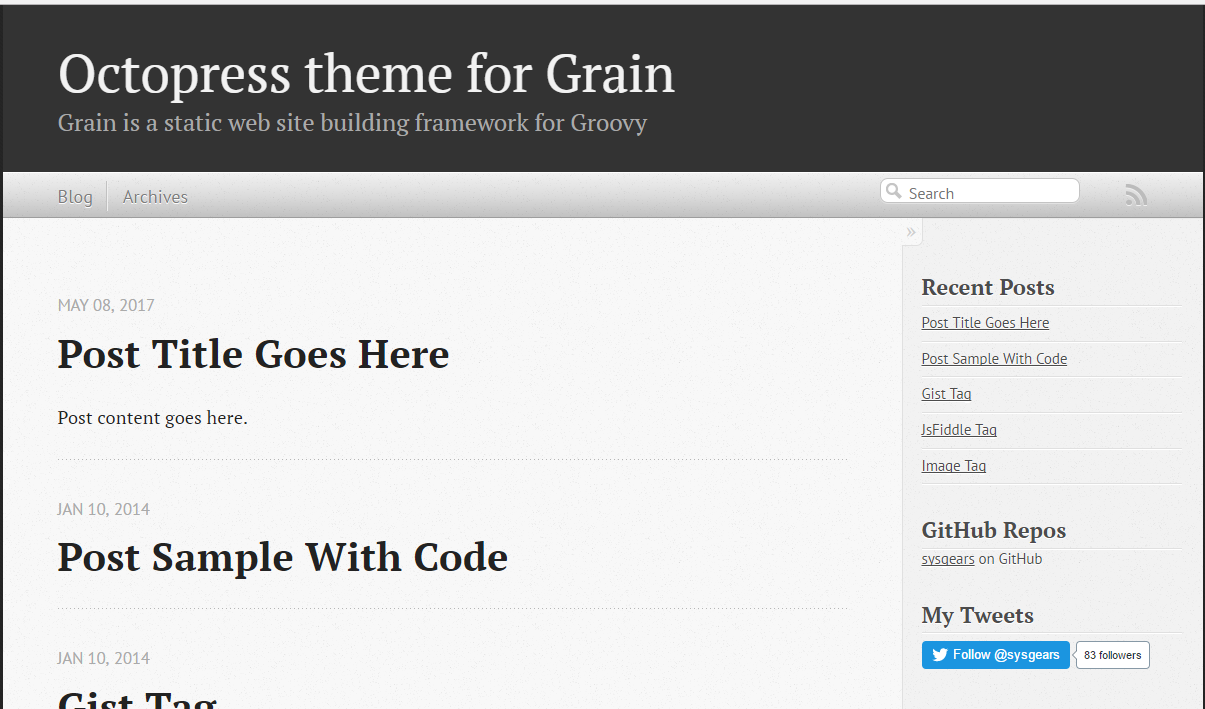
<div class="paragraph">
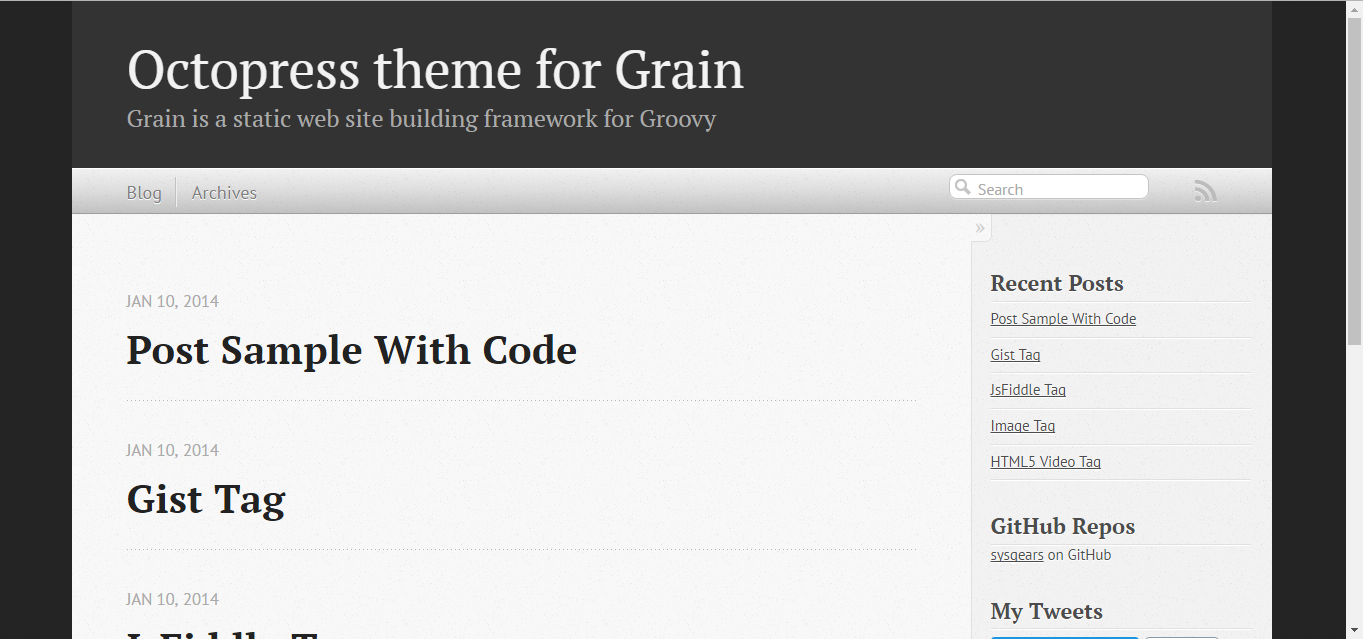
<p>If you open now <a href="http://localhost:4000" target="_blank">http://localhost:4000</a>, you should see following:</p>
</div>
<div class="imageblock">
<div class="content">
<img src="/old-blog/images/2017-06-27-groovy-static-sites-with-grain/3600d-3600d28dd51938ac3d3da7ec351d3114.png" alt="3600d 3600d28dd51938ac3d3da7ec351d3114">
</div>
</div>
</div>
</div>
<div class="sect1">
<h2 id="_now_some_housekeeping">Now some housekeeping</h2>
<div class="sectionbody">
<div class="paragraph">
<p>Before start using Grain, you need to perform some housekeeping.
For example, as Grain try to rely on Groovy ecosystem tool as much as possible, it uses Gradle as build tool.
But distribution that we&#8217;ve just download uses version 1.8 of Gradle wrapper (for the moment of writing this article 4.0 is actual version).
You can easily update it by applying following change to <em>build.gradle</em> file:</p>
</div>


<div id="gistad77d1f1c747791a37491d7cdaf6125c">
  <script src="https://gist.github.com/ad77d1f1c747791a37491d7cdaf6125c.js"></script>
</div>
<div class="paragraph">
<p>And running following command:</p>
</div>


<div id="gistd44849eee1050307969f218b29a7b869">
  <script src="https://gist.github.com/d44849eee1050307969f218b29a7b869.js"></script>
</div>
<div class="paragraph">
<p>Also, it would be great to update <em>.gitignore</em> file to ignore irrelevant for VCS files as following:</p>
</div>


<div id="gist67f0c7aae6a9299f3d58c15415078f21">
  <script src="https://gist.github.com/67f0c7aae6a9299f3d58c15415078f21.js"></script>
</div>
<div class="paragraph">
<p>You should also fix JVM memory configuration in <em>grainw</em> files:</p>
</div>


<div id="gista27c146412d4d6abcbde9331d312c9af">
  <script src="https://gist.github.com/a27c146412d4d6abcbde9331d312c9af.js"></script>
</div>
<div class="paragraph">
<p>Modern web requires you to serve all your site content over HTTPS protocol.
By default, not all Grain Octopress Theme content complies it.
You should edit file <em>theme/includes/custom/head.html</em> as following:</p>
</div>


<div id="gist365b888e528ddeca13604ac1a492df87">
  <script src="https://gist.github.com/365b888e528ddeca13604ac1a492df87.js"></script>
</div>
</div>
</div>
<div class="sect1">
<h2 id="_adding_new_post">Adding new post</h2>
<div class="sectionbody">
<div class="paragraph">
<p>The first thing you probably want to do with your blog is to create a new post.
To do it, add file named <em>yyyy-mm-dd-new-post.adoc</em> (substitute yyyy-mm-dd with publication date and new-post with short post name) with following content:</p>
</div>


<div id="gist57ddf7f0300c32ccc937783f565d2b9b">
  <script src="https://gist.github.com/57ddf7f0300c32ccc937783f565d2b9b.js"></script>
</div>
<div class="paragraph">
<p>As you can see, another great thing about Grain is that it supports <a href="http://asciidoctor.org/docs/what-is-asciidoc/" target="_blank">Asciidoc</a> format out-of-the-box.
It&#8217;s a great benefit if your blog is going to be developer-oriented, and you probably may be satisfied with using neither markdown nor HTML for your posts.
Asciidoc shares the same concept as <a href="http://daringfireball.net/projects/markdown/" target="_blank">Markdown</a>, is partially compatible with it but has much more powerful features needed for advanced drafting of articles, technical manuals, books, presentations, and prose.</p>
</div>
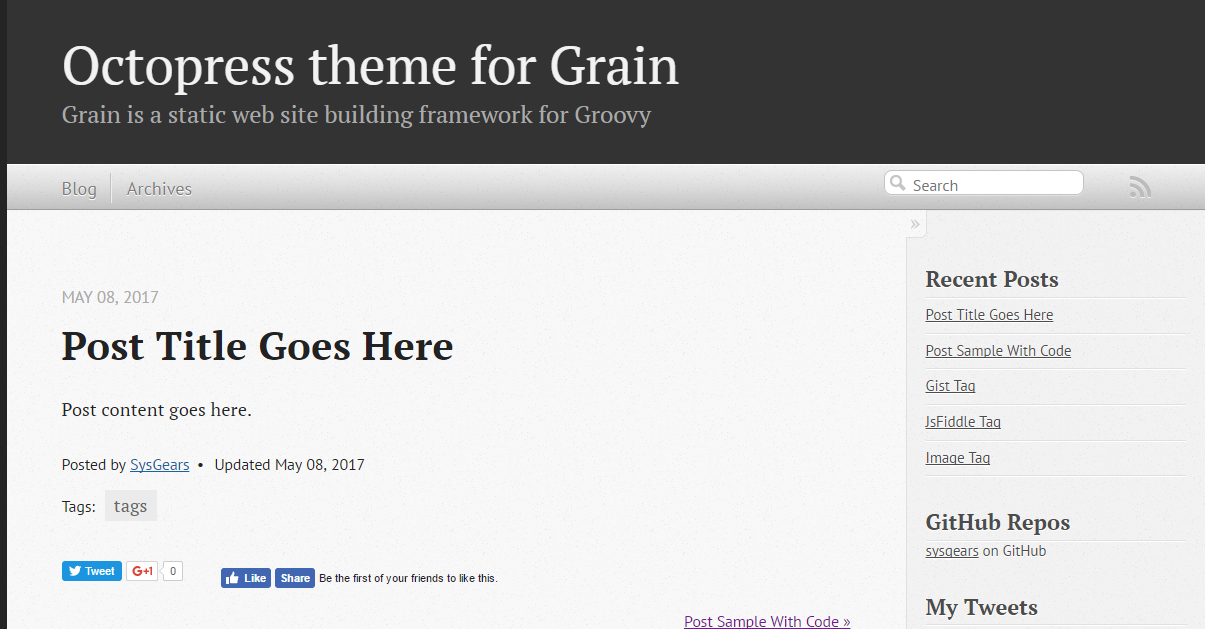
<div class="paragraph">
<p>Now your blog should look like following:</p>
</div>
<div class="imageblock">
<div class="content">
<img src="/old-blog/images/2017-06-27-groovy-static-sites-with-grain/8020f-8020f393565a558551c6c2e341b84c45.png" alt="8020f 8020f393565a558551c6c2e341b84c45">
</div>
</div>
<div class="paragraph">
<p>And if you follow new post link:</p>
</div>
<div class="imageblock">
<div class="content">
<img src="/old-blog/images/2017-06-27-groovy-static-sites-with-grain/cf787-cf787cc6e036ab60a8b546f9d25019e8.png" alt="cf787 cf787cc6e036ab60a8b546f9d25019e8">
</div>
</div>
<div class="paragraph">
<p>As I said in the beginning, Groovy is a privileged citizen in the Grain world.
To prove it, in the following sections I will demonstrate simple examples how you can use Groovy in all kinds of site sources - configuration, layout, content and even deployment.</p>
</div>
</div>
</div>
<div class="sect1">
<h2 id="_site_configuration">Site configuration</h2>
<div class="sectionbody">
<div class="paragraph">
<p>As you can see, there are plenty of defaults used by your blog now.
This problem is easily fixed via <em>SiteConfig.groovy</em> file.
What is important, is that it is implemented as executable Groovy script, which constructs site build context.
Inside it you can:</p>
</div>
<div class="ulist">
<ul>
<li>
<p>assign primitive values to configuration parameters</p>
</li>
</ul>
</div>


<div id="gistdf26ecc1e8cf0635e4e9eba6d94c0b86">
  <script src="https://gist.github.com/df26ecc1e8cf0635e4e9eba6d94c0b86.js"></script>
</div>
<div class="ulist">
<ul>
<li>
<p>use special Groovy literals like patterns, string templates or lists</p>
</li>
</ul>
</div>


<div id="gist1aa616b0e89a9c1c858e6d96bb94f0c6">
  <script src="https://gist.github.com/1aa616b0e89a9c1c858e6d96bb94f0c6.js"></script>
</div>
<div class="ulist">
<ul>
<li>
<p>instantiate objects and execute methods on them</p>
</li>
</ul>
</div>


<div id="gist9763624cf6becc9be3b5afce43b073fd">
  <script src="https://gist.github.com/9763624cf6becc9be3b5afce43b073fd.js"></script>
</div>
<div class="ulist">
<ul>
<li>
<p>use Groovy builders for hierarchical parameters</p>
</li>
</ul>
</div>


<div id="gist6d4ceea06cb9ab146ad5ed1191216a82">
  <script src="https://gist.github.com/6d4ceea06cb9ab146ad5ed1191216a82.js"></script>
</div>
<div class="paragraph">
<p>You can find tons of parameters there and even introduce your own.
For the beginning, let&#8217;s concentrate on the simple ones and perform following changes:</p>
</div>


<div id="giste36aa454a84fa42563ae9cf9689abc8d">
  <script src="https://gist.github.com/e36aa454a84fa42563ae9cf9689abc8d.js"></script>
</div>
<div class="paragraph">
<p>Now, your blog should look a little bit more personal:</p>
</div>
<div class="imageblock">
<div class="content">
<img src="/old-blog/images/2017-06-27-groovy-static-sites-with-grain/0cc17-0cc176f669122a794295dfaf7aca36bc.png" alt="0cc17 0cc176f669122a794295dfaf7aca36bc">
</div>
</div>
<div class="paragraph">
<p>Moreover, you can use <code>commands</code> object to create custom commands for grain cli.</p>
</div>


<div id="gist83914dd6bc422569d7ecb9ef21ebfb30">
  <script src="https://gist.github.com/83914dd6bc422569d7ecb9ef21ebfb30.js"></script>
</div>
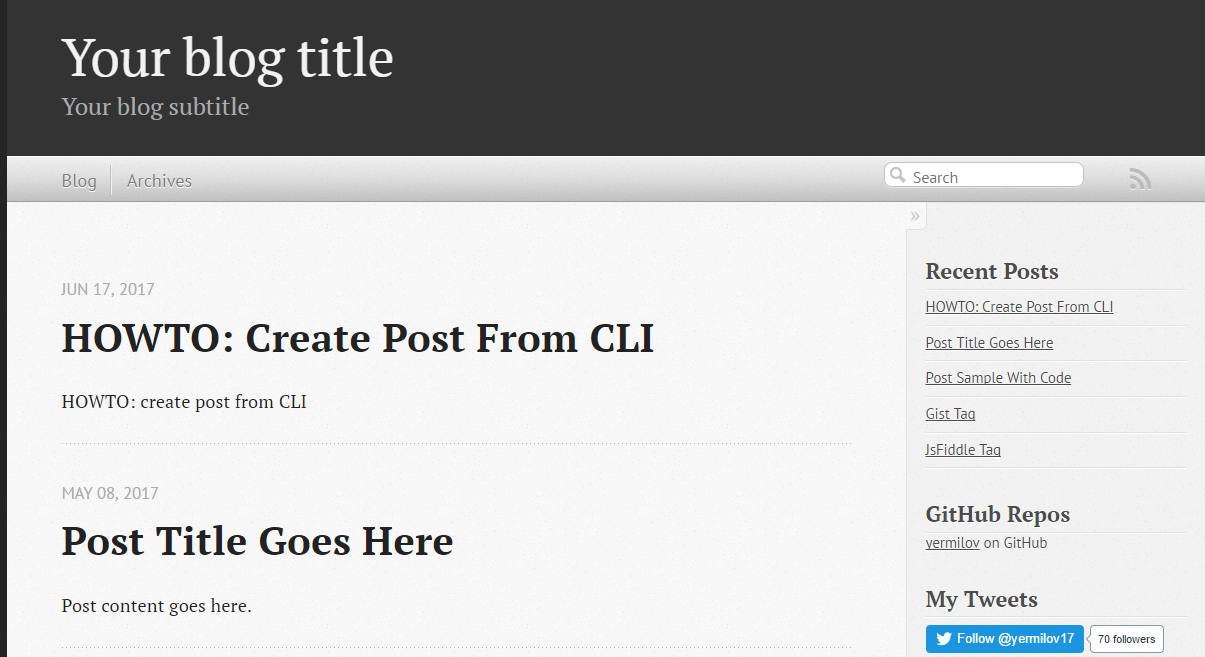
<div class="paragraph">
<p>It means that if you execute <code>./grainw create-post 'HOWTO: create post from CLI'</code> you will got following result:</p>
</div>


<div id="gista1d47cfc42df32c2294bfd6392bf3b00">
  <script src="https://gist.github.com/a1d47cfc42df32c2294bfd6392bf3b00.js"></script>
</div>
<div class="imageblock">
<div class="content">
<img src="/old-blog/images/2017-06-27-groovy-static-sites-with-grain/ee478-ee4782118817e6e1cf4c09b17cd8cab8.png" alt="ee478 ee4782118817e6e1cf4c09b17cd8cab8">
</div>
</div>
</div>
</div>
<div class="sect1">
<h2 id="_site_layout">Site layout</h2>
<div class="sectionbody">
<div class="paragraph">
<p>Grain has a pretty usual layout system.
Let&#8217;s explore it using example of <em>theme/layouts/blog.html</em> which controls layout of site home page.</p>
</div>


<div id="gistd31cd182f6ebd74926fae55e4fb4e0ac">
  <script src="https://gist.github.com/d31cd182f6ebd74926fae55e4fb4e0ac.js"></script>
</div>
<div class="paragraph">
<p>On the lines 1-5, you can see typical page front matter.
First of all, it configures layout inheritance.
You can open file named <em>theme/layouts/default.html</em>, which is parent layout for <em>blog.html</em> and check that  <em>blog.html</em> content will be put inside <code>${content}</code> tag (line 14) of <em>default.html</em>:</p>
</div>


<div id="gist472a52e4be5bbfab967715a2d8d90cca">
  <script src="https://gist.github.com/472a52e4be5bbfab967715a2d8d90cca.js"></script>
</div>
<div class="paragraph">
<p>Following lines of front matter are passed into special <code>page</code> object and can be used to parametrize layout behavior.</p>
</div>
<div class="paragraph">
<p>After front matter, we see kind of normal HTML code with addition of Groovy.
It can be one-liner, just like in lines 19 and 36.
In these concrete example special implicit method <code>include</code> is used, which takes another HTML file and optionally parameters map, renders their content and insert into original page.</p>
</div>
<div class="paragraph">
<p>The more sophisticated option is multi-line Groovy code, which is, however, very natural and clear.
You can use <code>if</code> statement (like in line 8) to control which parts of page layout should be rendered and which not.
As a result, you do not need any special constructions as many other static site generators have.
For example, if you require rendering collection of elements, you can use Groovy Collection API like in line 16.</p>
</div>
<div class="paragraph">
<p>With such approach you can quickly implement some interesting features like in line 17, where you loop through list of blog posts, render content of each one, extract briefs and put them on your home page.</p>
</div>
</div>
</div>
<div class="sect1">
<h2 id="_site_content">Site content</h2>
<div class="sectionbody">
<div class="paragraph">
<p>Just like with layout files you can simply put any Groovy code anywhere in your content file.
For example, if you modify latest generated post as following:</p>
</div>


<div id="gist42639e6e2d6157fc54c71314a5bcfd98">
  <script src="https://gist.github.com/42639e6e2d6157fc54c71314a5bcfd98.js"></script>
</div>
<div class="paragraph">
<p>You will get something like:</p>
</div>
<div class="imageblock">
<div class="content">
<img src="/old-blog/images/2017-06-27-groovy-static-sites-with-grain/05279-05279b8895a2b4ce8c0efb67f7a9f307.png" alt="05279 05279b8895a2b4ce8c0efb67f7a9f307">
</div>
</div>
<div class="paragraph">
<p>Pay attention that this code will be executed once and its result will be put into static HTML page.
If you need dynamic behavior you will probable need something like:</p>
</div>


<div id="gistac9904062cbeb91196034b423e4c1247">
  <script src="https://gist.github.com/ac9904062cbeb91196034b423e4c1247.js"></script>
</div>
<div class="paragraph">
<p>If you need to reuse some code in multiple places, there is an excellent feature called custom tags in Grain.
If you have an experience with template frameworks like JSP, you can find something familiar in it.
As reference, open file <em>\theme\src\com\sysgears\octopress\taglibs\OctopressTagLib.groovy</em> which already contains several very useful tags like <code>gist</code> or <code>img</code>.
As you can see, custom tag is as simple as Groovy closure and HTML template so that we can implement our own in 3 minutes.</p>
</div>
<div class="paragraph">
<p>First, add following closure to <em>\theme\src\com\sysgears\octopress\taglibs\OctopressTagLib.groovy</em>:</p>
</div>


<div id="gist4abbf385d08118452dd25162ca42986e">
  <script src="https://gist.github.com/4abbf385d08118452dd25162ca42986e.js"></script>
</div>
<div class="paragraph">
<p>Then, create new file <em>\theme\includes\tags\dateNow.html</em> with following content:</p>
</div>


<div id="gistf799a454c3be0d07fc44cced4f41c0be">
  <script src="https://gist.github.com/f799a454c3be0d07fc44cced4f41c0be.js"></script>
</div>
<div class="paragraph">
<p>And last, modify your content page:</p>
</div>


<div id="gistc7e583fa6da4ca837114094ba408f73a">
  <script src="https://gist.github.com/c7e583fa6da4ca837114094ba408f73a.js"></script>
</div>
<div class="paragraph">
<p>Ready! You will get something like:</p>
</div>
<div class="imageblock">
<div class="content">
<img src="/old-blog/images/2017-06-27-groovy-static-sites-with-grain/22b63-77df0a95716854e6fd110dd4d29c2a14.png" alt="22b63 77df0a95716854e6fd110dd4d29c2a14">
</div>
</div>
</div>
</div>
<div class="sect1">
<h2 id="_deployment_to_github_pages">Deployment to GitHub Pages</h2>
<div class="sectionbody">
<div class="paragraph">
<p>Now, it&#8217;s time to finalize all our efforts and publish results of our work to the internet.
It can be achieved easily with support of <a href="https://pages.github.com/" target="_blank">GitHub Pages</a> - web platform that serves static content from GitHub repositories.
If you put some static resources to your repository branch named <em>gh-pages</em>, GitHub Pages will automatically serve it as web resource.</p>
</div>
<div class="paragraph">
<p>So, first obvious option is to run <code>./grainw generate</code> and push content of <em>dist</em> folder to the <em>gh-pages</em> branch of your repository manually. But it is so boring!</p>
</div>
<div class="paragraph">
<p>Let&#8217;s rather set up automatic pipeline: <a href="https://travis-ci.org/" target="_blank">Travis CI job</a> which will be started automatically by each commit to <em>develop</em> branch, and actually do the same: run <code>./grainw generate</code> and push content of <em>dist</em> folder to the <em>gh-pages</em> branch from the same repository.</p>
</div>
<div class="paragraph">
<p>The first thing we need to do - generate key pair, so Travis job will have permissions to push to your repository. To achieve it just run <code>ssh-keygen -t rsa</code> in your shell.
Then, go to <a href="https://github.com/settings/keys" target="_blank">GitHub settings page</a>, and register new SSH key by providing its public part.</p>
</div>
<div class="paragraph">
<p>Next, create file <em>.travis.yml</em> to configure Travis job with following content:</p>
</div>


<div id="gist06601cf711422ecc791d3cd85c5cc3c0">
  <script src="https://gist.github.com/06601cf711422ecc791d3cd85c5cc3c0.js"></script>
</div>
<div class="paragraph">
<p>Don&#8217;t forget to enable your repository build at <a href="https://travis-ci.org/profile/" target="_blank">Travis dashboard</a>.</p>
</div>
<div class="paragraph">
<p>As you can see, Travis is supposed to take private part of your generated key from <em>.travis/</em> directory.
But surely it&#8217;s not safe to put something private into public GitHub repository.
Luckily enough, Travis supports file encryption.
All you need is to run <code>travis encrypt-file .travis/id_rsa --add</code>.
But it&#8217;s important to know two tweaks regarding this command: first, be careful enough to commit encrypted file <em>id_rsa.enc</em> instead of original <em>.travis/id_rsa</em> and second - this command does not work on Windows boxes, you need a *nix one.</p>
</div>
<div class="paragraph">
<p>As you can see, there is almost no manual scripting for interaction with git in job definition.
The reason is that grain has special <code>grainw deploy</code> command which will invoke <em>\theme\src\com\sysgears\octopress\deploy\GHPagesDeployer.groovy</em> script.
It works fine with manual deployment process but needs some improvements to integrate with Travis.
You can take desired code here:</p>
</div>


<div id="gisted573c2c93e1ed69d6a9c552a7cf8898">
  <script src="https://gist.github.com/ed573c2c93e1ed69d6a9c552a7cf8898.js"></script>
</div>
<div class="paragraph">
<p><em>GHPagesDeployer</em> script is instantiated in <em>SiteConfig</em> script we already seen.
You need to configure it, by providing single parameter inside <em>SiteConfig.groovy</em> file:</p>
</div>


<div id="gistf5f2d9d09a9f52a842e25517f963be01">
  <script src="https://gist.github.com/f5f2d9d09a9f52a842e25517f963be01.js"></script>
</div>
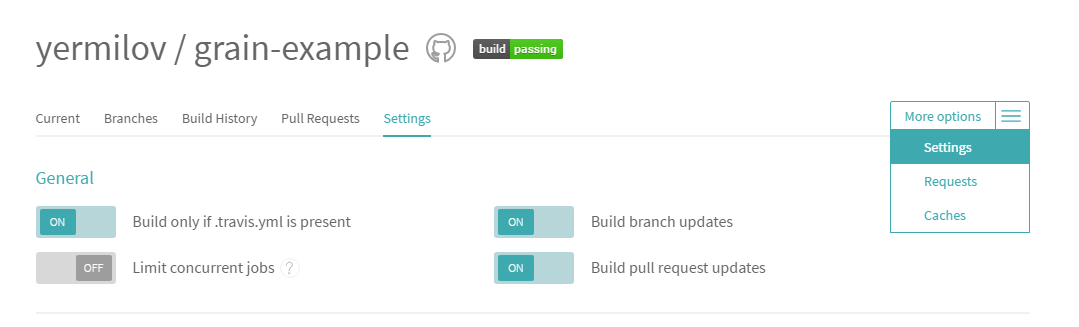
<div class="paragraph">
<p>The last thing you should do is to go to the setting of your Travis job and enable <em>Build only if .travis.yml is present</em> to prevent Travis from running build for <em>gh-pages</em> branch.
Now you can push your latest changes to GitHub and watch how they will be processed by Travis job.</p>
</div>
<div class="imageblock">
<div class="content">
<img src="/old-blog/images/2017-06-27-groovy-static-sites-with-grain/19ae2-19ae2566e5deb30c71da1348d45182f1.png" alt="19ae2 19ae2566e5deb30c71da1348d45182f1">
</div>
</div>
<div class="paragraph">
<p>If you&#8217;ve done everything correctly, you should get the same result as I have here - <a href="https://yermilov.github.io/grain-example/" target="_blank">https://yermilov.github.io/grain-example</a> (sources can be examined <a href="https://github.com/yermilov/grain-example" target="_blank">here</a>).</p>
</div>
</div>
</div>
<div class="sect1">
<h2 id="_links">Links</h2>
<div class="sectionbody">
<div class="paragraph">
<p><a href="https://www.staticgen.com/" target="_blank">Top Open-Source Static Site Generators</a></p>
</div>
<div class="paragraph">
<p><a href="https://jekyllrb.com" target="_blank">Jekyll&#8217;s home</a></p>
</div>
<div class="paragraph">
<p><a href="/old-blog/blog/2017/02/20/using-jekyll-asciidoctor-and-github-pages-for-static-site-creation/" target="_blank">Using Jekyll, Asciidoctor and GitHub Pages for static site creation</a></p>
</div>
<div class="paragraph">
<p><a href="https://sysgears.com/grain/" target="_blank">Grain&#8217;s home</a></p>
</div>
<div class="paragraph">
<p><a href="https://github.com/yermilov/grain-example" target="_blank">Sample repository</a></p>
</div>
<div class="paragraph">
<p><a href="http://daringfireball.net/projects/markdown/" target="_blank">Markdown home</a></p>
</div>
<div class="paragraph">
<p><a href="http://asciidoctor.org" target="_blank">Asciidoctor home</a></p>
</div>
<div class="paragraph">
<p><a href="http://asciidoctor.org/docs/what-is-asciidoc/" target="_blank">What is Asciidoc?</a></p>
</div>
<div class="paragraph">
<p><a href="http://asciidoctor.org/docs/asciidoc-writers-guide/" target="_blank">Asciidoc Writer&#8217;s Guide</a></p>
</div>
<div class="paragraph">
<p><a href="http://asciidoctor.org/docs/asciidoc-syntax-quick-reference/" target="_blank">Asciidoc Syntax Quick Reference</a></p>
</div>
<div class="paragraph">
<p><a href="http://asciidoctor.org/docs/user-manual/" target="_blank">Asciidoctor User Manual</a></p>
</div>
<div class="paragraph">
<p><a href="https://pages.github.com/" target="_blank">GitHub Pages home</a></p>
</div>
<div class="paragraph">
<p><a href="https://travis-ci.org/" target="_blank">Travis CI</a></p>
</div>
</div>
</div>]]></content></entry><entry><title type="html"><![CDATA[GPars, Eratosthenes and Sieve of Concurrency]]></title><link href="https://yermilov.github.io/old-blog/blog/2017/05/25/gpars-eratosthenes-and-sieve-of-concurrency/"/><updated>2017-05-25T15:45:00+00:00</updated><id>/old-blog/blog/2017/05/25/gpars-eratosthenes-and-sieve-of-concurrency/</id><content type="html"><![CDATA[<div class="paragraph">
<p>When there is a need to make sequential code concurrent, there are two major options.
First one is to take the original code as is, divide it between multiple executors, protect a mutable state from concurrent access, do all other "please don&#8217;t fail" multithreading stuff and hope for better.
The alternative is to look through different concurrency concepts like data parallelism, actors, dataflows, CSP, etc., select the most appropriate one for your problem statement and write the solution on its basis.
Luckily there is a library that provides DSLs for all major concurrency concepts called <a href="http://www.gpars.org/" target="_blank">GPars</a>.
In this article I will tease how it can be used before my <a href="http://jeeconf.com/program/gpars-unsung-hero-of-concurrency-in-practice/" target="_blank">JEEConf talk</a>.</p>
</div>
<!--more-->
<div class="sect1">
<h2 id="_example_problem">Example problem</h2>
<div class="sectionbody">
<div class="paragraph">
<p>For demonstration purposes let&#8217;s take a problem of finding prime numbers and well-known algorithm to solve this problem - <a href="https://en.wikipedia.org/wiki/Sieve_of_Eratosthenes" target="_blank">Sieve of Eratosthenes</a>.</p>
</div>
<div class="paragraph">
<p>Just to remind it ourselves - a prime number is a natural number that has exactly two distinct natural number divisors: 1 and itself.</p>
</div>
<div class="paragraph">
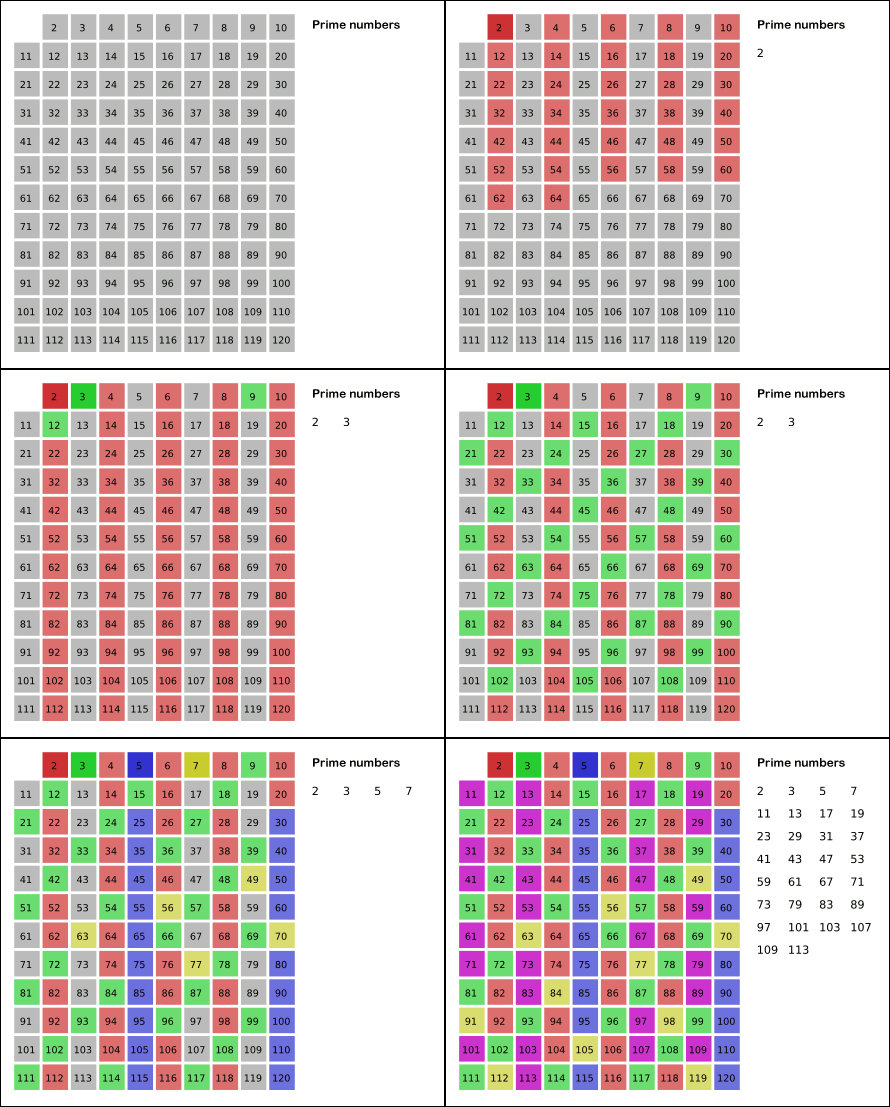
<p>Sieve of Eratosthenes suggests that primes can be found with the following algorithm:</p>
</div>
<div class="olist arabic">
<ol class="arabic">
<li>
<p>Create a list of consecutive integers from 2 through n: (2, 3, 4, &#8230;&#8203;, n).</p>
</li>
<li>
<p>Take the smallest number from the list - it is prime.</p>
</li>
<li>
<p>Iterate through the list of remaining numbers and keep only those that can&#8217;t be divided by number found in previous step (that&#8217;s why it&#8217;s called sieve).</p>
</li>
<li>
<p>Repeat previous two steps until the desired number of primes is generated.</p>
</li>
</ol>
</div>
<div class="imageblock">
<div class="content">
<img src="/old-blog/images/2017-05-25-gpars-eratosthenes-and-sieve-of-concurrency/f6ca8-6420e3488e509dce176a1e957ea07ff5.gif" alt="f6ca8 6420e3488e509dce176a1e957ea07ff5">
</div>
</div>
</div>
</div>
<div class="sect1">
<h2 id="_sequential_solution">Sequential solution</h2>
<div class="sectionbody">
<div class="paragraph">
<p>Optimized sequential solution may look like following:</p>
</div>


<div id="gistd1f54e1e8887c090a38d29eb92cee17a">
  <script src="https://gist.github.com/d1f54e1e8887c090a38d29eb92cee17a.js"></script>
</div>
<div class="paragraph">
<p>Turning this code into concurrent solution may become a challenge.
Especially, turning into bug-free one.
But even if it&#8217;s not a challenge for an experienced developer, if we check original algorithm description, we can find that there are concurrency concepts that fit it much more naturally that trivial migration from sequential to the concurrent solution.</p>
</div>
</div>
</div>
<div class="sect1">
<h2 id="_meet_gpars">Meet GPars</h2>
<div class="sectionbody">
<div class="paragraph">
<p>That&#8217;s when GPars comes into the game.
First of all, add it to your project as following dependency:</p>
</div>


<div id="gistba20b04041a16c74a143645815885028">
  <script src="https://gist.github.com/ba20b04041a16c74a143645815885028.js"></script>
</div>
<div class="paragraph">
<p>Now let&#8217;s go through original algorithm step by step and implement it using the most powerful GPars concept - dataflows:</p>
</div>
<div class="olist arabic">
<ol class="arabic">
<li>
<p>Create a list of consecutive integers from 2 through n: (2, 3, 4, &#8230;&#8203;, n).</p>
</li>
</ol>
</div>
<div class="paragraph">
<p>This one can easily be translated into asynchronous task:</p>
</div>


<div id="gist5e154bc336ac0fed66b3497687536cbe">
  <script src="https://gist.github.com/5e154bc336ac0fed66b3497687536cbe.js"></script>
</div>
<div class="olist arabic">
<ol class="arabic" start="2">
<li>
<p>Take the smallest number from the list - it is prime.</p>
</li>
</ol>
</div>
<div class="paragraph">
<p>Again, it&#8217;s trivial:</p>
</div>


<div id="gist40eadcbafaa4e173553f735a929b1ba0">
  <script src="https://gist.github.com/40eadcbafaa4e173553f735a929b1ba0.js"></script>
</div>
<div class="olist arabic">
<ol class="arabic" start="3">
<li>
<p>Iterate through the list of remaining numbers and keep only those that can&#8217;t be divided by number found in the previous step.</p>
</li>
</ol>
</div>
<div class="paragraph">
<p>Here, we define the asynchronous operator, that takes each number from <em>remainingNumbers</em> queue and push it into <em>sievedNumbers</em> queue if it can&#8217;t be divided by the number found in the previous step.</p>
</div>


<div id="gist5273479e8e5a4aa626237f14a1ff996f">
  <script src="https://gist.github.com/5273479e8e5a4aa626237f14a1ff996f.js"></script>
</div>
<div class="olist arabic">
<ol class="arabic" start="4">
<li>
<p>Repeat previous two steps until the desired number of primes is generated.</p>
</li>
</ol>
</div>
<div class="paragraph">
<p>Complete code looks like following:</p>
</div>


<div id="gist3bb1310bfb59af0fe1fb473ef5ad2166">
  <script src="https://gist.github.com/3bb1310bfb59af0fe1fb473ef5ad2166.js"></script>
</div>
</div>
</div>
<div class="sect1">
<h2 id="_conclusion">Conclusion</h2>
<div class="sectionbody">
<div class="paragraph">
<p>I can see several immediate benefits from choosing GPars Dataflows as a basic concept for implementing Sieve of Eratosthenes:</p>
</div>
<div class="ulist">
<ul>
<li>
<p>source code almost 100% matches original algorithm text script</p>
</li>
<li>
<p>zero lines of excessive concurrency infrastructure in the source code</p>
</li>
<li>
<p>safe and reliable execution in the concurrent environment provided by framework out-of-the-box</p>
</li>
</ul>
</div>
</div>
</div>]]></content></entry><entry><title type="html"><![CDATA['What Mr. Spock would possibly say about modern unit testing: pragmatic and emotional overview' talk at JavaDay Kharkiv 2016]]></title><link href="https://yermilov.github.io/old-blog/blog/2016/09/27/what-mr-spock-would-possibly-say-about-modern-unit-testing-pragmatic-and-emotional-overview-talk-at-javaday-kharkiv-2016/"/><updated>2016-09-27T00:00:00+00:00</updated><id>/old-blog/blog/2016/09/27/what-mr-spock-would-possibly-say-about-modern-unit-testing-pragmatic-and-emotional-overview-talk-at-javaday-kharkiv-2016/</id><content type="html"><![CDATA[<div class="paragraph">
<p>Venue: <a href="http://javaday.org.ua/kharkiv/" target="_blank">JavaDay Kharkiv 2016</a></p>
</div>
<div class="paragraph">
<p>Sources: <a href="https://github.com/yermilov/spock-talk/tree/c295e4d81483ac12604e8380415146299e49e9eb" target="_blank">https://github.com/yermilov/spock-talk</a></p>
</div>
<div class="paragraph">
<p>Slides: <a href="https://www.slideshare.net/yaroslavyermilov/what-mr-spock-would-possibly-say-about-modern-unit-testing-pragmatic-and-emotional-overview-62280211" target="_blank">slideshare</a></p>
</div>
<iframe width="560" height="315" src="https://www.youtube.com/embed/9GwQg_4MX7o?ecver=1" frameborder="0" allowfullscreen></iframe>]]></content></entry><entry><title type="html"><![CDATA[What Mr. Spock would possibly say about modern unit testing: pragmatic and emotional overview]]></title><link href="https://yermilov.github.io/old-bloghttps://yermilov.github.io/spock-talk/"/><updated>2016-11-09T00:43:00+00:00</updated><id>https://yermilov.github.io/spock-talk/</id><content type="html"><![CDATA[]]></content></entry><entry><title type="html"><![CDATA['What Mr. Spock would possibly say about modern unit testing: pragmatic and emotional overview' talk at JEEConf 2016]]></title><link href="https://yermilov.github.io/old-blog/blog/2016/07/12/what-mr-spock-would-possibly-say-about-modern-unit-testing-pragmatic-and-emotional-overview-talk-at-jeeconf-2016/"/><updated>2016-07-12T00:00:00+00:00</updated><id>/old-blog/blog/2016/07/12/what-mr-spock-would-possibly-say-about-modern-unit-testing-pragmatic-and-emotional-overview-talk-at-jeeconf-2016/</id><content type="html"><![CDATA[<div class="paragraph">
<p>Venue: <a href="http://jeeconf.com/program/what-mr-spock-would-possibly-say-about-modern-unit-testing-pragmatic-and-emotional-overview/" target="_blank">JEEConf 2016</a></p>
</div>
<div class="paragraph">
<p>Sources: <a href="https://github.com/yermilov/spock-talk/tree/99f52d5c41b09dca50a7c360f919363ed7484f40" target="_blank">https://github.com/yermilov/spock-talk</a></p>
</div>
<div class="paragraph">
<p>Slides: <a href="https://www.slideshare.net/yaroslavyermilov/what-mr-spock-would-possibly-say-about-modern-unit-testing-pragmatic-and-emotional-overview-62280211" target="_blank">slideshare</a></p>
</div>
<iframe width="560" height="315" src="https://www.youtube.com/embed/3nSXDEj7sKM?ecver=1" frameborder="0" allowfullscreen></iframe>]]></content></entry><entry><title type="html"><![CDATA['Building domain-specific languages with Groovy' talk at JEEConf 2015]]></title><link href="https://yermilov.github.io/old-blog/blog/2015/07/22/building-domain-specific-languages-with-groovy-talk-at-jeeconf-2015/"/><updated>2015-07-22T00:00:00+00:00</updated><id>/old-blog/blog/2015/07/22/building-domain-specific-languages-with-groovy-talk-at-jeeconf-2015/</id><content type="html"><![CDATA[<div class="paragraph">
<p>Venue: <a href="http://jeeconf.com/materials/building-dsl-with-groovy/" target="_blank">JEEConf 2015</a></p>
</div>
<div class="paragraph">
<p>Sources: <a href="https://github.com/yermilov/groovy-dsl" target="_blank">https://github.com/yermilov/groovy-dsl</a></p>
</div>
<div class="paragraph">
<p>Slides: <a href="https://www.slideshare.net/yaroslavyermilov/groovy-dsl-48630799" target="_blank">slideshare</a></p>
</div>
<iframe width="560" height="315" src="https://www.youtube.com/embed/ft3XrFrGiuA?ecver=1" frameborder="0" allowfullscreen></iframe>]]></content></entry><entry><title type="html"><![CDATA['Groovy for Domain-Specific Languages' talk at JUGUA]]></title><link href="https://yermilov.github.io/old-blog/blog/2015/02/18/groovy-for-domain-specific-languages-talk-at-jugua/"/><updated>2015-02-18T00:00:00+00:00</updated><id>/old-blog/blog/2015/02/18/groovy-for-domain-specific-languages-talk-at-jugua/</id><content type="html"><![CDATA[<div class="paragraph">
<p>Venue: <a href="http://jug.ua/2015/02/dsl-with-groovy-clojure/" target="_blank">JUGUA</a></p>
</div>
<div class="paragraph">
<p>Sources: <a href="https://github.com/yermilov/groovy-dsl" target="_blank">https://github.com/yermilov/groovy-dsl</a></p>
</div>
<div class="paragraph">
<p>Slides: <a href="https://www.slideshare.net/yaroslavyermilov/groovy-dsl-44945972" target="_blank">slideshare</a></p>
</div>
<iframe width="560" height="315" src="https://www.youtube.com/embed/Cue5B11UfDU?ecver=1" frameborder="0" allowfullscreen></iframe>]]></content></entry></feed>