<?xml version="1.0" encoding="utf-8"?><feed xmlns="http://www.w3.org/2005/Atom"><title><![CDATA[Development notes by Yaroslav Yermilov]]></title><link href="https://yermilov.github.io/old-blog/categories/jekyll/atom.xml" rel="self"/><link href="https://yermilov.github.io/old-blog/"/><updated>2018-01-13T23:36:41+00:00</updated><id>https://yermilov.github.io/old-blog/</id><author><name><![CDATA[Yaroslav Yermilov]]></name></author><generator uri="http://sysgears.com/grain/">Grain</generator><entry><title type="html"><![CDATA[Using Jekyll, Asciidoctor and GitHub Pages for static site creation]]></title><link href="https://yermilov.github.io/old-blog/blog/2017/02/20/using-jekyll-asciidoctor-and-github-pages-for-static-site-creation/"/><updated>2017-02-20T02:27:00+00:00</updated><id>/old-blog/blog/2017/02/20/using-jekyll-asciidoctor-and-github-pages-for-static-site-creation/</id><content type="html"><![CDATA[<div class="paragraph">
<p>After I decided to start write things down, the first tool that I found for this task was Jekyll - a static site generator supported by GitHub Pages.
It was very useful for creating the first version of this blog, but finally, I decided to use Grain (hope to present it in the following article).
As a result of playing with Jekyll, in this article I will show how to build a simple blog using Jekyll as static site generator, GitHub Pages as static site server and Asciidoc as markdown language.
We will create a blog from scratch, add new posts and change default configuration and web pages layout using mentioned technologies.</p>
</div>
<!--more-->
<div class="sect1">
<h2 id="_why_static_matters">Why static matters?</h2>
<div class="sectionbody">
<div class="paragraph">
<p>The web started as a bunch of static sites that provided various pieces of useful information for first explorers of the internet.
But it turned into civilization phenomenon with exponential growth only when it became dynamic with all Web 2.0 stuff like social media, wikis, media platforms, etc.</p>
</div>
<div class="paragraph">
<p>Anyway, even today lots of web resources really need a very limited amount of dynamic magic.
If client state on your site is not persisted, it can be handled by JavaScript locally.
If content is changing relatively rarely, you can just redeploy it with every change.
If you need something like commenting feature, you can rely on external resources (for example <a href="https://disqus.com" target="_blank">disqus.com</a> in this case).</p>
</div>
<div class="paragraph">
<p>And if you get rid of all heavy dynamic weapons like databases and server-side code and express your site as a collection of HMTL, CSS and JavaScript files you can gain some very worthy benefits.
The first and the main one is the ease of site deployment.
All you need to do is copy your files into any kind of web server (Apache, Nginx).
And if you go further and use cloud file storage (like S3) or dedicated web platform (like GitHub Pages), you get even more (think how it can help you in content management, content delivery, maintenance simplicity, performance, and security).</p>
</div>
</div>
</div>
<div class="sect1">
<h2 id="_who_is_jekyll">Who is Jekyll?</h2>
<div class="sectionbody">
<div class="imageblock" style="text-align: right">
<div class="content">
<img src="/old-blog/images/2017-02-20-jekyll-githubpages-asciidoc/jekyll-ab698-ab69891f3e58371ac378b226143fa763.png" alt="jekyll ab698 ab69891f3e58371ac378b226143fa763">
</div>
<div class="title"><em><a href="https://en.wikipedia.org/wiki/Strange_Case_of_Dr_Jekyll_and_Mr_Hyde" target="_blank">source</a></em></div>
</div>
<div class="paragraph">
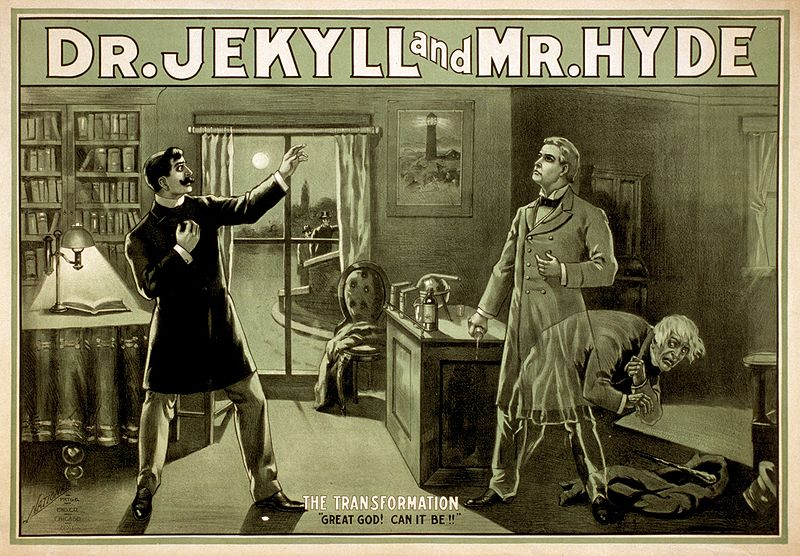
<p><a href="https://jekyllrb.com" target="_blank">Jekyll</a> is a static site generator written in Ruby.
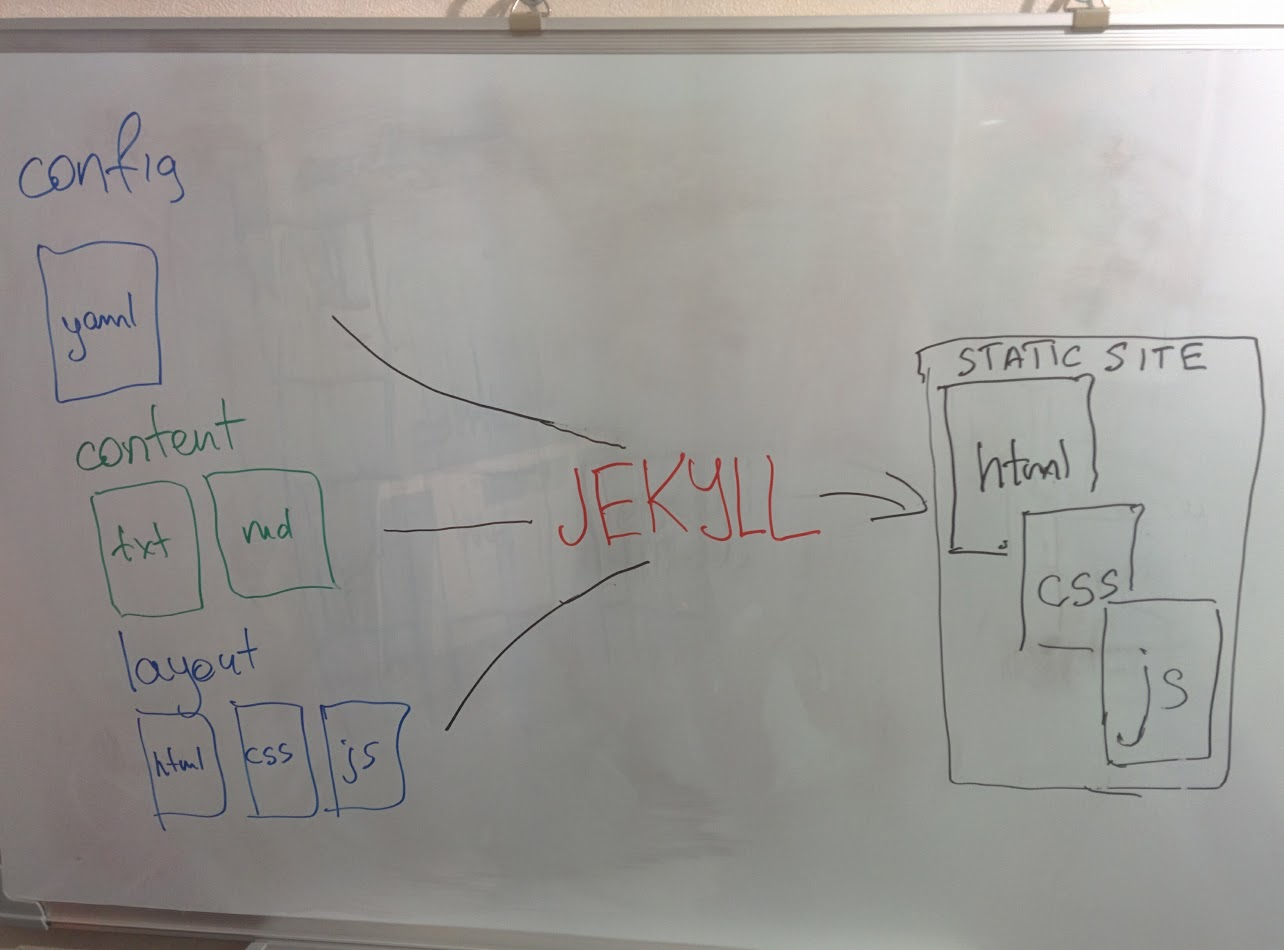
Actually what it does is taking your content along with the desired layout and transform them into a collection of HTML, CSS and JavaScript files ready for deployment and servicing as a static web resource.
Content can be provided in any form from plain text files or markdown to pieces of HTMLs.
The layout is specified as the name of one of the ready-to-go layouts Jekyll provides (with customization possibilities) or as your own HTML, CSS, and JavaScript files with template-related features.</p>
</div>
<div class="imageblock">
<div class="content">
<img src="/old-blog/images/2017-02-20-jekyll-githubpages-asciidoc/jekyll-ecef3-ecef3ed5e49ee2c1093d722619911c85.png" alt="jekyll ecef3 ecef3ed5e49ee2c1093d722619911c85">
</div>
</div>
<div class="paragraph">
<p>Moreover, Jekyll is a great example of the tool with both comprehensive predefined conventions and almost endless customization possibilities.
If all you need is a simple blog, you should just place you text-file posts named in a special way into the special directory, define few configuration parameters and you&#8217;re done.
If you need something more specific, you can include your own pieces of HTML, CSS or JavaScript anywhere you need, even using Jekyll as just template engine for your sources ignoring all other features.</p>
</div>
</div>
</div>
<div class="sect1">
<h2 id="_so_all_i_need_is_a_simple_blog">So, all I need is a simple blog</h2>
<div class="sectionbody">
<div class="paragraph">
<p>Check <a href="https://jekyllrb.com/docs/quickstart" target="_blank">Jekyll quick-start guide</a>!
You need to follow these 5 steps:</p>
</div>
<div class="olist arabic">
<ol class="arabic">
<li>
<p>Install <a href="https://www.ruby-lang.org/en/documentation/installation/" target="_blank">Ruby</a></p>
</li>
<li>
<p>Execute <code>gem install jekyll bundler</code></p>
</li>
<li>
<p>Execute <code>jekyll new myblog</code></p>
</li>
<li>
<p>Execute <code>cd myblog; bundle exec jekyll serve</code></p>
</li>
<li>
<p>Go to <a href="http://localhost:4000" target="_blank">http://localhost:4000</a></p>
</li>
</ol>
</div>
<div class="paragraph">
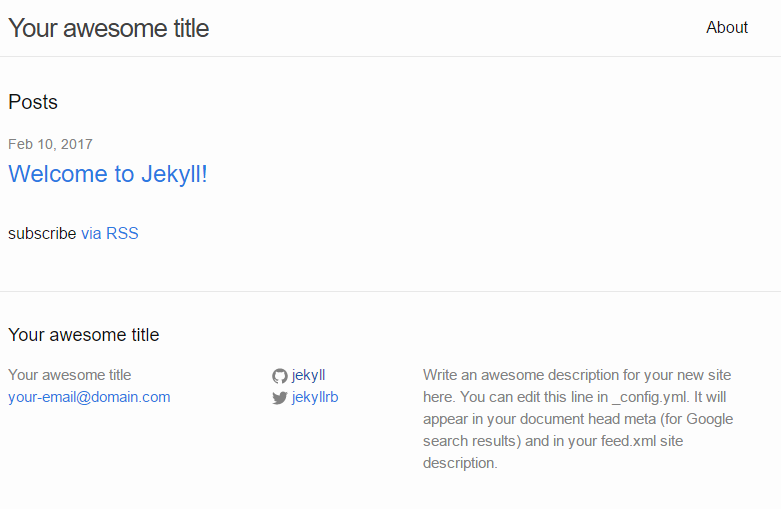
<p>You should get result same as <a href="https://yermilov.github.io/jekyll-start/" target="_blank">this one</a>:</p>
</div>
<div class="imageblock">
<div class="content">
<img src="/old-blog/images/2017-02-20-jekyll-githubpages-asciidoc/jekyll-707aa-707aab07625a4434b996c11a11c9a6ba.png" alt="jekyll 707aa 707aab07625a4434b996c11a11c9a6ba">
</div>
</div>
<div class="paragraph">
<p>However, you can do the same even without installing Ruby and Jekyll itself.
First, you need to fork repository or download sources from <a href="https://github.com/yermilov/mini-jekyll" target="_blank">mini-jekyll repository</a>, or, as an alternative, you can quickly create them by yourself:</p>
</div>
<div class="olist arabic">
<ol class="arabic">
<li>
<p>Create directory for your blog</p>
</li>
<li>
<p>Create file _config.yml with the following content</p>
</li>
</ol>
</div>


<div id="gistf25ae17a6bc85b7fc75eab310bc9ff52">
  <script src="https://gist.github.com/f25ae17a6bc85b7fc75eab310bc9ff52.js"></script>
</div>
<div class="olist arabic">
<ol class="arabic" start="3">
<li>
<p>Create file Gemfile with the following content</p>
</li>
</ol>
</div>


<div id="gist118d18ea311905e224e311fd16f7c4dd">
  <script src="https://gist.github.com/118d18ea311905e224e311fd16f7c4dd.js"></script>
</div>
<div class="olist arabic">
<ol class="arabic" start="4">
<li>
<p>Create file index.md with the following content</p>
</li>
</ol>
</div>


<div id="gist9cadf8cb8f96067e5022501ca825026a">
  <script src="https://gist.github.com/9cadf8cb8f96067e5022501ca825026a.js"></script>
</div>
<div class="olist arabic">
<ol class="arabic" start="5">
<li>
<p>Create file about.md with following content</p>
</li>
</ol>
</div>


<div id="gist994c3dff2062a96f9f257000482e2c36">
  <script src="https://gist.github.com/994c3dff2062a96f9f257000482e2c36.js"></script>
</div>
<div class="olist arabic">
<ol class="arabic" start="6">
<li>
<p>Create file <span id="todayFileName">_posts/2017-02-20-welcome-to-mini-jekyll.md</span> with following content:</p>
</li>
</ol>
</div>


<div id="gist8102dc4bee24aeef7f511d7211eaf741">
  <script src="https://gist.github.com/8102dc4bee24aeef7f511d7211eaf741.js"></script>
</div>
<script>
  var today = new Date();
  var dd = today.getDate();
  var mm = today.getMonth() + 1; //January is 0!
  var yyyy = today.getFullYear();

  if (dd < 10) {
      dd = '0' + dd
  }

  if (mm < 10) {
      mm = '0' + mm
  }

  today = yyyy + '-' + mm + '-' + dd;

  document.getElementById('todayFileName').innerHTML = '_posts/' + today + '-welcome-to-mini-jekyll.md'
</script>
<div class="paragraph">
<p>How can you start this site without even installing Jekyll?
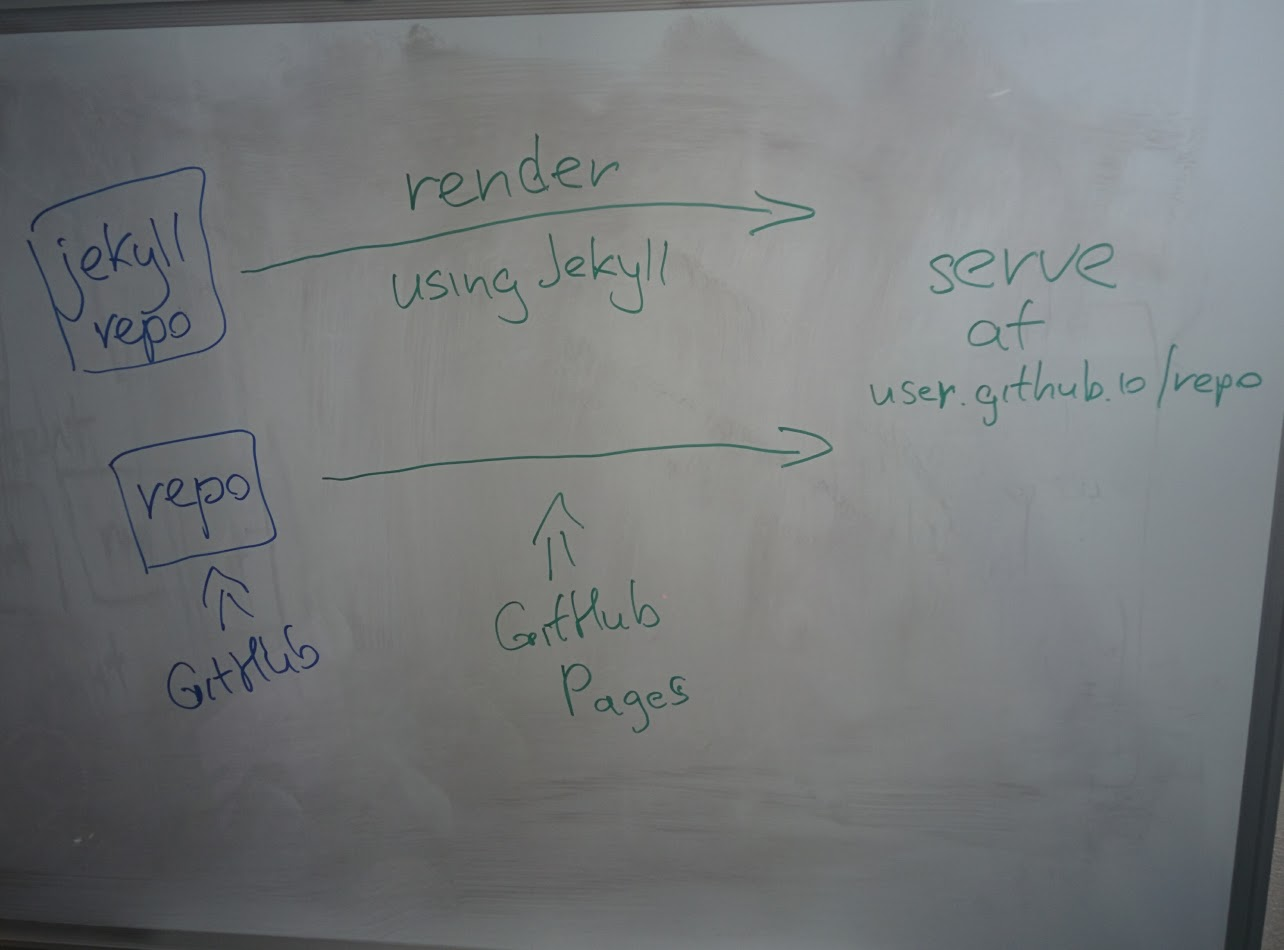
Easily, with support of <a href="https://pages.github.com/" target="_blank">GitHub Pages</a> - web platform that serves static content from GitHub repositories.
Besides just showing content as it is, GitHub Pages can determine that your repository contains Jekyll project, render it and serve result.</p>
</div>
<div class="imageblock">
<div class="content">
<img src="/old-blog/images/2017-02-20-jekyll-githubpages-asciidoc/jekyll-e5cd5-e5cd5a4b237fae4edc9efc449ec92f97.png" alt="jekyll e5cd5 e5cd5a4b237fae4edc9efc449ec92f97">
</div>
</div>
<div class="paragraph">
<p>All you need to do is:</p>
</div>
<div class="olist arabic">
<ol class="arabic">
<li>
<p><a href="https://github.com/new" target="_blank">Create new GitHub repository</a></p>
</li>
<li>
<p>Execute <code>git init</code> inside your local blog directory</p>
</li>
<li>
<p>Execute <code>git add .</code></p>
</li>
<li>
<p>Execute <code>git commit -m 'initial blog commit'</code></p>
</li>
<li>
<p>Execute <code>git remote add origin <a href="https://github.com/yermilov/mini-jekyll.git" class="bare">https://github.com/yermilov/mini-jekyll.git</a></code> (substitute URL with yours)</p>
</li>
<li>
<p>Execute <code>git push -u origin gh-pages</code></p>
</li>
<li>
<p>Go to <a href="https://yermilov.github.io/mini-jekyll" target="_blank">https://yermilov.github.io/mini-jekyll</a> (substitute with your github username and repository name)</p>
</li>
</ol>
</div>
<div class="imageblock">
<div class="content">
<img src="/old-blog/images/2017-02-20-jekyll-githubpages-asciidoc/jekyll-86b33-86b33272473f30136abb8f58bd27abcc.png" alt="jekyll 86b33 86b33272473f30136abb8f58bd27abcc">
</div>
</div>
</div>
</div>
<div class="sect1">
<h2 id="_got_jekyll_and_github_pages_what_s_about_asciidoctor">Got Jekyll and GitHub Pages. What&#8217;s about Asciidoctor?</h2>
<div class="sectionbody">
<div class="paragraph">
<p>If you want to create blog for simple text+images posts, you&#8217;ve already got a good starting point.
But if your blog is going to be developer-oriented, you probably may not be satisfied with using neither markdown nor HTML for your posts.
In this case, <a href="http://asciidoctor.org/docs/what-is-asciidoc/" target="_blank">Asciidoc</a> should be your default choice.
It shares the same concept as <a href="http://daringfireball.net/projects/markdown/" target="_blank">Markdown</a>, is partially compatible with it, but has much more powerful features needed for advanced drafting of articles, technical manuals, books, presentations, and prose.</p>
</div>
<div class="paragraph">
<p><a href="http://asciidoctor.org" target="_blank">Asciidoctor</a> is a toolchain that implements Asciidoc format.
We are going to integrate it with Jekyll for rendering content using <a href="https://github.com/asciidoctor/jekyll-asciidoc" target="_blank">jekyll-asciidoc plugin</a>.</p>
</div>
<div class="paragraph">
<p>As a starting point, fork or download sources from <a href="https://github.com/asciidoctor/jekyll-asciidoc-quickstart" target="_blank">jekyll-asciidoc-quickstart repository</a>.
The same as before, instead you can download it and create your own repository from scratch with same content.</p>
</div>
<div class="paragraph">
<p>Unlike previous examples, some additional setup is needed.
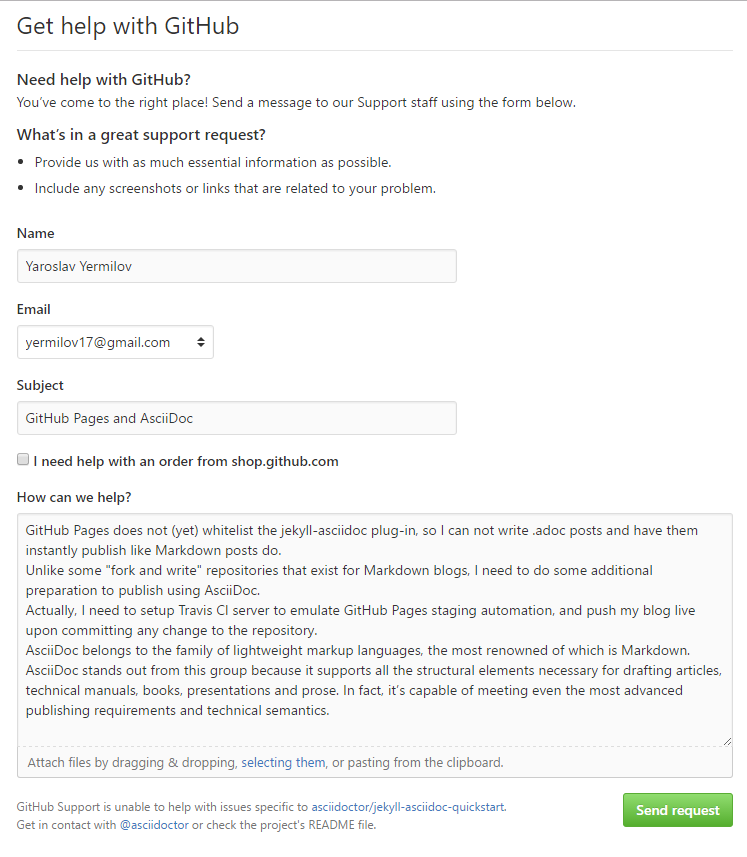
GitHub Pages does not (yet) support rendering Asciidoc content, so you can&#8217;t just push it to GitHub repository and got rendered site back.
Luckily, there is an easy way to overcome this problem.
However, it will be great to show GitHub demand in Asciidoc rendering for example through <a href="http://github.com/support" target="_blank">GitHub support form</a>.</p>
</div>
<div class="imageblock">
<div class="content">
<img src="/old-blog/images/2017-02-20-jekyll-githubpages-asciidoc/jekyll-595ea-595eab93a79c0e1912251cdf8b32edbe.png" alt="jekyll 595ea 595eab93a79c0e1912251cdf8b32edbe">
</div>
</div>
<div class="paragraph">
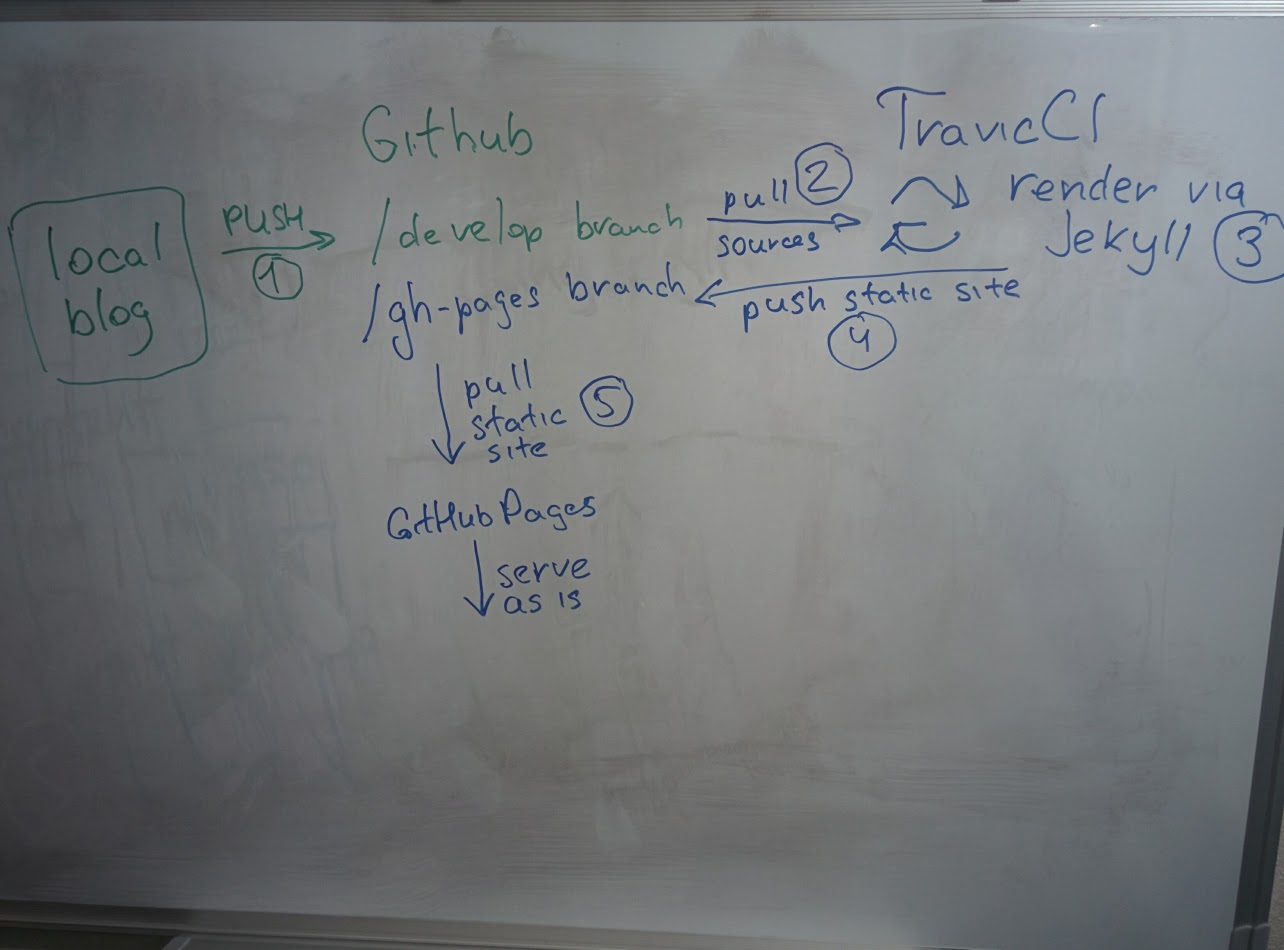
<p>Actually, we will setup <a href="https://travis-ci.org/" target="_blank">Travis CI server</a> to emulate GitHub Pages staging automation, and push blog live upon committing any change to the repository.
Steps to achieve it are perfectly described in <a href="https://github.com/asciidoctor/jekyll-asciidoc-quickstart/blob/master/README.adoc" target="_blank">jekyll-asciidoc plugin documentation</a>.</p>
</div>
<div class="imageblock">
<div class="content">
<img src="/old-blog/images/2017-02-20-jekyll-githubpages-asciidoc/jekyll-e1af1-e1af1db7acd5c92a9069103e2d6d7256.png" alt="jekyll e1af1 e1af1db7acd5c92a9069103e2d6d7256">
</div>
</div>
<div class="paragraph">
<p>After cloning quickstart repository you need to make two changes in the sources:</p>
</div>
<div class="olist arabic">
<ol class="arabic">
<li>
<p>Add GitHub personal access token (described <a href="https://github.com/asciidoctor/jekyll-asciidoc-quickstart/blob/master/README.adoc#6-encrypt-the-github-token-for-travis-ci" target="_blank">here</a>).</p>
</li>
<li>
<p>Modify original <em>.Rakefile</em>, to make it possible to use your e-mail for automated pushes to your repository:</p>
</li>
</ol>
</div>


<div id="gist4abe7931165f10cf28edd9b55c4d32ba">
  <script src="https://gist.github.com/4abe7931165f10cf28edd9b55c4d32ba.js"></script>
</div>
<div class="paragraph">
<p>After your push changes into <strong><strong>develop</strong></strong> branch (do not use <em>master</em> or <em>gh-pages</em> because it may cause conflicts), Travis CI automatically will pick up sources, render them using Jekyll and push them back into master or gh-pages branch (depending on GitHub conventions).</p>
</div>
<div class="paragraph">
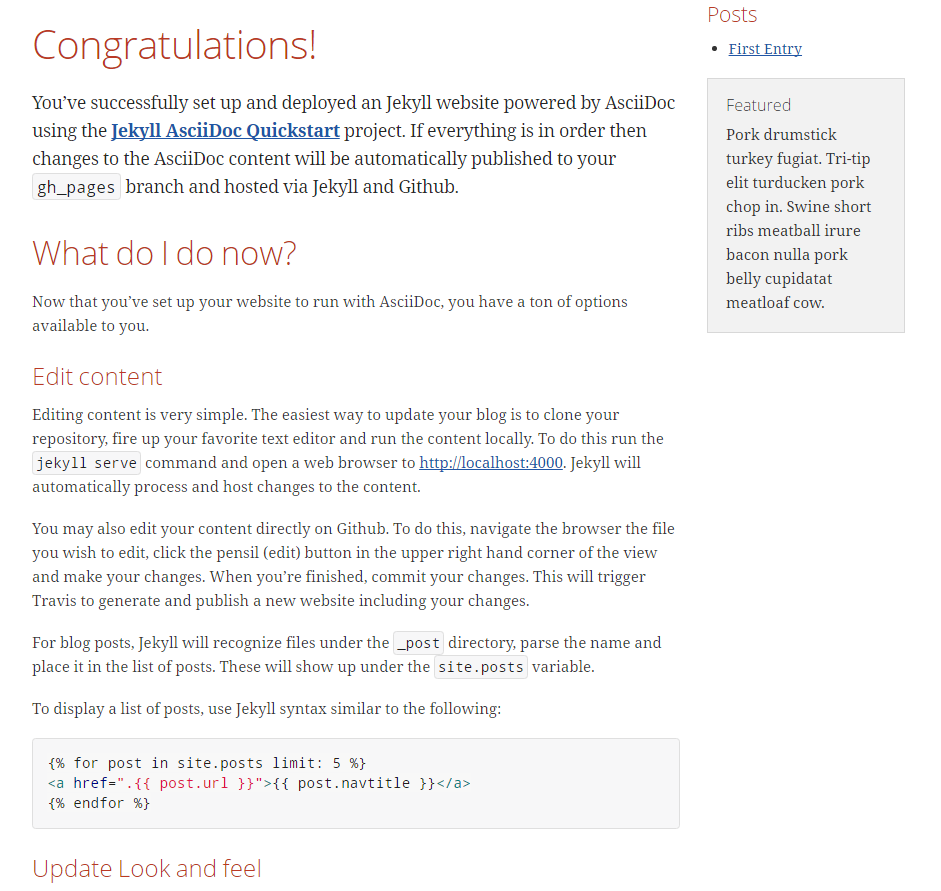
<p>Now you can go to <a href="https://yermilov.github.io/jekyll-asciidoc-quickstart" target="_blank">https://yermilov.github.io/jekyll-asciidoc-quickstart</a> (substitute with your github username and repository name) and enjoy!</p>

</div>
<div class="imageblock">
<div class="content">
<img src="/old-blog/images/2017-02-20-jekyll-githubpages-asciidoc/jekyll-e7f2b-e7f2bd8762f464e3fe2a7f2f3acb50a8.png" alt="jekyll e7f2b e7f2bd8762f464e3fe2a7f2f3acb50a8">
</div>
</div>
</div>
</div>
<div class="sect1">
<h2 id="_adding_new_post">Adding new post</h2>
<div class="sectionbody">
<div class="paragraph">
<p>The first thing you probably want to do with your blog is to create a new post.
To do it, add file named <em>yyyy-mm-dd-new-post.adoc</em> (substitute yyyy-mm-dd with publication date and new-post with short post name) with following content:</p>
</div>


<div id="gista7a48ff65668b4299bf5f9692b4a9c46">
  <script src="https://gist.github.com/a7a48ff65668b4299bf5f9692b4a9c46.js"></script>
</div>
<div class="imageblock">
<div class="content">
<img src="/old-blog/images/2017-02-20-jekyll-githubpages-asciidoc/jekyll-c5427-c5427c7c2496d42ac1d8b6ff61414a0e.png" alt="jekyll c5427 c5427c7c2496d42ac1d8b6ff61414a0e">
</div>
</div>
<div class="paragraph">
<p>For quick start with Asciidoc refer to <a href="http://asciidoctor.org/docs/asciidoc-writers-guide/" target="_blank">Writer&#8217;s Guide</a>.
After it, you can proceed with more advanced <a href="http://asciidoctor.org/docs/asciidoc-syntax-quick-reference/" target="_blank">Syntax Quick Reference</a> and full <a href="http://asciidoctor.org/docs/user-manual/" target="_blank">User Manual</a>.</p>
</div>
<div class="paragraph">
<p>Probably, you already have some post on external resources you want to link to your new blog.
With Jekyll&#8217;s flexibility, this is the matter of two easy steps.
First of all, create file that will contain your external post metadata.
Name it <em>yyyy-mm-dd-external-post.<strong>md</strong></em> similarly to regular posts.</p>
</div>


<div id="gist7889355953f8277594ca2f2a8c57215f">
  <script src="https://gist.github.com/7889355953f8277594ca2f2a8c57215f.js"></script>
</div>
<div class="paragraph">
<p>After it, open file <em><em>_layouts/default.html</em></em> and do following changes:</p>
</div>


<div id="gista158df94b32e91588acdaf7fb073d629">
  <script src="https://gist.github.com/a158df94b32e91588acdaf7fb073d629.js"></script>
</div>
<div class="paragraph">
<p>Now link in the posts feed is pointing to original external link.</p>
</div>
</div>
</div>
<div class="sect1">
<h2 id="_improving_pages_layout">Improving pages layout</h2>
<div class="sectionbody">
<div class="imageblock">
<div class="content">
<img src="/old-blog/images/2017-02-20-jekyll-githubpages-asciidoc/jekyll-33bb0-33bb0628a770179921350f59ae06896b.png" alt="jekyll 33bb0 33bb0628a770179921350f59ae06896b">
</div>
</div>
<div class="paragraph">
<p>As we have already made a minor change to default page layout in our blog, let&#8217;s try some more significant ones, like changing pages layout.</p>
</div>
<div class="paragraph">
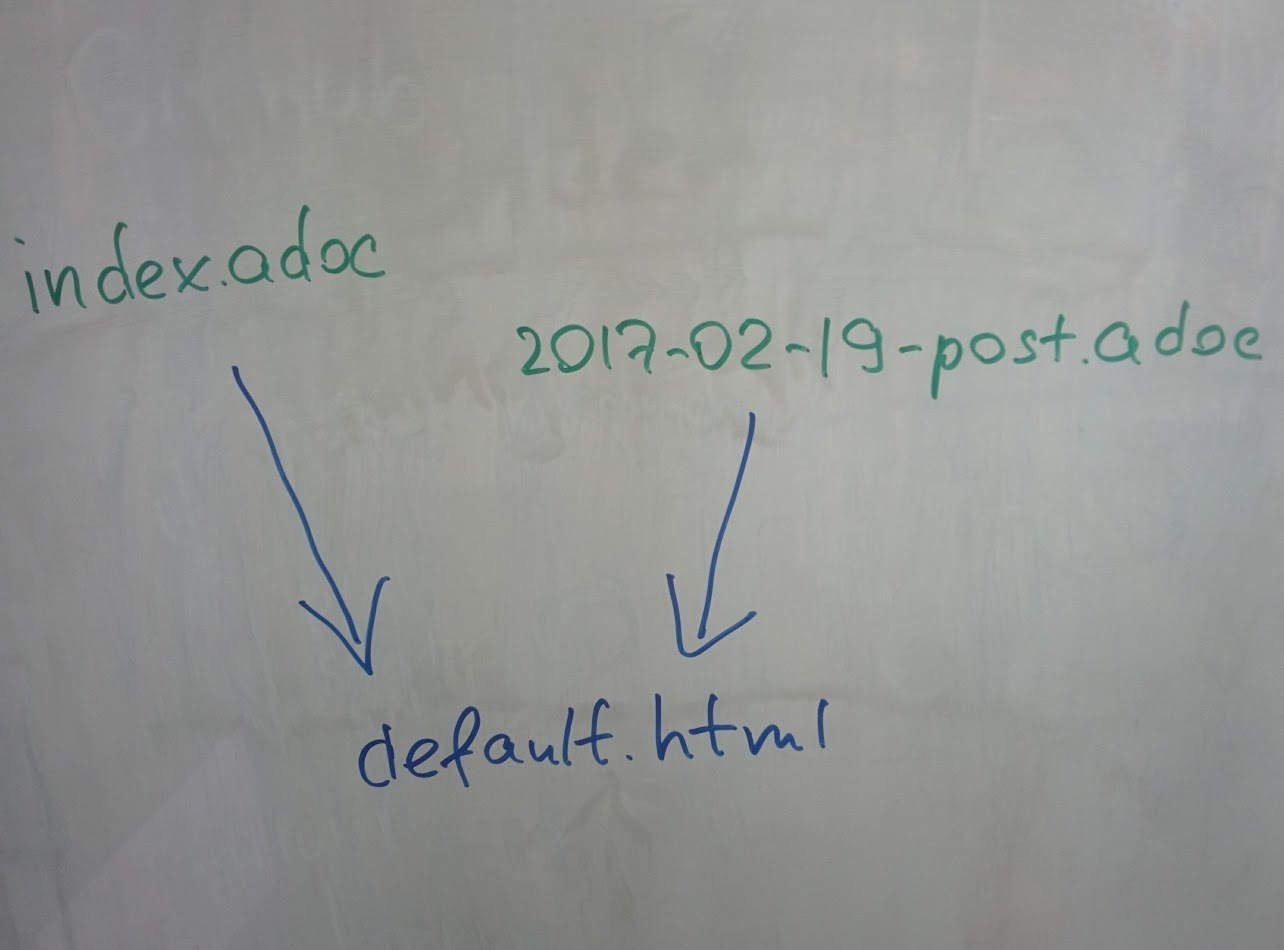
<p>For the starting point, pages layout is pretty straightforward.
There is a file named <em>default.html</em> in the <em><em>_layouts</em></em> folder and it&#8217;s used for all site pages.
Each page (<em>index.adoc</em> or any from the <em><em>_posts</em></em> folder) during rendering is placed instead of <code>{{ content }}</code> placeholder.</p>
</div>
<div class="imageblock">
<div class="content">
<img src="/old-blog/images/2017-02-20-jekyll-githubpages-asciidoc/jekyll-5de01-5de01f5a2d2a2f8b4e4a68955562eef1.png" alt="jekyll 5de01 5de01f5a2d2a2f8b4e4a68955562eef1">
</div>
</div>
<div class="paragraph">
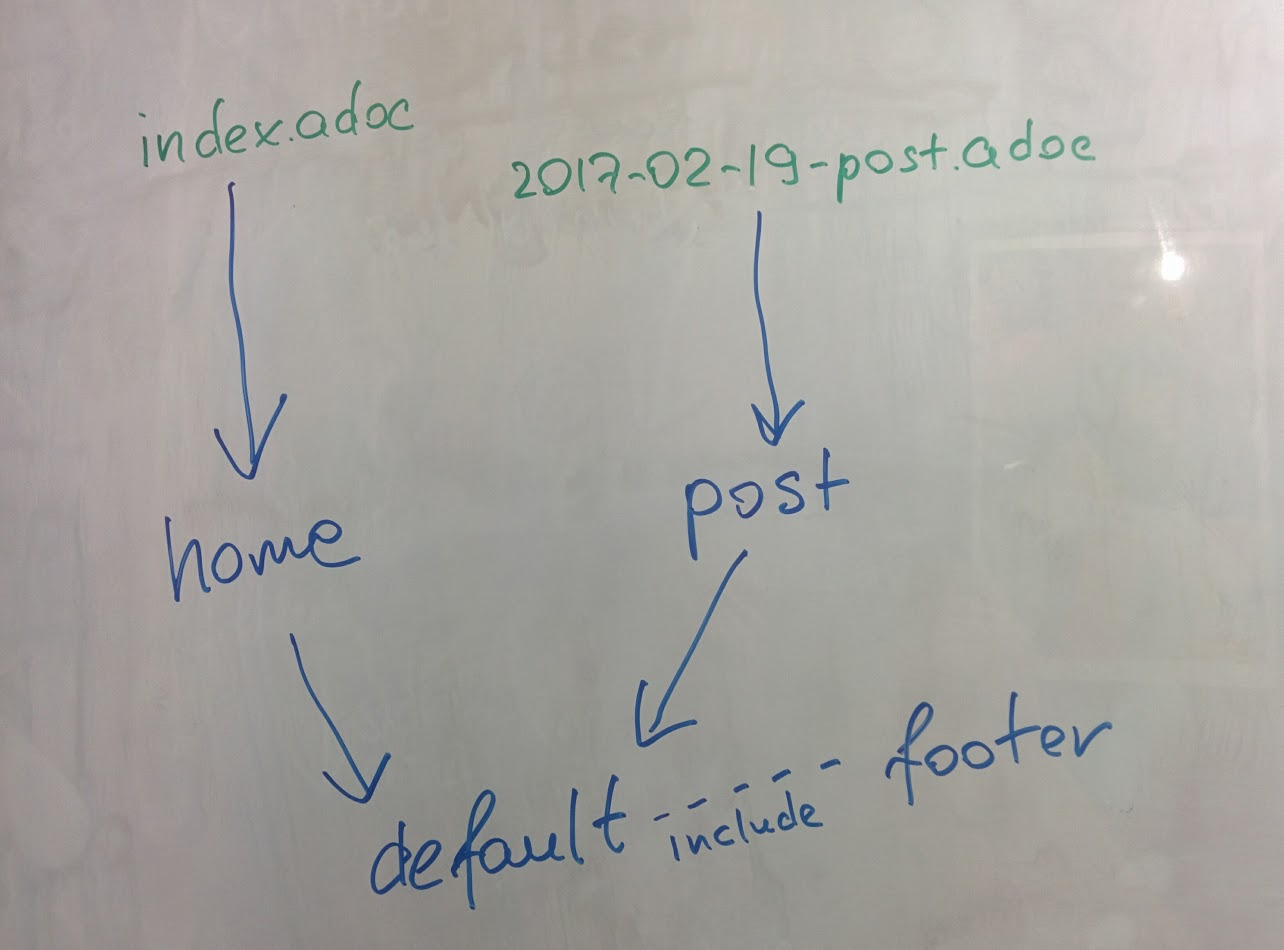
<p>Let&#8217;s now split it to different layouts.
First, to change home page layout, create file <em>_layouts/home.html</em>:</p>
</div>


<div id="gistf8e11c33860336e880f774d232ec0508">
  <script src="https://gist.github.com/f8e11c33860336e880f774d232ec0508.js"></script>
</div>
<div class="paragraph">
<p>First 3 lines are YAML configuration of the layout.
Here we specify that we want to inherit default layout, which implies placing content of current page instead of <code>{{ content }}</code> placeholder.</p>
</div>
<div class="paragraph">
<p>Now, create file <em>_layouts/post.html</em>. It will be used as layout for all post pages.</p>
</div>


<div id="gist992833bd62105b491f5ba7ee2fa93b9d">
  <script src="https://gist.github.com/992833bd62105b491f5ba7ee2fa93b9d.js"></script>
</div>
<div class="paragraph">
<p>Next, modify <em>_layouts/default.html</em>. Do the following change:</p>
</div>


<div id="gistf78b89670d5da8f3e57a5941c7c33b34">
  <script src="https://gist.github.com/f78b89670d5da8f3e57a5941c7c33b34.js"></script>
</div>
<div class="paragraph">
<p>After finishing with layout, we need to reconfigure content files.
Let&#8217;s start from <em>index.adoc</em>.
Now it can be just:</p>
</div>


<div id="gistc9ab333a1f1318837bc82885e9cdf9bc">
  <script src="https://gist.github.com/c9ab333a1f1318837bc82885e9cdf9bc.js"></script>
</div>
<div class="paragraph">
<p>Proceed with post files.
Regular post should look like:</p>
</div>


<div id="gist08ed4a66561c14bb8809450f09be9cfb">
  <script src="https://gist.github.com/08ed4a66561c14bb8809450f09be9cfb.js"></script>
</div>
<div class="paragraph">
<p>External post metadata should look like:</p>
</div>


<div id="gistff4701d26a3d727df1fa91d1c17d2e23">
  <script src="https://gist.github.com/ff4701d26a3d727df1fa91d1c17d2e23.js"></script>
</div>
<div class="paragraph">
<p>The last thing we should do in scope of this post is organizing our layout a little bit.
For now, our default layout is quite big, let&#8217;s split it with help of include feature.
As example, we will take page footer.</p>
</div>
<div class="imageblock">
<div class="content">
<img src="/old-blog/images/2017-02-20-jekyll-githubpages-asciidoc/jekyll-faaab-faaabca1ee1e62db70a6b4c9409660d5.png" alt="jekyll faaab faaabca1ee1e62db70a6b4c9409660d5">
</div>
</div>
<div class="paragraph">
<p>First, create file <em>_includes/footer.html</em> with following content:</p>
</div>


<div id="gist52ae2b49bb67c02b38e04cd0a83cea72">
  <script src="https://gist.github.com/52ae2b49bb67c02b38e04cd0a83cea72.js"></script>
</div>
<div class="paragraph">
<p>Next, do the following change with <em>_layouts/default.html</em>:</p>
</div>


<div id="gist16edd990579e2f562ecbff880e5dc0b6">
  <script src="https://gist.github.com/16edd990579e2f562ecbff880e5dc0b6.js"></script>
</div>
<div class="paragraph">
<p>You can notice, that footer uses variables named starting with <code>site.</code>.
They are taken from <em>_config.yml</em> file.
Add two lines to it (substitute with your personal data):</p>
</div>


<div id="gist80964004f7c01b96fd47d2120e09a751">
  <script src="https://gist.github.com/80964004f7c01b96fd47d2120e09a751.js"></script>
</div>
<div class="paragraph">
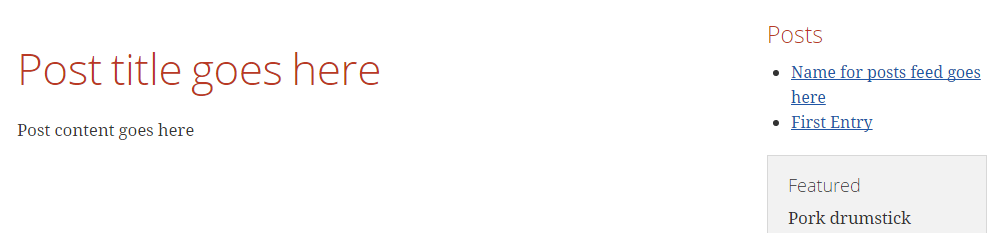
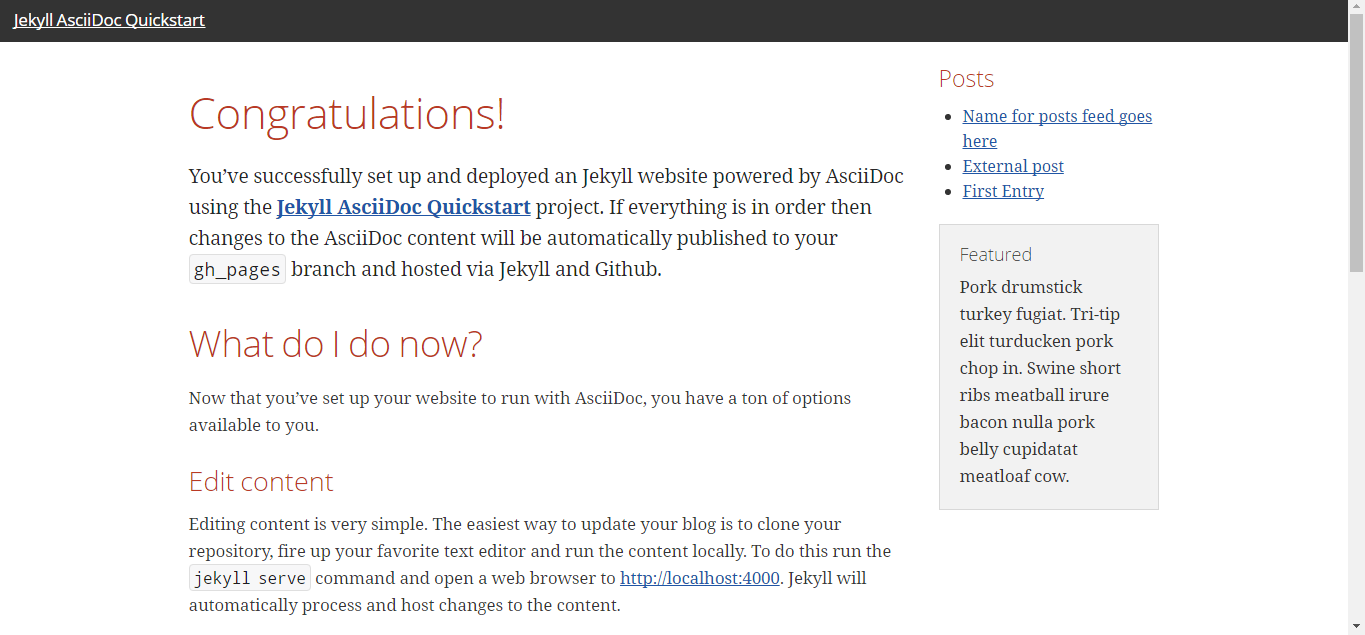
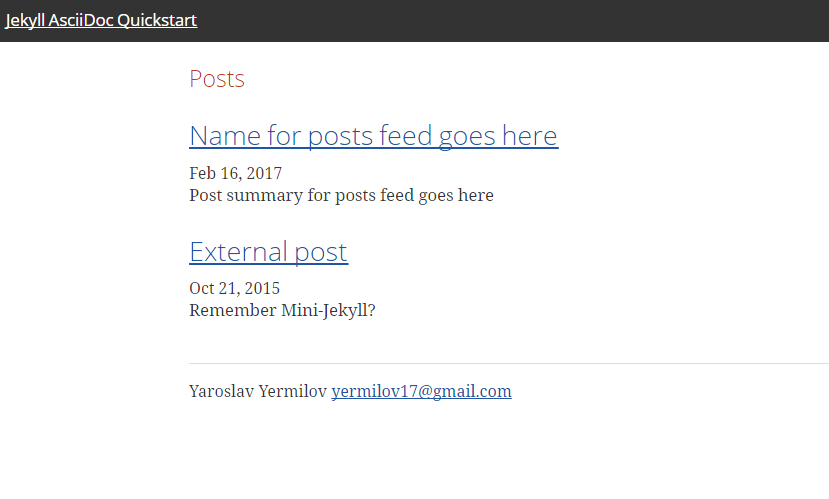
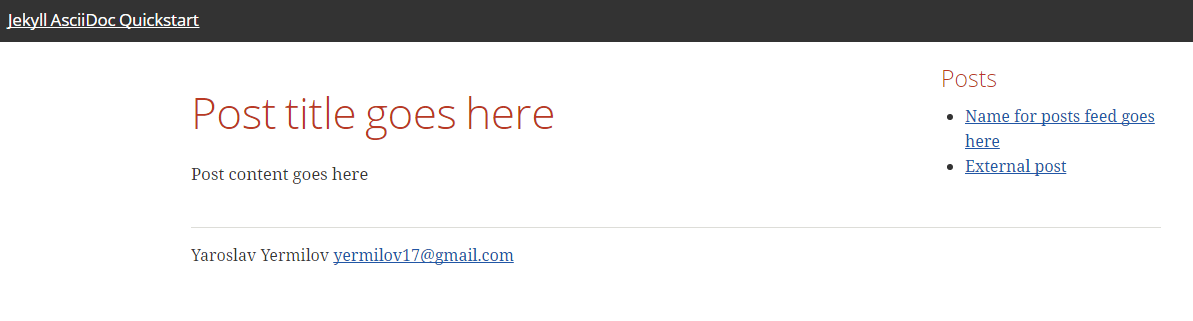
<p>Now we are done!
Let&#8217;s examine final result:</p>
</div>
<div class="imageblock" style="text-align: right">
<div class="content">
<img src="/old-blog/images/2017-02-20-jekyll-githubpages-asciidoc/jekyll-350da-350da985b22ab2d3d61f647f644be394.png" alt="jekyll 350da 350da985b22ab2d3d61f647f644be394">
</div>
<div class="title"><em>Home page</em></div>
</div>
<div class="imageblock" style="text-align: right">
<div class="content">
<img src="/old-blog/images/2017-02-20-jekyll-githubpages-asciidoc/jekyll-366e7-366e77e92daa91ca729cf28a15b3acf5.png" alt="jekyll 366e7 366e77e92daa91ca729cf28a15b3acf5">
</div>
<div class="title"><em>Post page</em></div>
</div>
</div>
</div>
<div class="sect1">
<h2 id="_links">Links</h2>
<div class="sectionbody">
<div class="paragraph">
<p><a href="https://jekyllrb.com" target="_blank">Jekyll home</a></p>
</div>
<div class="paragraph">
<p><a href="https://pages.github.com/" target="_blank">GitHub Pages home</a></p>
</div>
<div class="paragraph">
<p><a href="https://github.com/yermilov/mini-jekyll" target="_blank">Mini-Jekyll repository</a></p>
</div>
<div class="paragraph">
<p><a href="http://daringfireball.net/projects/markdown/" target="_blank">Markdown home</a></p>
</div>
<div class="paragraph">
<p><a href="http://asciidoctor.org" target="_blank">Asciidoctor home</a></p>
</div>
<div class="paragraph">
<p><a href="http://asciidoctor.org/docs/what-is-asciidoc/" target="_blank">What is Asciidoc?</a></p>
</div>
<div class="paragraph">
<p><a href="http://asciidoctor.org/docs/asciidoc-writers-guide/" target="_blank">Asciidoc Writer&#8217;s Guide</a></p>
</div>
<div class="paragraph">
<p><a href="http://asciidoctor.org/docs/asciidoc-syntax-quick-reference/" target="_blank">Asciidoc Syntax Quick Reference</a></p>
</div>
<div class="paragraph">
<p><a href="http://asciidoctor.org/docs/user-manual/" target="_blank">Asciidoctor User Manual</a></p>
</div>
<div class="paragraph">
<p><a href="https://github.com/asciidoctor/jekyll-asciidoc" target="_blank">jekyll-asciidoc plugin home</a></p>
</div>
<div class="paragraph">
<p><a href="https://github.com/asciidoctor/jekyll-asciidoc-quickstart" target="_blank">jekyll-asciidoc-quickstart repository</a></p>
</div>
</div>
</div>]]></content></entry></feed>