
As your team grows, you need to scale its culture. There is no doubt that things like a high hiring bar are critical, but still, there is a limit to what can be achieved by only smart people talking in the office kitchen and agreeing to do something. At a certain point, you need to transform culture into processes. Culture is something natural that sustains itself, but processes are man-made and often unfitting to the natural pace of things. One of the ways to guide processes in the right direction is by automating them using ChatOps. I want to share some lessons I’ve learned while doing it to establish good on-call processes on my team.
💭 Slack on-call topic
This one seems quite obvious: in the channel where people ask your team questions, keep the topic as “Oncall engineer: @igor.sikorsky”, so people know who is the contact person. Quite often, I see it is done manually, either by a person who leaves on-call (I don’t want to receive questions anymore), a person who enters on-call (please write your question to me), or a team manager (I’m maintaining processes for my team). Note that for the second and third options, you will not notice anything going wrong if you forget to do your part, but for the first one - you will keep receiving questions you don’t want to receive. This is a crucial principle of building manual processes: always create an instructional feedback loop that signals wrong behavior and guides it to correction.
I could say that in this case, I recommend the first option, except for the fact that there is one more principle above the previous one: The only way to make the manual process better than self-correcting is to make it automatic in the first place. All you need is a service that has access to your Slack and your PagerDuty:
List<Person> oncallEngineers = getOncallEngineers(now);
setSlackTopic(channel, "Oncall engineers: " + oncallEngineers.stream().map(Person::name).collect(joining(", "));
Easy enough, right? Well, putting real-life processes into code unveils all of the ambiguous parts that we as humans process instinctively, but machines need direct instructions on how to handle them. As an example, from time to time, engineers take on-call temporarily, let’s say, for one hour, to monitor the rollout of their changes more carefully. We don’t want to change the Slack topic for that because it may be spammy, and also, this temporal on-call engineer is not supposed to answer incoming questions. To do so, let’s find stable on-call engineers - people who are on-call for at least two hours straight:
List<Person> oncallEngineers = getStableOncallEngineers(now);
setSlackTopic(channel, "Oncall engineers: " + oncallEngineers.stream().map(Person::name).collect(joining(", "));

List<Person> getStableOncallEngineers(ZonedDateTime start) {
  List<Person> stableOncallPersons = List.of();
  ZonedDateTime when = start;

  while (stableOncallPersons.isEmpty() && Duration.between(start, when).compareTo(Duration.ofDays(7)) < 0) {
    List<Person> oncallPersonsAtMoment = getOncallEngineers(when);
    List<Person> oncallPersonsInTwoHours = getOncallEngineers(when.plusHours(2));

    stableOncallPersons = oncallPersonsAtMoment.stream()
          .filter(oncallPerson -> oncallPersonsInTwoHours.stream().anyMatch(oncallPerson::equals))
          .toList();

    when = when.plusHours(1);
  }

  return stableOncallPersons;
}
🎸 Slack on-call group
Sometimes people need to summon the on-call engineer to another channel. Because it is kinda hard in such a situation (it may be real deal urgent and stressful) to remember your team home channel name, go to it, and check the on-call engineer name, people tend to tag the tech lead, manager, or even random team members they know best. There is a quite simple way to guide this behavior to a better way - maintain @on-call Slack group that always contains only on-call engineers.
I’ve rarely seen this process implemented manually; probably, it crosses the line of how easy it is to maintain this procedure. However, it is quite easy to automate it following the same approach as the on-call topic:
List<Person> oncallEngineers = getOncallEngineers(now);
updateUsergroupList(oncallGroupId, oncallEngineers);
Note that in this case, it does not make sense to use getStableOncallEngineers - if someone takes on-call for an hour, they would probably want to be notified if someone is looking for the attention of an on-call engineer at the same time. Once the temporal on-call shift is over, this person is removed from the @on-call and from further on-call conversations.
The lesson here is that people always follow the most convenient path through the process - make sure that the one you want everyone to follow is really the most convenient one.
🗓️ On-call schedule reminder
Paradox: without these tools mentioned above, people need to check their on-call schedule regularly to see whether it is time for them to put themselves into Slack topic and Slack group or not. But with these tools in place, you don’t need to double-check the schedule - once your rotation comes, everything will be updated automatically. What I saw in practice is it resulted in people being caught by surprise by the fact that they entered on-call today.
To mitigate it, I’ve extended the bot to post the oncall schedule for the next month every week. Given that API allows us to check who is on-call at a specific instant, we need to check with the 3-hour step who is on-call at that moment and detect changes in the rotation to compose the message.
ZonedDateTime zonedNow = Instant.now().atZone(projectZoneId).withMinute(0);
ZonedDateTime scheduleEnd = zonedNow.plusMonths(1);

DateTimeFormatter formatter = DateTimeFormatter.ofPattern("MMM d");
StringBuilder scheduleMessage = new StringBuilder();

List<Person> previousOncallPersons = null;
ZonedDateTime oncallStart = zonedNow;

ZonedDateTime currentDateTime = zonedNow;
while (currentDateTime.isBefore(scheduleEnd)) {
  List<Person> currentOncallPersons = getOncallEngineers(currentDateTime);

  if (!currentOncallPersons.equals(previousOncallPersons)) {
    // exclude current on-call
    if (!oncallStart.toLocalDate().equals(zonedNow.toLocalDate())) {
      scheduleMessage
        .append(toSlackMentions(previousOncallPersons))
        .append(" ")
        .append(oncallStart.format(formatter))
        .append(" - ")
        .append(currentDateTime.format(formatter))
        .append("\n");
    }

    previousOncallPersons = currentOncallPersons;
    oncallStart = currentDateTime;
  }

  currentDateTime = currentDateTime.plusHours(3);
}

if (previousOncallPersons != null) {
  ZonedDateTime endOfLastOncall = currentDateTime;
  while (getOncallEngineers(endOfLastOncall).equals(previousOncallPersons)) {
    endOfLastOncall = endOfLastOncall.plusHours(3);
  }

  scheduleMessage
    .append(toSlackMentions(previousOncallPersons))
    .append(" ")
    .append(oncallStart.format(formatter))
    .append(" - ")
    .append(endOfLastOncall.format(formatter))
    .append("\n");
}

String oncallScheduleMessage = ":calendar-fire-fine: *JFYI ONCALL SCHEDULE* :party-calendar:\n\n" + scheduleMessage + "\nYou can use this thread to ask for re-schedule :thread:";
The nice thing is that this message creates a natural place to discuss swaps and reschedules in case someone needs them. And the lesson to learn is that you need to monitor secondary effects from your changes in processes and react to them. Then monitor secondary effects after your reaction and repeat it until it stabilizes around the state you are happy with.
🏃♀️ On-call handoff
We have tried to establish the process of on-call handoff for months. Here is the list of things that didn’t work out:
-
agree on the team meeting that we need to do on-call handoff every week
-
create a dedicated weekly on-call handoff meeting
-
practice what you preach from handoff supporters
-
reminders from the manager to do oncall handoff
All of them followed the same scenario: for several weeks, we do on-call handoff, then skip once for some totally valid reason, skip the second time after a few more weeks, and then abandon practice completely.
What happened? As we already discussed, there was no instructional feedback in case the handoff process was skipped. Basically, if handoff is not done, nothing happens. But what is tricky in this situation is that it is hard to automate such a feedback loop. How can the Slack bot know if the handoff happened or not?
The solution is that in case you can’t create an instructional feedback loop, create at least an automated positive nudge toward a better process. For the on-call handoff, the most impactful process change was to make the Slack bot post a reminder in case it detects that the on-call engineer will change in the next six hours.
ZonedDateTime zonedNow = Instant.now().atZone(projectZoneId);

List<Person> allOncallPersonsBefore = getStableOncallEngineers(zonedNow);

ZonedDateTime zonedAfter = zonedNow.plusHours(6);
while (!DateTimeService.isBusinessDay(zonedAfter)) {
  zonedAfter = zonedAfter.plusHours(1);
}
List<Person> allOncallPersonsAfter = getStableOncallEngineers(zonedAfter);

List<Person> finishingOncall = allOncallPersonsBefore.stream()
    .filter(oncallNow -> !personService.isPersonInList(oncallNow, allOncallPersonsAfter))
    .toList();

List<Person> startingOncall = allOncallPersonsAfter.stream()
    .filter(oncallInSixHours -> !personService.isPersonInList(oncallInSixHours, allOncallPersonsBefore))
    .toList();

if (!finishingOncall.isEmpty() && !startingOncall.isEmpty()) {
  String oncallHandoffMessage = "*ONCALL HANDOFF THREAD* :thread:\n\n" +
      toSlackMentions(finishingOncall) +
      " please use this thread to share oncall context with " +
      toSlackMentions(startingOncall) +
      "\n\nThank you! :handshake:";
}
What is interesting about this code? Of course, don’t forget to use stable on-call engineers here to avoid asking to do handoffs for a one-hour on-call override. Also, when you are checking if the on-call is changing soon - skip the weekend and holidays. In rotation happens on Saturday, it is better to post a handoff reminder on Friday, while it is still business hours.
🤒 On-call engineer is out
What happens if an on-call engineer is out for some reason? They may get sick, have an urgent errand, or even forget to reschedule the rotation that overlaps with a holiday or vacation. Well, if your team is lucky enough, the rotation will be smooth and no one will even notice it. If you are not so lucky, non-urgent on-call matters will start to pile up, and in case of something urgent like a production outage, you will need to find someone to cover FAST. Of course, systems like PagerDuty have a concept of escalation so in case on-call is not responding, someone else will be notified. But it will happen only if there is already an incident - wouldn’t be better to fix it proactively?
The initial Slackbot idea here is quite obvious: if an on-call engineer is out, then post a message to the team Slack channel.
List<Person> allOncallPersonsNow = getStableOncallPersonsForAllSchedules(project);
boolean isAllOncallOutOfOfficeNow = allOncallPersonsNow.stream().allMatch(oncallPerson -> personService.isOutOfOffice(oncallPerson));
To reduce spam, it also makes sense to check if the person will also be out in 2 hours - maybe it is short AFK:
List<Person> allOncallPersonsInTwoHours = getStableOncallPersonsForAllSchedules(project, inTwoHours);
boolean isAllOncallOutOfOfficeInTwoHours = allOncallPersonsInTwoHours.stream().allMatch(oncallPerson -> personService.isOutOfOffice(oncallPerson, inTwoHours.toInstant()));
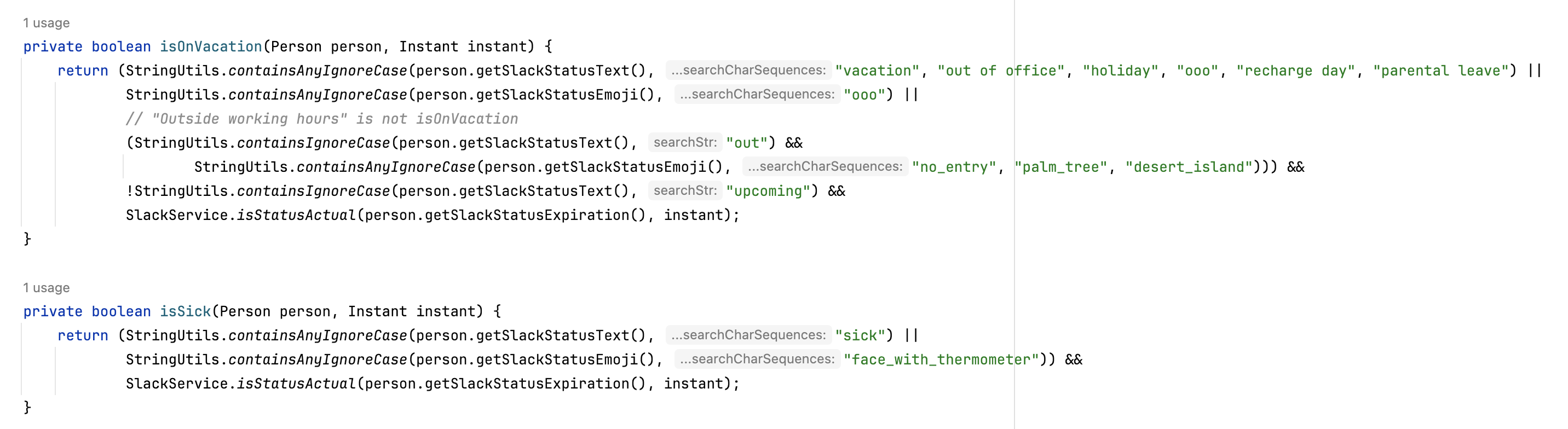
How to identify that person is out? Simpler is better in this case: without looking for anything more sophisticated, you can check a person’s Slack status. In 80% of cases, it is enough, which is Pareto-acceptable for us.
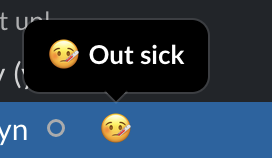
So far, we didn’t get a lot, as this person probably already posted something like “Hey folks, I’m out, please cover for me 🙏”. Can we do more? What’s the main problem here? The original on-call engineer posted message and went offline, they quite probably don’t have time to control that someone volunteered to cover. So the best improvement we can make is to repeat the reminder until there is a volunteer.
if (isAllOncallOutOfOfficeNow && isAllOncallOutOfOfficeInTwoHours) {
  if (previousOncallOutOfOfficeMessage == null || Duration.between(getTimeOfMessage(previousOncallOutOfOfficeMessage), Instant.now()).toHours() >= 2) {
    String oncallOutOfOfficeMessage = ":mild-panic-intensifies: <!subteam^S012DETECEA|@capi-all>, {{oncall}} (who is on-call now) {{is/are}} out of office. Could someone please take over the on-call?"
      .replace("{{oncall}}", toSlackMentions(allOncallPersonsNow))
      .replace("{{is/are}}", isAre(allOncallPersonsNow));
  }
}
It also aligns very well with the instructional feedback loop principle: until on-call is covered, the bot will nudge people to correct the wrong situation. However, there is another problem here that leads us to questions of psychology. You asked a group of people to take action and there is a high risk that every one of them will think the same thing: “That shouldn’t be me because X (I was on-call last week, I will be on-call next week, I’m behind on my tasks, I already covered last time, etc.). We are a large team and someone else for sure will help with it.” There is no sure strategy against it, but here are some tricks that you can employ:
- Reward people for taking the right action: post a thank you message after someone has taken on-call responsibilities
if (!isAllOncallOutOfOfficeNow && !isAllOncallOutOfOfficeInTwoHours && previousOncallOutOfOfficeMessage != null) {
  String updatedMessage = ":saluting_face: Thank you " + toSlackMentions(allOncallPersonsNow) + " for taking on-call responsibilities!"
}- Re-enforce sense of urgency: it can be as easy as increasing the number of worried emojis on every consecutive message
oncallOutOfOfficeMessage = StringUtils.repeat(":mild-panic-intensifies:", previousOncallOutOfOfficeMessagesCount) + oncallOutOfOfficeMessage- Personal ask: even a randomly picked person to ask personally may be better than asking the whole group. Having strict rules, like always asking the next person in the on-call schedule, may be even better.
oncallOutOfOfficeMessage += " " + toSlackMention(team.get(RandomUtils.nextInt(0, team.size()))) + ", maybe you can do it? :shrek_cat_eyes:";You must be mindful that such an approach may create annoying false positives. Be open with the team and discuss tradeoffs: are you ok with periodic false negatives (on-call is out and no one knows about it) or with periodic false positives (on-call is not out, but notification triggers). It is impossible to avoid both false positives and false negatives, but it is okay to have one of them as long as your team agrees on which one.
The lesson here is that when you try to guide processes, remember that they guide people, so try to think about the psychology aspect a bit.
🧑🎓 All lessons together
-
Always create an instructional feedback loop that signals wrong behavior and guides it to correction.
-
The only way to make the manual process better than self-correcting is to make it automatic in the first place.
-
People always follow the most convenient path through the process - make sure that the one you want everyone to follow is really the most convenient one.
-
You need to monitor secondary effects from your changes in processes and react to them. Then monitor secondary effects after your reaction and repeat it until it stabilizes around the state you are happy with.
-
In case you can’t create an instructional feedback loop, create at least an automated positive nudge toward a better process.
-
It is impossible to avoid both false positives and false negatives, but it is okay to have one of them as long as your team agrees on which one.
-
When you try to guide processes, remember that they guide people, so try to think about the psychology aspect a bit.